
In today’s digital age, staying connected through messaging apps like WhatsApp has become essential. But what happens when you’re unsure if someone you want to connect with is active on the platform? In this guide, we’ll walk you through all the steps and tips on how to know if a number is active on WhatsApp, helping you avoid any guesswork. Let’s dive in!
1. What Does It Mean for a Number to Be Active on WhatsApp?
Before we explore the steps to check if a number is active on WhatsApp, it’s essential to understand what it means. An “active” number could refer to one of two things:
- Registered on WhatsApp: The number is linked to an active WhatsApp account.
- Currently Online: The person is using WhatsApp at that moment.
2. Key Signs a Number is Active on WhatsApp
There are a few ways to verify whether a number is active on WhatsApp. These indicators are accessible if the person hasn’t hidden their privacy settings.
3. Checking WhatsApp Registration:
The simplest way to know if a number is registered on WhatsApp is to save the contact and look them up in your app. Follow these steps:
- Open WhatsApp.
- Tap on the new chat icon.
- Search for the number in your contact list.
If the number appears with a WhatsApp icon, the person is registered.
4. Verifying if a Contact is Online
When it comes to checking if a contact is currently online, WhatsApp provides a real-time update:
- Open the chat with the person.
- If the person is online, you’ll see the word “Online” under their name.
However, keep in mind that many users disable this feature in their privacy settings.
5. How to Check Last Seen Status
If the person is not online, you can still check their last seen time. Here’s how:
- Open the chat.
- Under the person’s name, you may see “Last seen at…” which will tell you when they last used WhatsApp.
This feature can also be hidden if the person has changed their privacy settings.
6. What If You Can’t See the Last Seen Status?
There are three possible reasons:
- Privacy Settings: The person has hidden their last seen status.
- You’ve Hidden Your Last Seen: WhatsApp has a mutual privacy policy—if you hide your last seen status, you won’t be able to see others’.
- You’ve Been Blocked: The person may have blocked you on WhatsApp.
7. Verifying Contact Information Through the Phone’s Contacts List
Another way to check if a number is active on WhatsApp is by browsing your phone’s contacts list:
- On Android, open the Contacts or Phonebook app.
- On iPhone, open the Contacts app.
Look for the WhatsApp logo next to the person’s contact information, which indicates their registration.
8. Checking Status and Profile Picture Updates
Another way to determine if someone is active is by checking for:
- Profile Picture Updates: If someone frequently changes their profile picture, it can signal activity.
- Status Updates: Users who update their status (like stories) are actively using WhatsApp.
9. Has the Person Blocked You?
If you suspect a contact has blocked you, you won’t be able to:
- See their last seen or online status.
- View their profile picture updates.
- Send them messages (they’ll remain undelivered).
To be certain, you can also try adding the contact in a group chat. If you’re blocked, WhatsApp won’t allow you to add the person.
10. Privacy Settings and What They Mean
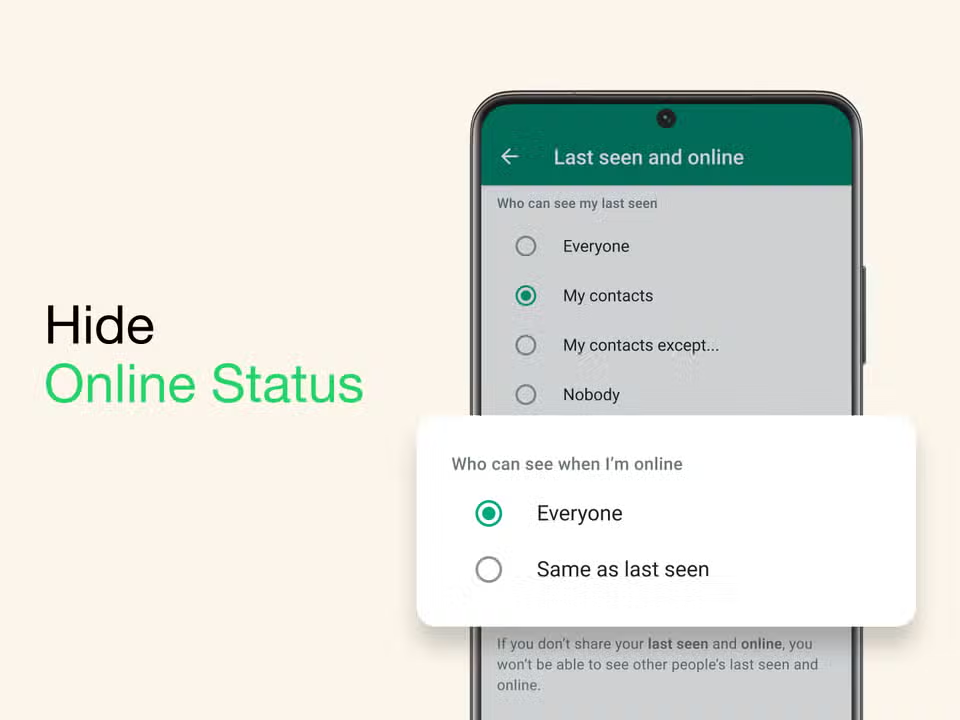
WhatsApp offers various privacy settings, allowing users to hide:
- Online Status
- Last Seen
- Profile Picture
- Status Updates
If someone is concerned about their privacy, you may not be able to access much of their information on WhatsApp.
11. How to Stay Informed About Privacy Changes
To stay informed about changes to WhatsApp’s privacy settings, regularly check WhatsApp’s settings by navigating to:
- Settings > Account > Privacy
Here, you can adjust your own privacy settings and understand how others may have adjusted theirs.
12. Using Third-Party Apps to Check WhatsApp Activity
There are third-party apps that claim to track WhatsApp activity, but we highly recommend avoiding them. Not only do they breach privacy rules, but they may also compromise your data.
13. What to Do if You Can’t Reach Someone on WhatsApp
If you’re unable to reach someone on WhatsApp, try these alternatives:
- Send an SMS: If their number is still active, they’ll receive your message.
- Try Calling: A direct call can verify if their phone number is still in use.
- Use Other Platforms: They might be more active on platforms like Instagram or Facebook Messenger.
14. The Role of WhatsApp Web in Verifying Activity
WhatsApp Web offers the same functionalities as the mobile app when it comes to checking if someone is online or when they were last seen. Just head to WhatsApp Web and open your chat to see the status indicators.
15. Conclusion: Be Mindful of Privacy and Boundaries
While knowing if someone is active on WhatsApp can be useful, remember that privacy is key. Always respect people’s privacy settings and boundaries. If someone doesn’t want to share their last seen or online status, that’s their choice, and it’s important to respect it.
FAQs
1. Can I see if someone is using WhatsApp if they’ve hidden their online status?
No, if someone has hidden their online status or last seen, you won’t be able to view it unless they change their settings.
2. How can I know if a number is no longer in use on WhatsApp?
If a number is no longer associated with a WhatsApp account, it will not appear when you search for it in WhatsApp contacts.
3. Why can’t I see a person’s last seen time on WhatsApp?
This could be due to the person’s privacy settings or because you’ve hidden your own last seen.
4. Does WhatsApp notify the user when you check their online status?
No, WhatsApp does not notify users if someone checks their online status or last seen.
5. Can I tell if someone has blocked me on WhatsApp?
Yes, signs include no longer seeing their profile picture, last seen, and your messages not being delivered.
6. Why can’t I add someone to a WhatsApp group?
If you can’t add someone to a WhatsApp group, they may have blocked you, or their privacy settings may prevent it.
7. How can I find out if someone is active on WhatsApp without messaging them?
Check their last seen status or look for status updates or profile picture changes.
8. Is it possible to hide both last seen and online status on WhatsApp?
Yes, WhatsApp allows you to hide both last seen and online statuses through the privacy settings.


