
How to Know if an Email Has Been Read on Gmail
Are you wondering if your colleague has read that important email you forwarded from your Gmail account? You’re not alone! Many of us have been in situations where we’ve sent an email, but we’re not sure if the recipient has actually seen it. In this article, we’ll explore ways to know if an email has been read on Gmail, even when using a free account.
Gmail’s Integrated Function
Gmail has an integrated function called “Confirm reading” that allows users to request a confirmation of reading from the recipient. This feature is available only on institutional or member accounts managed by an administrator (e.G., @Gmail.Com). To access this feature, follow these steps:
- Log in to your Gmail account and click on the gear icon at the top right corner.
- Select “See all settings.”
- Scroll down to the “Vacation responder” section and click on “Request a confirmation of reading.”
Mailtrack (Chrome/Edge)
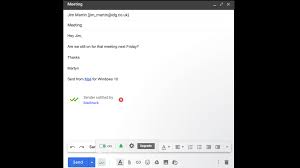
Another solution is Mailtrack, an extension available for Chrome and Edge browsers that allows you to track emails sent from Gmail. This free service enables you to monitor email openings and clicks without requiring any installation or configuration. To install Mailtrack:
- Go to the Mailtrack website and click on “Add to Chrome” or “Add to Edge.”
- Follow the prompts to install the extension.
- Log in to your Gmail account and compose a new message as you normally would.
- Click on the three dots at the bottom right corner of the compose window and select “Track this email.”
- Forward the email to the recipient.
To see if the email has been read, go to the “Sent” folder in Gmail and look for the double green checkmark next to the email.
Streak (Chrome/Safari)
Streak is another solution that allows you to track emails sent from Gmail on both desktop and mobile devices. This extension integrates seamlessly with your browser and provides a user-friendly interface to monitor email openings and clicks. To install Streak:
- Go to the Streak website and click on “Add to Chrome” or “Add to Safari.”
- Follow the prompts to install the extension.
- Log in to your Gmail account and compose a new message as you normally would.
- Click on the Streak icon at the top right corner of the compose window and select “Track this email.”
Tracking Emails on Mobile
If you’re using a mobile device, there are several apps available that can help you track emails sent from Gmail. Here are a few options:
- Track – Email Tracking (Android/iOS): This app allows you to track emails sent from your Android or iOS device.
- Mail Tracker (iOS/iPadOS): This app enables you to track emails sent from your iPhone or iPad and provides a notification when the recipient has read the email.
Conclusion
Knowing if an email has been read on Gmail can be crucial in various situations, whether it’s for personal or professional reasons. By using Mailtrack, Streak, or other tracking solutions, you can ensure that your emails are being seen by the intended recipient. While these services may have limitations, they provide a reliable way to track email openings and clicks.
Frequently Asked Questions
- Can I Use Gmail’s Integrated Function on my Free Account?
No, the “Confirm reading” feature is available only on institutional or member accounts managed by an administrator (e.G., @Gmail.Com). - Is Mailtrack a Free Service?
Yes, Mailtrack offers a free version that allows you to track email openings and clicks. - Do I Need to Install Any Software or Extensions to Use Streak?
No, Streak is available as a browser extension for Chrome and Safari, making it easy to integrate with your existing browser setup. - Can I Track Emails Sent From my Mobile Device?
Yes, there are several apps available that can help you track emails sent from your Android or iOS device. - Does Mailtrack Have Any Limitations on The Number of Tracked Emails?
Mailtrack allows you to track an unlimited number of emails, but keep in mind that it’s a free service and may have limitations compared to paid options. - Is Streak Compatible With my Browser?
Streak is available as a browser extension for Chrome and Safari, so you can use it regardless of your browser setup. - Do I Need to Configure Any Settings on my Gmail Account to Use Mailtrack or Streak?
No, these services integrate seamlessly with your existing Gmail account, requiring no configuration or installation.
By following the steps outlined in this article, you can ensure that your emails are being seen by the intended recipient and take advantage of the features offered by Mailtrack, Streak, and other tracking solutions.


