
The Ultimate Guide to Getting Likes on Instagram
As you’ve finally decided to join the ever-growing community of Instagram users, you’re probably eager to understand how to get more likes on your posts. After all, what’s the point of being on a social media platform if you don’t get any engagement?
In this article, we’ll walk you through the simple steps of getting likes on Instagram, including how to like someone else’s post, how to see likes on your own posts, and some additional tips for increasing your online presence.
Why Getting Likes on Instagram Matters
Getting likes on Instagram is a great way to boost your self-esteem and confidence. When people like your posts, it means they’re interested in what you have to say or show, and that’s always a good feeling! Plus, having more likes can help increase your visibility and credibility online.
How to Like Someone Else’s Post on Instagram
To like someone else’s post on Instagram, simply follow these steps:
On Android/ios:
- Open the Instagram app.
- Go to the profile of the person who posted something you want to like.
- Find the post you’re interested in and tap on it.
- Tap on the heart icon located below the post.
That’s it! The post will now have a red heart, indicating that you’ve liked it.
On Pc:
- Go to Instagram.Com on your browser.
- Log in to your account (if you haven’t already).
- Find the post you want to like and click on it.
- Click on the heart icon located below the post.
How to See Likes on Your Own Posts on Instagram
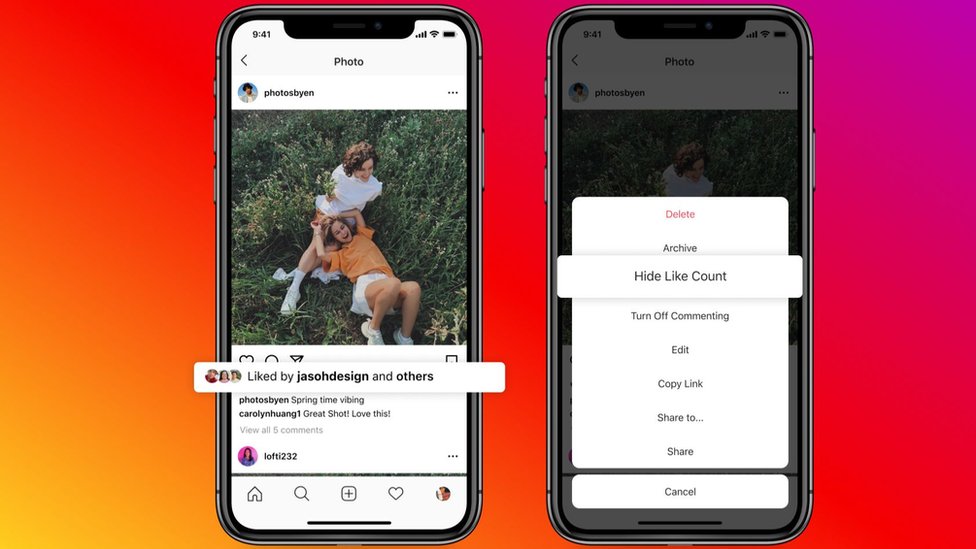
When someone likes one of your posts, you’ll see a small red heart appear under the post. Here’s how to view likes on your own posts:
On Android/ios:
- Open the Instagram app.
- Go to your profile page.
- Find the post that has likes and tap on it.
- Tap on the three dots located in the top-right corner of the screen.
- Select “View likes” from the menu.
You’ll now see a list of people who have liked your post, along with their names and profiles.
On Pc:
- Go to Instagram.Com on your browser.
- Log in to your account (if you haven’t already).
- Find the post that has likes and click on it.
- Click on the three dots located in the top-right corner of the screen.
- Select “View likes” from the menu.
How to Like Someone Else’s Post More Than Once
If you accidentally like someone else’s post and want to unlike it, here’s what you can do:
On Android/ios:
- Open the Instagram app.
- Go to the profile of the person who posted something you wanted to like.
- Find the post you liked by mistake and tap on it.
- Tap on the heart icon located below the post.
The post will now no longer have a red heart, indicating that you’ve unliked it.
On Pc:
- Go to Instagram.Com on your browser.
- Log in to your account (if you haven’t already).
- Find the post you liked by mistake and click on it.
- Click on the heart icon located below the post.
How to See Likes on Someone Else’s Post From Your PC
If you want to view likes on someone else’s post from your PC, here’s what you can do:
On Instagram Web:
- Go to Instagram.Com on your browser.
- Log in to your account (if you haven’t already).
- Find the post you’re interested in and click on it.
- Click on the three dots located in the top-right corner of the screen.
- Select “View likes” from the menu.
How to Get More Likes on Instagram
While getting likes on Instagram is not an exact science, there are some strategies that can increase your chances:
Post High-quality Content:
Posting interesting and engaging content is key to getting more likes on Instagram. Make sure your photos and videos are of high quality and relevant to your audience.
Using hashtags can help you reach a wider audience. Choose popular and relevant hashtags that align with your content, but avoid overusing them.
Engage With Your Audience:
Interacting with your followers by responding to comments and direct messages is essential for building relationships and increasing engagement.
Collaborate With Other Users:
Collaborating with other users can help you tap into their audience and increase your visibility. Look for users who share similar interests or niches as you.
Additional Tips For Getting More Likes on Instagram
Here are some additional tips to help you get more likes on Instagram:
Post Consistently:
Posting consistently is key to keeping your followers engaged and interested in what you have to say or show. Try to post at least once a day, but no more than three times a day.
Use Instagram Stories:
Instagram stories are a great way to share behind-the-scenes content, sneak peeks, and exclusive deals. Use them to engage with your audience and increase your visibility.
Run Contests or Giveaways:
Running contests or giveaways can help you generate buzz and encourage engagement from your followers.
Conclusion
Getting likes on Instagram is not rocket science, but it does require some effort and dedication. By following these simple steps and using the tips outlined in this article, you’ll be well on your way to increasing your online presence and getting more likes on Instagram.


