
How to Block Your Iphone Using Imei Code: A Step-by-step Guide
Are you tired of dealing with the hassle and worry that comes with a stolen or lost iPhone? Have you considered blocking your device using its IMEI code? In this article, we’ll take you through the process of blocking your iPhone by means of IMEI, step by step.
What is Imei Code?
Before we dive into the nitty-gritty details, let’s quickly understand what an IMEI (International Mobile Equipment Identity) code is. It’s a unique 15-digit code that identifies your device on mobile networks worldwide. Think of it as the “VIN” number for your iPhone.
Why Block Your Iphone Using Imei?
Blocking your iPhone using its IMEI code can be a lifesaver in case of theft or loss. By doing so, you prevent unauthorized individuals from using your device to make calls, send texts, and access your personal data. It’s an added layer of security that gives you peace of mind.
How to Block Your Iphone Using Imei Code
Now that we’ve covered the basics, let’s move on to the process of blocking your iPhone by means of its IMEI code.
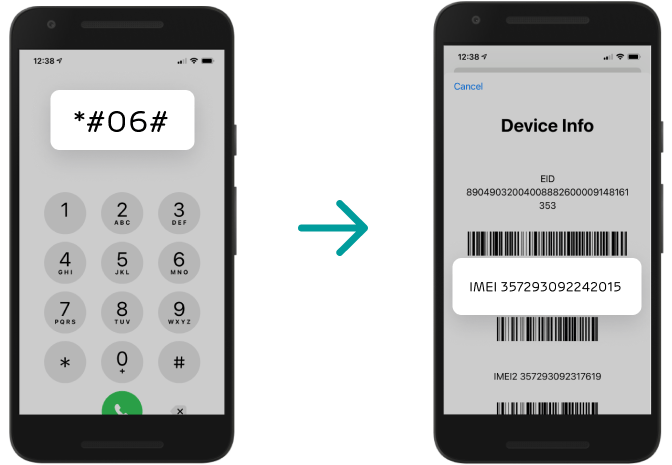
Step 1: Identify Your Imei Code
The first step is to find your device’s IMEI code. This can be done in several ways:
- Check the original packaging for the sticker with the IMEI code
- Look up the code on your iPhone by going to Settings > General > About > IMEI (or MEID)
- Use a third-party app, like CheckM8 or PhoneCheck, to retrieve the IMEI code
Step 2: Contact Your Carrier
Once you have the IMEI code, contact your carrier’s customer support and inform them about the loss or theft of your device. They’ll guide you through the process of blocking your iPhone by means of its IMEI code.
Step 3: Fill Out The Block Request Form
Your carrier will provide you with a form to fill out, which requires you to provide some personal details and information about your device. Be sure to complete this form accurately and submit it to your carrier.
What Happens After You Submit The Form?
After submitting the block request form, your carrier will process the request and block your iPhone using its IMEI code. This may take a few hours or up to 24 hours, depending on the carrier’s processing time.
Alternatives to Blocking Your Iphone Using Imei Code
While blocking your iPhone by means of its IMEI code is an effective way to prevent unauthorized use, there are alternative methods you can consider:
- Use the Find My iPhone feature to remotely locate and wipe your device
- Activate the “Lost Mode” on your iPhone to display a message with contact information
- Consider using a third-party app, like Prey or Lookout, to track and secure your device
Conclusion
Blocking your iPhone by means of its IMEI code can be an effective way to prevent unauthorized use in case of theft or loss. By following the steps outlined above, you’ll be able to block your device quickly and efficiently.
Frequently Asked Questions (FAQs)
Here are some frequently asked questions related to blocking your iPhone using its IMEI code:
- What happens if my iPhone is stolen or lost while it’s blocked?
- Your carrier will notify the network providers, making it difficult for unauthorized individuals to use your device.
- Will I still receive calls and messages on my iPhone even though it’s blocked?
- No, you won’t receive any calls or messages once your iPhone is blocked using its IMEI code.
- Can I unblock my iPhone if I recover it after it has been stolen?
- Yes, you can contact your carrier to request that the block be removed from your device.
I hope this guide helps you understand how to block your iPhone using its IMEI code. If you have any further questions or concerns, please feel free to ask!


