
How to Create a Beacon on Minecraft: A Step-by-step Guide
Are you tired of wondering how to create a beacon on Minecraft? Look no further! In this article, we will guide you through the process of creating a beacon, from constructing a pyramidal frame to activating its powerful bonuses.
What is a Beacon in Minecraft?
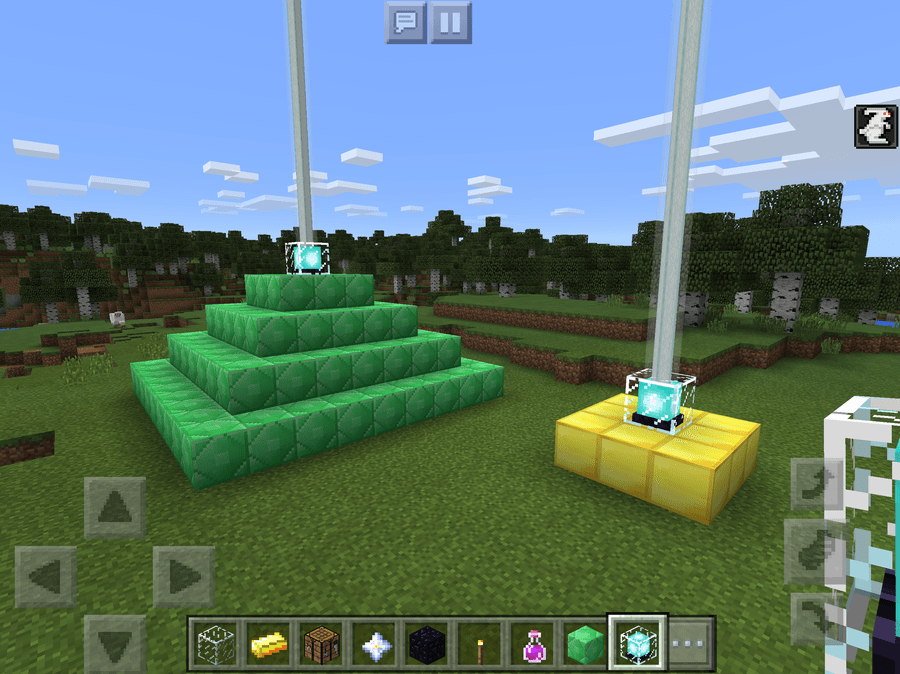
A beacon is a powerful object in Minecraft that can be used to gain temporary bonuses such as increased speed, health regeneration, and resistance to physical damage. To create a beacon, you will need to construct a pyramidal frame using specific materials and place it at the center of the pyramid.
Constructing a Beacon on Minecraft Java Edition
To create a beacon in the Java edition of Minecraft, follow these steps:
- Gather Materials: You will need 5 units of Glass, 3 units of Obsidian, and 1 unit of Nether Star to construct a beacon.
- Create The Pyramidal Frame: Construct a pyramidal frame using blocks of iron, gold, emerald, diamond, or netherite. The pyramid must have a base size of 9×9 and increase in height by 7×7, 5×5, and finally 3×3.
- Place The Beacon: Place the beacon at the center of the topmost platform.
- Activate The Beacon: Interact with the beacon to activate its bonuses.
Tips And Tricks
- Make sure to construct the pyramidal frame using specific materials as mentioned above.
- The beacon’s range is increased by 10 blocks for each level of pyramid.
- A level 1 pyramid has a range of 20 blocks, while a level 4 pyramid has a range of 50 blocks.
Constructing a Beacon on Minecraft Bedrock Edition
If you are playing the Bedrock edition of Minecraft, follow these steps:
- Gather Materials: You will need the same materials as mentioned above.
- Create The Pyramidal Frame: Construct a pyramidal frame using blocks of iron, gold, emerald, diamond, or netherite. The pyramid must have a base size of 9×9 and increase in height by 7×7, 5×5, and finally 3×3.
- Place The Beacon: Place the beacon at the center of the topmost platform.
- Activate The Beacon: Interact with the beacon to activate its bonuses.
Using Mods to Enhance Your Beacon Experience
If you want to take your beacon experience to the next level, consider using mods such as Big Beacons by Colderlavalamp. This mod allows you to create a pyramidal frame of level 16 and access tertiary power bonuses.
Conclusion
Creating a beacon on Minecraft is a relatively simple process that can be completed in just a few steps. By following the guidelines above, you can unlock powerful bonuses and enhance your gameplay experience. Whether you are playing the Java or Bedrock edition, the process remains the same. Happy crafting!
Frequently Asked Questions (FAQs)
- What is The Range of a Beacon?
A beacon’s range increases by 10 blocks for each level of pyramid. - What Materials Can I Use to Construct a Pyramidal Frame?
You can use iron, gold, emerald, diamond, or netherite blocks to construct a pyramidal frame. - How do I Activate The Beacon?
Interact with the beacon to activate its bonuses. - Can I Use Mods to Enhance my Beacon Experience?
Yes, consider using mods such as Big Beacons by Colderlavalamp to unlock tertiary power bonuses and create a pyramidal frame of level 16. - What is The Maximum Level of Pyramid I Can Build?
You can build a pyramid up to level 4 without using mods. - How do I Access Tertiary Power Bonuses?
Use mods such as Big Beacons by Colderlavalamp to unlock tertiary power bonuses and create a pyramidal frame of level 16. - What is The Purpose of Placing an Ingot in The Beacon’s Interface?
Placing an ingot in the beacon’s interface allows you to activate its primary bonus. - Can I Build a Pyramid With More Than One Beacon at The Top?
Yes, but this will not increase the range or power of the beacon.


