
Creating a Professional Profile on Linkedin
Are you looking to boost your professional career by creating a strong online presence? Look no further than LinkedIn, the world’s largest social network for business professionals and students. With over 700 million users worldwide, LinkedIn is an ideal platform to connect with potential clients, employers, and partners, while also showcasing your skills and expertise.
In this comprehensive guide, we’ll walk you through the process of creating a professional profile on LinkedIn, step by step. Whether you’re just starting out or looking to upgrade your existing profile, our expert tips will help you stand out from the crowd and achieve your career goals.
Why Create a Professional Profile on Linkedin?
Before diving into the process, let’s quickly explore why having a strong LinkedIn profile is essential for professionals like you:
- Networking: Connect with potential clients, employers, and partners in your industry.
- Personal Branding: Showcase your skills, expertise, and achievements to establish yourself as a thought leader.
- Job Searching: Use LinkedIn’s vast job database to find employment opportunities that match your interests and qualifications.
- Business Development: Identify new business opportunities and connect with potential customers.
Getting Started: Creating Your Profile
To create your profile on LinkedIn, follow these simple steps:
- Access The Website: Open a web browser (e.G., Google Chrome, Mozilla Firefox) and navigate to www.Linkedin.Com.
- Click “Sign Up”: Look for the “Sign up” button in the top-right corner of the page.
- Enter Your Email Address: Provide your email address and create a password.
- Fill Out Your Profile Information: Complete the required fields, including your name, location, industry, and job title.
Optimizing Your Profile For Maximum Visibility
Now that you have a basic profile set up, let’s focus on optimizing it to attract potential clients, employers, and partners:
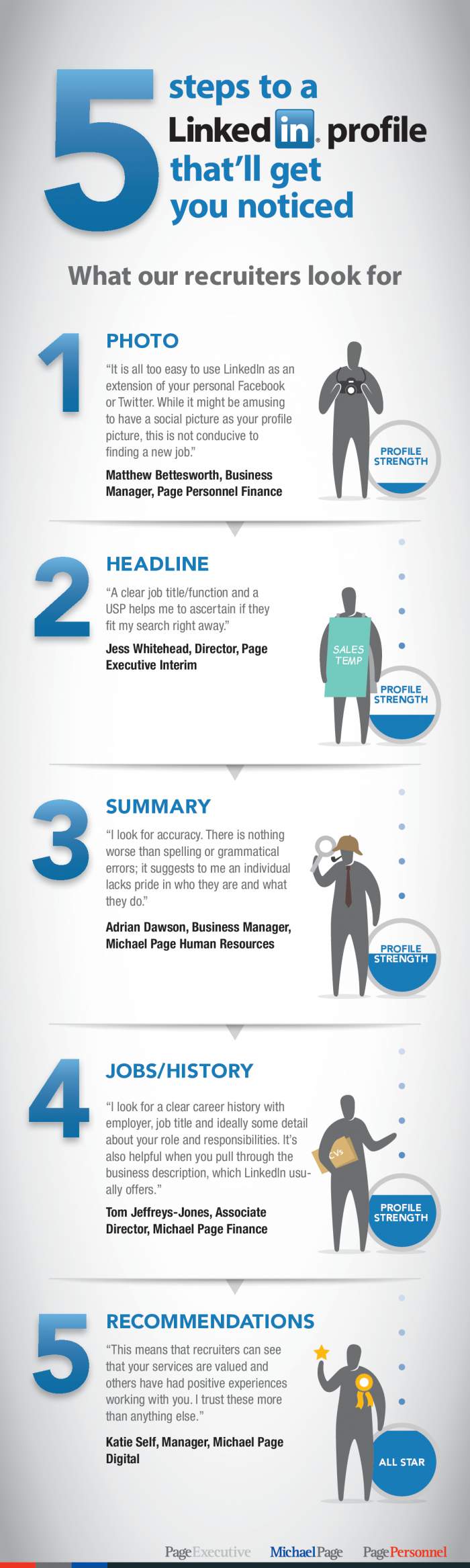
- Choose a Professional Photo: Select a high-quality image that showcases your face and professionalism.
- Write a Compelling Headline: Craft a clear and concise summary of your skills, expertise, and achievements.
- Customize Your Url: Claim a unique LinkedIn URL to make it easier for others to find you online.
- Add Relevant Sections: Utilize the “Experience” and “Education” sections to showcase your work history and academic background.
Enhancing Your Profile With Relevant Sections
To further enhance your profile, consider adding these essential sections:
- Skills: List your most important skills and expertise to attract potential employers or clients.
- Recommendations: Request recommendations from colleagues, managers, or clients to build credibility.
- Projects: Showcase any relevant projects you’ve worked on to demonstrate your skills in action.
Best Practices For Writing an Effective Linkedin Headline
When crafting a compelling headline, keep the following tips in mind:
- Be Concise: Use a clear and concise summary of your skills and expertise.
- Use Keywords: Incorporate relevant industry terms to make it easier for others to find you online.
- Keep it Focused: Avoid using jargon or overly technical language.
The Benefits of Connecting With Relevant Professionals
Networking on LinkedIn is an essential step in establishing yourself as a professional in your field. By connecting with relevant professionals, you can:
- Expand Your Network: Reach out to potential clients, employers, and partners.
- Stay Informed: Stay up-to-date on industry news and trends through group discussions and content sharing.
Best Practices For Writing Engaging Linkedin Posts
When writing posts on LinkedIn, consider the following tips:
- Keep it Concise: Use clear and concise language to engage your audience.
- Use Visuals: Incorporate relevant images or videos to break up text and make your content more engaging.
- Add a Call-to-action: Encourage engagement by asking questions or requesting feedback.
Conclusion
Creating a professional profile on LinkedIn is an essential step in establishing yourself as a credible professional in your field. By following the tips outlined in this guide, you can:
- Increase Visibility: Showcase your skills and expertise to attract potential clients, employers, and partners.
- Enhance Credibility: Establish yourself as a thought leader through your content and engagement.
Faqs
-
Q: What is The Best Way to Write a Compelling Headline on Linkedin?
A: Use clear and concise language that highlights your skills and expertise. -
Q: How Can I Optimize my Profile For Maximum Visibility?
A: Choose a professional photo, customize your URL, add relevant sections (e.G., Skills, Recommendations), and use keywords in your headline. -
Q: What is The Most Effective Way to Engage With my Network on Linkedin?
A: Use clear and concise language, incorporate visuals, and add a call-to-action to encourage engagement. -
Q: How Can I Stay Informed About Industry News And Trends Through Linkedin?
A: Join relevant groups and follow thought leaders in your field. -
Q: Can I Use Linkedin For Job Searching?
A: Yes! Use LinkedIn’s vast job database to find employment opportunities that match your interests and qualifications. -
Q: How Can I Connect With Potential Clients, Employers, or Partners on Linkedin?
A: Utilize the “Connections” feature to search for relevant professionals in your industry. -
Q: Can I Use Linkedin For Business Development?
A: Yes! Identify new business opportunities and connect with potential customers through LinkedIn’s vast network. -
Q: What Are The Most Important Sections to Include on my Linkedin Profile?
A: “Experience,” “Education,” “Skills,” and “Recommendations” are essential sections to showcase your work history, academic background, skills, and expertise. -
Q: Can I Use Linkedin For Personal Branding?
A: Yes! Use LinkedIn to establish yourself as a thought leader through your content and engagement. -
Q: How Can I Stay Up-to-date on Industry News And Trends Through Group Discussions And Content Sharing on Linkedin?
A: Join relevant groups, follow thought leaders in your field, and engage with others’ content by liking, commenting, or sharing posts.


