
How to Create a Map on Minecraft: A Step-by-step Guide
Are you tired of getting lost in the vast world of Minecraft? Do you want to explore every nook and cranny without worrying about losing your way? Look no further! In this article, we will guide you through the process of creating a map on Minecraft, so you can navigate the game with ease.
What You Need to Know
Before we dive into the tutorial, it’s essential to understand that Minecraft has two main editions: Java and Bedrock. The instructions provided in this article are applicable to both versions, but some minor variations may occur depending on your platform of choice.
Why Create a Map on Minecraft?
Creating a map on Minecraft allows you to visualize the world around you, making it easier to navigate and explore. With a map, you can see the terrain, locate resources, and even find hidden treasures!
Step 1: Gather Your Materials
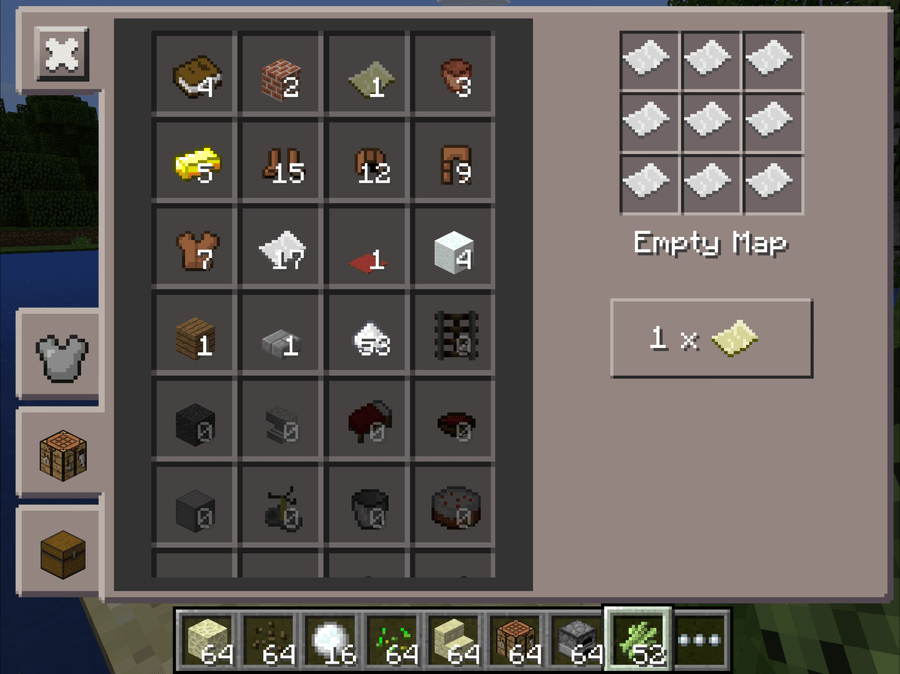
To create an empty map on Minecraft, you’ll need the following materials:
- A compass
- 8 Pieces of card
You can obtain these items by crafting them or finding them in-game.
Step 2: Create a Compass
A compass is essential for creating a map. To make one, follow these steps:
- Open your inventory and craft a compass.
- Place the compass on an empty slot in your hotbar.
- Right-click on the compass to equip it.
Step 3: Create a Map
Now that you have your compass, it’s time to create a map! To do this, follow these steps:
- Open your inventory and place the 8 pieces of card on an empty slot in your hotbar.
- Right-click on the compass to equip it.
- Place the compass in the center of your hotbar, followed by the 8 pieces of card.
- Click on the “Create Map” button (or press the corresponding key on your keyboard).
Step 4: Customize Your Map
Once you have created a map, you can customize it to suit your needs. Here are some tips:
- Use different colors and symbols to mark important locations or resources.
- Add notes and labels to help you remember where things are located.
- Experiment with different map styles and designs to make your map truly unique.
Step 5: Find The Treasure Map
If you’re feeling adventurous, you can try creating a treasure map! To do this, follow these steps:
- Open your inventory and find the “Relitto” (or shipwreck) item.
- Right-click on the Relitto to equip it.
- Use the command “/locate structure minecraft:Shipwreck” to find the coordinates of the Relitto.
- Teleport to the coordinates using the command “/teleport [coordinates]”.
Step 6: Explore And Enjoy
Now that you have your map, it’s time to explore! Use your map to navigate the world, locate resources, and discover hidden treasures. Remember to always stay safe and be mindful of your surroundings.
Conclusion
Creating a map on Minecraft is an essential skill for any player. With this guide, you should now know how to create a map, customize it, and even find treasure! Remember to always experiment and try new things – that’s what makes Minecraft so much fun!
Frequently Asked Questions (FAQs)
Q: What are the benefits of creating a map on Minecraft?
A: Creating a map allows you to visualize the world around you, making it easier to navigate and explore.
Q: How do I create a compass on Minecraft?
A: You can craft a compass by combining 4 ingots of iron and 1 piece of redstone dust in a crafting table.
Q: What is the purpose of a map on Minecraft?
A: A map allows you to see the terrain, locate resources, and even find hidden treasures!
Q: How do I customize my map on Minecraft?
A: You can use different colors and symbols to mark important locations or resources. Add notes and labels to help you remember where things are located.
Q: Can I create a treasure map on Minecraft?
A: Yes! To create a treasure map, follow the steps outlined in Step 5 of this guide.
Q: How do I find the coordinates of the Relitto (shipwreck)?
A: Use the command “/locate structure minecraft:Shipwreck” to find the coordinates of the Relitto.
Q: Can I use my map on Minecraft Bedrock?
A: Yes! The instructions provided in this article are applicable to both Java and Bedrock editions of Minecraft.


