
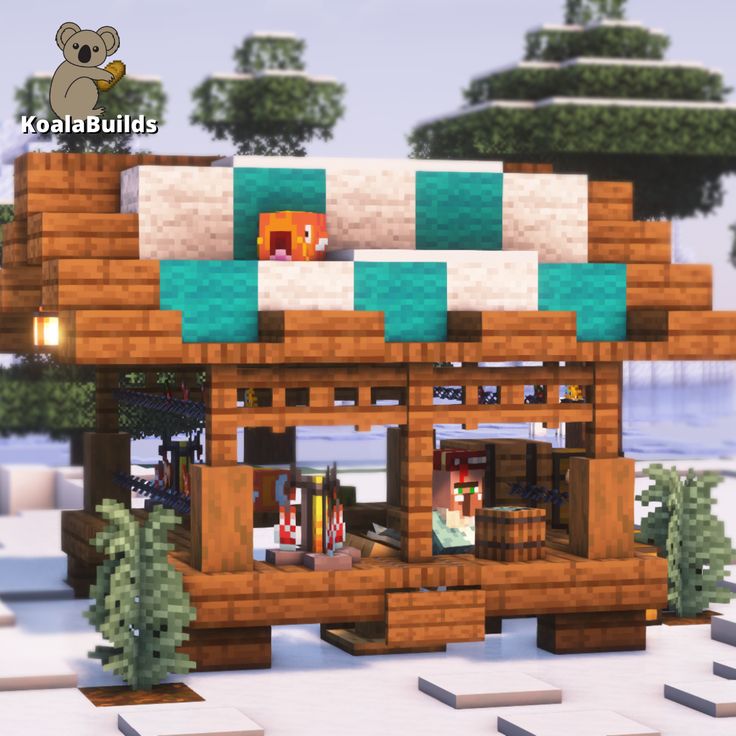
How to Create a Market on Minecraft: A Step-by-step Guide
Are you looking to create a market on Minecraft, but don’t know where to start? Look no further! In this article, we will guide you through the process of creating a market on Minecraft, from choosing the right materials to adding the finishing touches.
Materials Needed
Before we begin, let’s take a look at the materials needed to create a market on Minecraft. These include:
- Wood (8 units)
- Stairs (4 units)
- Fence posts (2 units)
- Ladder (1 unit)
- Concrete blocks (12 units)
- Glowstone (optional)
Step 1: Choosing The Right Location
The first step in creating a market on Minecraft is to choose the right location. You’ll want to find a spot that’s easily accessible and has enough space for your market.
- Delimit a 5×5 square area where you want to build your market.
- Use the wood blocks to create a frame around the perimeter of the square.
- Add the fence posts to the corners of the square to create a sturdy base.
Step 2: Constructing The Frame
Now that we have our location, it’s time to start constructing the frame of our market. This will involve adding the stairs and ladder to create a multi-level structure.
- Use the wood blocks to create the stairs and ladder.
- Add the fence posts to the corners of the square to create a sturdy base.
- Use the ladder to connect the different levels of your market.
Step 3: Adding The Roof
Next, we’ll add the roof to our market. This will involve using concrete blocks to create a solid structure that can support weight.
- Use the concrete blocks to create a flat surface on top of the frame.
- Add additional layers of concrete blocks to create a sturdy roof.
- Use the glowstone to illuminate your market and make it more visually appealing.
Step 4: Decorating Your Market
Now that we have our basic structure, it’s time to add some personality to our market. This will involve adding decorations such as banners, signs, and other visual elements.
- Add the banners and signs to the perimeter of your market.
- Use the glowstone to illuminate any dark areas or to create a specific atmosphere.
- Experiment with different designs and layouts to make your market truly unique.
Using Minecraft Forge
If you’re looking for an easier way to create a market on Minecraft, you can use Minecraft Forge. This mod allows you to download pre-made structures that you can add to your game.
- Download the Instant Structures Mod (ISM) from the official website.
- Install the mod by following the instructions provided.
- Use the ISM engine to search for and download the market structure.
- Place the structure in your world using the brick icon.
Tips And Tricks
Here are a few tips and tricks to keep in mind when creating a market on Minecraft:
- Experiment with different materials and designs to create a unique look.
- Consider adding a entrance or exit to your market for easier access.
- Use the ISM mod to download pre-made structures if you’re short on time.
Conclusion
Creating a market on Minecraft is a fun and rewarding experience. With these steps, you’ll be able to create a beautiful and functional market that’s perfect for trading with other players.
Frequently Asked Questions
Q: What materials do I need to create a market on Minecraft?
A: You’ll need wood blocks (8 units), stairs (4 units), fence posts (2 units), ladder (1 unit), concrete blocks (12 units), and glowstone (optional).
Q: How do I choose the right location for my market?
A: Choose a spot that’s easily accessible and has enough space for your market.
Q: Can I use Minecraft Forge to create a market?
A: Yes, you can use Minecraft Forge to download pre-made structures and add them to your game.
Q: What are some tips and tricks for creating a market on Minecraft?
A: Experiment with different materials and designs, consider adding an entrance or exit, and use the ISM mod to download pre-made structures.


