
Carrying Out a Payment With Paypal: A Step-by-step Guide
As one of the most widely used online payment systems, PayPal offers a convenient and secure way to make payments on the web. In this article, we will guide you through the process of carrying out a payment using PayPal.
What is Paypal?
PayPal is an online payment system that allows users to send and receive payments without revealing their credit card information. It’s widely used for online shopping, donations, and other financial transactions.
Carrying Out a Payment With Paypal: A Step-by-step Guide
- Open Your Paypal Account
To start the process, you need to have a PayPal account. If you don’t have one, create an account by following our tutorial on how to open a PayPal account.
- Link Your Card or Bank Account
Once your account is set up, link a credit card or bank account to your PayPal account. This will serve as the funding source for your payments.
- Select Paypal as Payment Method
When making a payment online, select PayPal as your payment method during checkout.
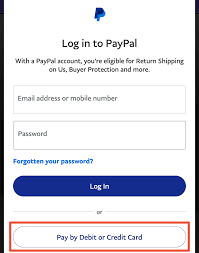
- Log in to Your Paypal Account
Enter your login credentials to access your PayPal account.
- Confirm Your Payment Details
Review and confirm your payment details, including the amount, currency, and recipient’s information.
- Choose Your Funding Source
Select the funding source for your payment from your linked credit card or bank account.
- Confirm And Complete Your Payment
Finalize your payment by confirming and completing the transaction.
Using Paypal Via Email
Sometimes, you may need to send a payment using PayPal through email. Here’s how:
- Log in to Your Paypal Account
Enter your login credentials to access your PayPal account.
- Click on “Send Money”
Find the “Send Money” button and click on it.
- Select Recipient’s Email
Choose the recipient’s email address from your contacts list.
- Enter Payment Details
Enter the payment amount, currency, and any additional details required.
- Confirm Your Payment Details
Review and confirm your payment details before submitting your request.
Using Paypal With Postepay
If you have a Postepay card, here’s how to link it to your PayPal account:
- Access Your Paypal Account
Log in to your PayPal account using your credentials.
- Click on “Wallet”
Find the Wallet section and click on it.
- Link Your Postepay Card
Select the option to add a new card and follow the instructions to link your Postepay card.
- Confirm Your Payment Details
Review and confirm your payment details before submitting your request.
Carrying Out Payments Without Registration
If you don’t have a PayPal account but want to make a payment using PayPal, here’s what you need to do:
- Choose Paypal as Payment Method
Select PayPal as your payment method during checkout.
- Follow The On-screen Instructions
Follow the on-screen instructions provided by PayPal to complete your payment without registering an account.
Using Paypal With Pagopa
If you want to make a payment using PayPal and need to know how, follow these steps:
- Access Your Paypal Account
Log in to your PayPal account using your credentials.
- Click on “Payments”
Find the Payments section and click on it.
- Select Recipient’s Email
Choose the recipient’s email address from your contacts list.
- Enter Payment Details
Enter the payment amount, currency, and any additional details required.
Troubleshooting: Why Can’t I Make a Payment Using Paypal?
If you’re unable to make a payment using PayPal despite following these steps, consider the following reasons:
- Insufficient funds
- Incorrect account ownership
- Browser or antivirus software issues
Check with PayPal’s support team for assistance in resolving your issue.
Conclusion
Carrying out payments with PayPal is straightforward and convenient. By following these step-by-step guides, you’ll be able to make payments using PayPal without any hassle. Remember to troubleshoot any issues that may arise and seek help from PayPal’s support team if needed.
Frequently Asked Questions (FAQs)
Q: How do I link my Postepay card to my PayPal account?
A: To link your Postepay card, log in to your PayPal account, click on the Wallet section, and follow the instructions to add a new card.
Q: Can I make payments using PayPal without registering an account?
A: Yes, you can use PayPal as a payment method during checkout even if you don’t have an account. Follow the on-screen instructions provided by PayPal to complete your payment.
Q: What should I do if my PayPal payment is declined?
A: If your PayPal payment is declined, check for insufficient funds, incorrect account ownership, or browser/antivirus software issues. Contact PayPal’s support team for assistance in resolving your issue.
Q: Can I use PayPal with pagoPA?
A: Yes, you can make payments using PayPal and pagoPA by accessing your PayPal account, clicking on the Payments section, selecting the recipient’s email address, and entering payment details.
Q: Why am I unable to complete my PayPal payment?
A: If you’re unable to complete your PayPal payment, check for issues such as insufficient funds, incorrect account ownership, or browser/antivirus software issues. Contact PayPal’s support team for assistance in resolving your issue.
Q: How do I troubleshoot issues with my PayPal payments?
A: Troubleshooting issues with PayPal payments typically involves checking for sufficient funds, correct account ownership, and ensuring that your browser and antivirus software are not blocking the payment.
Q: Can I make a payment using PayPal via email?
A: Yes, you can send a payment using PayPal through email by accessing your PayPal account, clicking on the “Send Money” button, selecting the recipient’s email address, entering payment details, and confirming your request.


