
How to Make Your Phone Number Private: A Step-by-step Guide
Are you tired of your phone number being visible to everyone who calls or texts you? Do you want to keep your personal information private? Look no further! In this article, we will guide you through the process of making your phone number private on various devices and platforms.
Why Make Your Phone Number Private?
Making your phone number private is a great way to protect your personal information from unwanted callers or messages. With the rise of social media and online interactions, it’s easier than ever for people to find your contact information. By keeping your phone number private, you can avoid spam calls, reduce telemarketing, and maintain your online anonymity.
Private Number on Android Devices
If you have an Android device, making your phone number private is a relatively straightforward process. Here’s how:
- Access The Dialer App: Open the dialer app on your Android device.
- Type in The Code: Enter the code #31# followed by the phone number you want to call. For example, if you want to call 1234567890, type in #31#1234567890.
- Initiate The Call: Press the call button to initiate the call.
By using this code, your phone number will not be visible to the person receiving the call. They will only see “Unknown” or “Private Number”.
Concealing Your Phone Number on Android Devices
If you want to conceal your phone number for all calls, follow these steps:
- Open The Dialer App: Access the dialer app.
- Go to Settings: Open the settings menu and select “Account & sync”.
- Advanced Settings: Scroll down and select “Advanced settings”.
- Other Settings: Select “Other settings”.
- Conceal Number: Toggle the switch next to “Conceal number” to turn it on.
This will conceal your phone number for all calls, making you appear as an unknown or private number.
Private Number on Iphone Devices
Making your phone number private on an iPhone is also relatively easy:
- Access The Dialer App: Open the dialer app.
- Type in The Code: Enter the code #31# followed by the phone number you want to call.
- Initiate The Call: Press the call button to initiate the call.
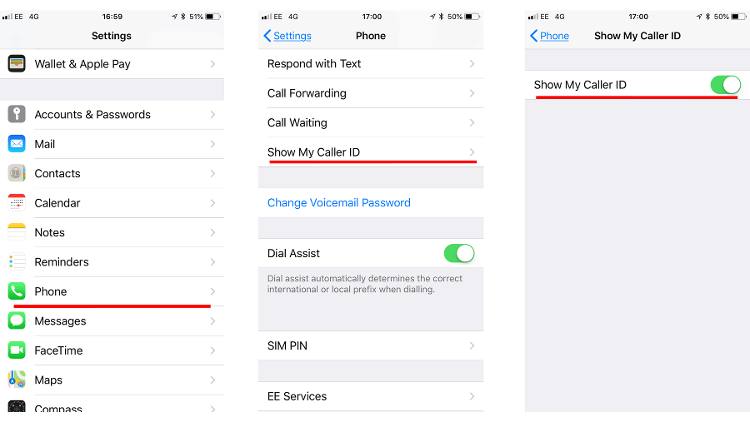
Alternatively, if you want to conceal your phone number for all calls:
- Open Settings App: Access the settings app.
- Select Phone: Scroll down and select “Phone”.
- Display Caller ID: Toggle the switch next to “Display caller ID” to turn it off.
- Turn Off Display Caller ID: Also toggle the switch next to “Show My Caller ID” to turn it off.
By following these steps, your phone number will not be visible to recipients of calls or messages.
Private Number on Fixed Line Phones
If you have a fixed line phone, making your phone number private is also possible:
- Dial The Code: Dial the code #67# followed by the phone number you want to call.
- Initiate The Call: Press the call button to initiate the call.
Alternatively, if you’re using a specific service provider (e.G., Fastweb, WINDTRE, or TIM), use the code #31# instead.
Private Number on Whatsapp
If you frequently use WhatsApp for messaging and calling, here’s how to make your phone number private:
- Open Whatsapp: Access the WhatsApp app.
- Go to Settings: Open the settings menu.
- Select Account: Select “Account”.
- Privacy: Scroll down and select “Privacy”.
- Phone Number: Toggle the switch next to “My Phone Number” to turn it off.
By following these steps, your phone number will not be visible to recipients of calls or messages on WhatsApp.
Conclusion
Making your phone number private is a simple and effective way to protect your personal information from unwanted callers or messages. By following the step-by-step guides provided above for various devices and platforms, you can maintain your online anonymity and reduce telemarketing.
Frequently Asked Questions (FAQs)
- Q: How do I Make my Phone Number Private on Android?
A: Use the code #31# followed by the phone number you want to call. - Q: Can I Conceal my Phone Number For All Calls on Android?
A: Yes, go to settings and select “Account & sync” > “Advanced settings” > “Other settings”, then toggle the switch next to “Conceal number”. - Q: How do I Make my Phone Number Private on Iphone?
A: Use the code #31# followed by the phone number you want to call, or go to settings and select “Phone” > “Display caller ID” and toggle the switch off. - Q: Can I Conceal my Phone Number For All Calls on Fixed Line Phones?
A: Yes, dial the code #67# (or #31# for specific service providers) followed by the phone number you want to call. - Q: How do I Make my Phone Number Private on Whatsapp?
A: Go to settings > “Account” > “Privacy”, then toggle the switch next to “My Phone Number” off.
We hope this article has been helpful in guiding you through the process of making your phone number private.


