
How to Create a Stunning Collage Video: A Step-by-step Guide
Are you tired of creating boring videos that don’t showcase your best moments? Do you want to tell a story with your favorite memories, but don’t know where to start? Look no further! In this article, we’ll show you how to create a stunning collage video that will make your friends and family jealous.
What is a Collage Video?
A collage video is a type of video that combines multiple clips into one, creating a visually appealing and engaging experience. It’s like making a photo album, but with videos! You can add music, text, effects, and more to make it truly special.
Why Create a Collage Video?
Creating a collage video is a great way to:
- Share your favorite memories with friends and family
- Tell a story or highlight a specific moment from an event
- Create a personalized gift for someone special
- Show off your creativity and editing skills
Tools You Need
To create a collage video, you’ll need a few tools. Don’t worry, we’ll walk you through each step!
- A smartphone or computer with internet access
- A video editing app (we recommend Canva or Splice)
- Your favorite videos and music to add to the collage
Step 1: Choose Your Videos
Select the videos you want to include in your collage. Make sure they’re high-quality and relevant to the story you want to tell.
Step 2: Choose a Video Editing App
Pick a video editing app that suits your needs. We recommend Canva or Splice, both of which are user-friendly and offer a wide range of features.
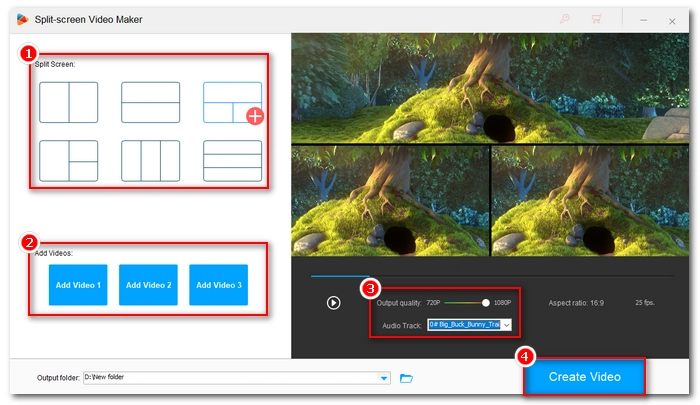
Step 3: Create Your Collage
Open your chosen app and start creating your collage! Use the templates and tools provided to add videos, music, text, effects, and more.
Step 4: Add Videos And Music
Add your selected videos to the collage, making sure they’re in the correct order. You can also add music to set the mood and enhance the overall experience.
Step 5: Customize Your Collage
Personalize your collage by adding text, effects, and other elements. This is where you can get creative and make it truly special!
Tools For Creating a Collage Video on Android, Ios, Ipados, Windows, And Macos
Here are some of the best tools for creating a collage video on different platforms:
- Canva (Android, iOS, iPadOS)
- Splice (Android, iOS, iPadOS)
- CapCut (Android, iOS, iPadOS)
- Mojo (Android, iOS, iPadOS)
- InShot (Android, iOS, iPadOS)
- Windows Clipchamp (Windows)
- DaVinci Resolve (Windows, macOS, Linux)
How to Create a Collage Video on Instagram
Want to create a collage video on Instagram? Simply use the built-in editor or add your favorite videos and music using one of the apps mentioned above.
Conclusion
Creating a stunning collage video is easier than you think! With these step-by-step instructions and the right tools, you can tell a story that will leave your friends and family amazed. So why wait? Start creating your masterpiece today!
Faqs
- What is The Best App For Creating a Collage Video?
Our top pick is Canva or Splice, both of which are user-friendly and offer a wide range of features. - How do I Add Music to my Collage Video?
You can add music to your collage video using the built-in editor in most apps or by adding a song from your library. - Can I Create a Collage Video on Instagram?
Yes, you can create a collage video on Instagram using the built-in editor or by adding your favorite videos and music using one of the apps mentioned above. - What is The Best Tool For Creating a Collage Video on Windows?
Our top pick is Windows Clipchamp, which offers a wide range of features and is user-friendly. - Can I Create a Collage Video on Macos?
Yes, you can create a collage video on macOS using DaVinci Resolve or iMovie. - How do I Share my Collage Video With Friends And Family?
You can share your collage video with friends and family by exporting it to your device or sharing it directly from the app. - Can I Add Text to my Collage Video?
Yes, you can add text to your collage video using most apps, which offer a range of fonts and styles to choose from. - How do I Customize my Collage Video?
You can customize your collage video by adding effects, transitions, and other elements to make it truly special!


