
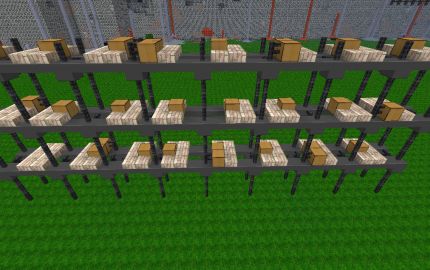
How to Build a Warehouse in Minecraft
Are you tired of cluttered spaces and scattered items in your Minecraft world? Do you dream of having a well-organized storage system that makes it easy to find what you need? Look no further! In this article, we’ll show you how to build a warehouse in Minecraft that will revolutionize the way you store and manage your items.
What is a Warehouse in Minecraft?
A warehouse in Minecraft is essentially a building designed for storing and organizing items. It’s like a digital storage unit where you can keep all your treasures safe and easily accessible. By creating a warehouse, you’ll have a centralized location to store your loot, making it easier to manage and retrieve what you need.
Why Build a Warehouse in Minecraft?
Building a warehouse in Minecraft offers several benefits:
- Organization: A warehouse helps you stay organized by providing a dedicated space for storing items.
- Easy Access: With a warehouse, you can quickly find the item you need without having to search through cluttered spaces.
- Space-saving: By storing items in a designated area, you’ll free up space elsewhere in your world.
How to Build a Warehouse in Minecraft (Java Edition)
To build a warehouse in Minecraft’s Java edition, follow these steps:
- Choose The Perfect Location: Select a spot for your warehouse that’s easily accessible and has enough space for the building.
- Determine The Size: Decide on the size of your warehouse based on your storage needs. You can make it small or large, depending on how much space you need.
- Build The Foundation: Construct the foundation of your warehouse using any type of block. Make sure it’s sturdy and wide enough to support the weight of the building.
- Add Walls And a Roof: Build walls around the foundation, leaving room for doors and windows if desired. Add a roof to protect your items from damage.
- Install Doors And Windows: Add doors and windows to make it easy to access your warehouse.
How to Build a Warehouse in Minecraft (Bedrock Edition)
Building a warehouse in Minecraft’s Bedrock edition is similar to the Java version:
- Choose The Perfect Location: Select a spot for your warehouse that’s easily accessible.
- Determine The Size: Decide on the size of your warehouse based on your storage needs.
- Build The Foundation: Construct the foundation using any type of block.
- Add Walls And a Roof: Build walls around the foundation, leaving room for doors and windows if desired. Add a roof to protect your items from damage.
- Install Doors And Windows: Add doors and windows to make it easy to access your warehouse.
How to Automate Your Warehouse in Minecraft
To take your warehouse to the next level, you can automate it using redstone contraptions. This will allow you to easily sort and retrieve items without having to manually search through them.
- Research Redstone Contraptions: Study existing redstone contraptions online or experiment with building your own.
- Create a Sorting System: Design a sorting system that categorizes items based on their type, name, or quantity.
- Add Trunks And Shelves: Add trunks and shelves to store your items, making it easier to manage and retrieve what you need.
Conclusion
Building a warehouse in Minecraft is an excellent way to stay organized and efficient in your world. By following the steps outlined above, you can create a custom storage system that meets your needs. Remember to automate your warehouse using redstone contraptions for maximum efficiency. Happy building!
Frequently Asked Questions (FAQs)
- Q: What is The Best Material to Use For Building a Warehouse?
A: Any type of block will work, but consider using materials like stone or brick for durability. - Q: How Big Should I Make my Warehouse?
A: The size depends on your storage needs. Make it small if you have limited space, or large if you need to store many items. - Q: Can I Automate my Warehouse With Redstone Contraptions?
A: Yes! Redstone contraptions can help you sort and retrieve items efficiently. - Q: What is The Best Way to Categorize Items in my Warehouse?
A: Use a combination of item type, name, or quantity to create an effective sorting system. - Q: How do I Add Trunks And Shelves to my Automated Warehouse?
A: Simply place them strategically around your warehouse to store and sort items easily. - Q: Can I Customize The Appearance of my Warehouse?
A: Yes! Use various blocks, colors, and designs to make your warehouse unique and visually appealing. - Q: How do I Maintain And Update my Automated Warehouse?
A: Regularly check and adjust your sorting system to ensure it continues working efficiently.
Additional Resources
For more information on building warehouses in Minecraft, visit the following resources:
- The official Minecraft wiki
- Online tutorials and guides
- Community forums and discussions
Remember to always follow the game’s rules and guidelines when building and automating your warehouse. Happy crafting!


