
How to Do a Transfer Online: A Step-by-step Guide
Are you tired of visiting your bank’s physical location to make payments? Do you want to know how to do a transfer online with ease? Look no further! In this article, we will guide you through the process of making a seamless online transfer using various banking systems.
Why Online Transfers Are Becoming Popular
In today’s digital age, online transfers have become increasingly popular. With more and more people turning to digital banking, it’s essential to know how to make a transfer online. Not only is it convenient, but it also saves time and effort. No longer do you need to physically visit your bank or wait in line to make payments.
What You Need to Know Before Making an Online Transfer
Before making an online transfer, there are a few things you should know:
- You Must Have Qualified For Online Banking: To make an online transfer, you’ll need to have already set up online banking with your bank. This typically involves creating a username and password, as well as setting up security measures such as a PIN or token.
- Your Account Must be Active: Make sure your account is active and in good standing before attempting to make an online transfer.
- You’ll Need The Recipient’s Iban Number: To make a transfer, you’ll need the recipient’s International Bank Account Number (IBAN) number.
How to Do a Transfer Online
Now that we’ve covered the basics, let’s dive into the step-by-step process of making an online transfer:
- Log in to Your Online Banking Platform: Start by logging in to your online banking platform using your username and password.
- Select The Transfer Option: Once you’re logged in, select the transfer option from the menu.
- Choose The Account You Want to Use: Choose the account you want to use for the transfer.
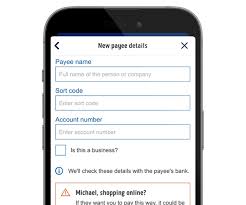
- Enter The Recipient’s Details: Enter the recipient’s IBAN number, name, and address.
- Specify The Amount: Specify the amount you want to transfer.
- Confirm The Details: Confirm the details of the transfer.
- Complete The Transaction: Complete the transaction by confirming your identity using a PIN or token.
Tips For Making an Online Transfer
Here are some tips to keep in mind when making an online transfer:
- Make Sure You Have Enough Funds: Ensure that you have enough funds in your account to cover the transfer amount.
- Double-check The Recipient’s Details: Double-check the recipient’s IBAN number, name, and address to avoid errors.
- Keep a Record of The Transaction: Keep a record of the transaction for your records.
Conclusion
Making an online transfer is a straightforward process that can be completed in just a few minutes. By following these steps and tips, you’ll be able to make seamless online transfers using various banking systems. Remember to always double-check the recipient’s details and keep a record of the transaction for your records.
Frequently Asked Questions
Here are some frequently asked questions about making an online transfer:
- Q: Can I Make an Online Transfer if my Account is Inactive?
A: No, you cannot make an online transfer if your account is inactive. Make sure your account is active and in good standing before attempting to make a transfer. - Q: Do I need the recipient’s IBAN number to make an online transfer?
A: Yes, you’ll need the recipient’s IBAN number to make a transfer. - Q: Can I make an online transfer using my mobile device?
A: Yes, many banks allow you to make online transfers using your mobile device. Check with your bank for more information.
Additional Resources
If you’re interested in learning more about making online transfers, here are some additional resources:
- Your Bank’s Website: Visit your bank’s website for more information on online transfers.
- Online Banking Tutorials: Watch online banking tutorials to learn more about the process of making an online transfer.
Stay tuned for future updates and don’t hesitate to reach out if you have any further questions.


