
How to Create a Green Dye on Minecraft: A Step-by-step Guide
Are you tired of using the same old blocks, stone, or wood in your Minecraft world? Do you want to add some color and personality to your creations? Look no further! In this article, we’ll show you how to create a green dye on Minecraft, and all the amazing things you can do with it.
What You Need to Know Before We Begin
Before we dive into the step-by-step guide, there are a few things you should know. First, this guide is specifically for the Java Edition of Minecraft. If you’re playing the Bedrock Edition, some steps might be slightly different. Second, make sure you have a furnace and fuel (such as coal or charcoal) to bake your ingredients.
Step 1: Gather Your Materials
To create green dye on Minecraft, you’ll need cacti. Yes, you read that right! Cacti are the key ingredient for our green dye. You can find them in two biomes: The Empty and Mesa biomes. Simply dig up the cactus using a shovel or your bare hands.
Step 2: Prepare Your Furnace
Now that you have your cacti, it’s time to prepare your furnace. Make sure it’s fueled with coal or charcoal (we’ll get to that in a minute). Place one cactus per block of fuel in the furnace. This will create one green dye for each cactus.
Step 3: Create Your Green Dye
Now that you have all the necessary materials, it’s time to create your green dye! Simply place the cacti and fuel in the furnace as described above. This will result in one green dye per block of fuel used.
What Can You Do With Green Dye?
The possibilities are endless! Here are just a few examples:
- Color Blocks: Use green dye to color blocks, beds, banners, and many other objects.
- Capsize Wolf Collars: Use green dye to change the color of wolf collars. This is especially useful if you’re building a village or town.
- Color Sheep Wool: Use green dye to color sheep wool, perfect for creating colored wool for your next big build project.
How to Create Green Dye Files on Minecraft
If you want to create green dye files (which can be used to create other dyes), follow these steps:
- Find a cucumber in the ocean’s floor or near coral reefs.
- Use the same process as described above to bake the cucumber and create one green dye file per cucumber.
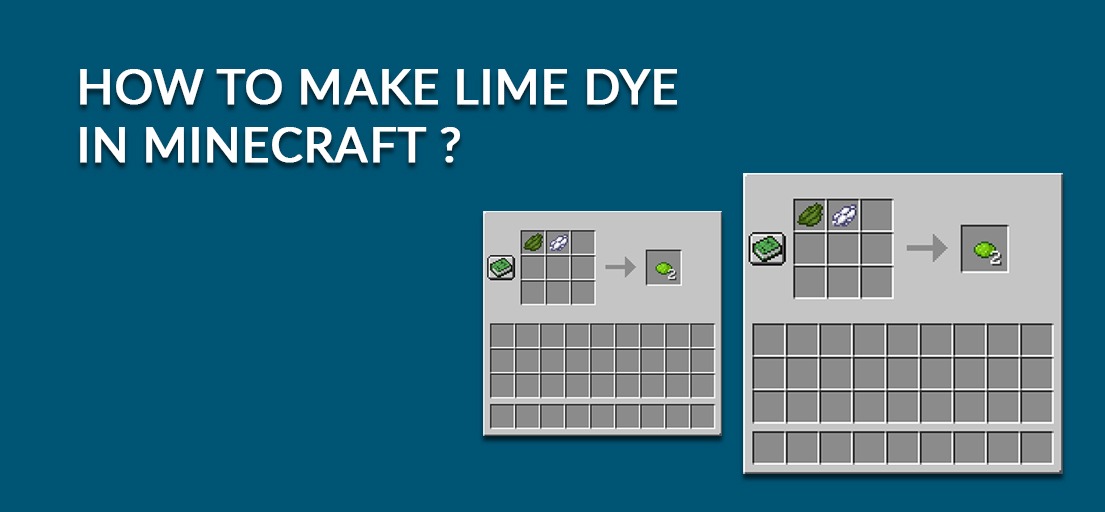
- Alternatively, mix 1 unit of green dye with 1 unit of white dye in a crafting table to create 2 units of green dye files.
Conclusion
Creating green dye on Minecraft is a simple yet powerful tool for any builder or player. With this guide, you can unlock new possibilities and take your creations to the next level. So why wait? Get crafting and show off your amazing builds!
Faqs
- Q: What if I’m Playing Bedrock Edition Instead of Java Edition?
A: While some steps might be slightly different, our guide should still work for you. Just keep an eye out for any discrepancies. - Q: Can I Use Green Dye to Color Anything on Minecraft?
A: Yes! Green dye can be used to color a wide variety of blocks, objects, and items. - Q: How do I Create Other Dyes Using Green Dye Files?
A: Simply mix the green dye file with another color dye (such as blue or red) in a crafting table. - Q: Can I Use Cacti to Create Other Colors on Minecraft?
A: Yes! Cacti can be used to create various dyes, but we’ll cover that in future guides. - Q: Where do I Find Cacti in The Game?
A: Cacti can be found in two biomes: The Empty and Mesa biomes.


