
How to Create a Colorful Rainbow Text on Instagram
Are you tired of using plain text on your Instagram posts and stories? Do you want to make your content stand out from the crowd? Look no further! In this article, we will guide you through the process of creating a colorful rainbow text on Instagram.
What is a Rainbow Text?
A rainbow text, also known as a multicolored text, is a feature that allows you to personalize your textual contents with different colors. This can be especially useful for events like Pride Month or other celebrations where a rainbow flag is often used.
Why Use a Rainbow Text on Instagram?
Using a rainbow text on Instagram can add a touch of creativity and whimsy to your posts and stories. It’s also a great way to express yourself and show off your personality. Plus, it’s a fun way to engage with your followers and make them feel special.
How to Create a Rainbow Text on Instagram Stories
Creating a rainbow text on Instagram stories is easy and straightforward. Here’s how:
- Open The Instagram App: Start by opening the Instagram app on your smartphone.
- Log in to Your Account: Log in to your account if you haven’t already.
- Swipe Left: Swipe left from right to open the editor of the story.
- Take a Photo or Record a Video: Take a photo, record a video, or select a content from your gallery.
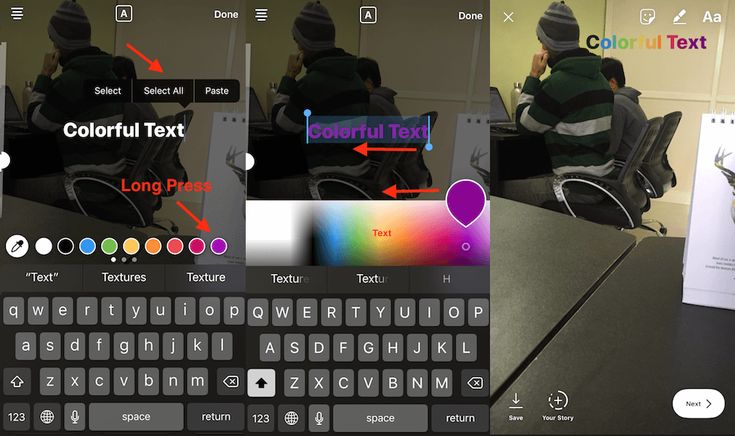
- Tap on The Aa Icon: Tap on the Aa icon in the top-right corner to open the text editor.
- Write Your Text: Write the text you want to use and personalize it with different colors.
How to Colorize Your Text
To colorize your text, follow these steps:
- Select a Letter or Word: Select a letter or word from your text by tapping on it.
- Tap on The Color Picker: Tap on the color picker icon (a small square) in the top-right corner of the screen to select a color.
- Choose Your Color: Choose the color you want to use for that letter or word.
- Repeat The Process: Repeat the process for each letter or word until your entire text is colored.
Tips And Tricks
Here are some tips and tricks to keep in mind when creating a rainbow text on Instagram:
- Use the correct order of colors for a traditional rainbow: Red, orange, yellow, green, blue, indigo, violet.
- Experiment with different fonts and sizes to add more creativity to your text.
- Use hashtags strategically to make them stand out from the rest of the text.
How to Create a Rainbow Text on Instagram Posts
Unfortunately, Instagram doesn’t allow you to colorize the text in post captions. However, there are some workarounds:
- Use Hashtags: You can use hashtags that automatically change colors for specific events like Pride Month.
- Edit Your Photos: Use photo editing apps to add a colorful text overlay on your photos or videos.
Conclusion
Creating a colorful rainbow text on Instagram is a fun and creative way to express yourself and engage with your followers. Whether you’re using it for a special event or just because, this feature can help make your content stand out from the crowd.
Common Questions Answered
Q: Can I use a rainbow text on Instagram posts?
A: Unfortunately, no, but there are some workarounds like using hashtags or photo editing apps.
Q: How do I colorize my text?
A: To colorize your text, select a letter or word, tap on the color picker icon, and choose your desired color.


