
How to Record And Share Your Ps4 Gameplay Videos
Are you tired of keeping your gaming achievements to yourself? Do you want to share your gaming prowess with friends or a wider audience? Look no further! In this article, we’ll show you how to record and share your PS4 gameplay videos on YouTube and Facebook.
Requirements For Recording Video on Ps4
Before we dive into the procedures, it’s essential to ensure that your PS4 meets the basic requirements. You need:
- A stable internet connection (especially during upload)
- A PlayStation Network (PSN) account configured correctly
Step 1: Connect Your Ps4 to The Internet
To start, connect your PS4 to the internet. Go to the Settings menu and select “Network.” Choose between Wi-Fi or LAN (cable) connection options.
Step 2: Access Your Psn Account
Access your PSN account by going to Settings > Management of Account > Access to PlayStation Network.
Step 3: Create a Psn Account (if You Don’t Have One)
If you don’t have a PSN account, create one by selecting “New User” and following the prompts. You’ll need to provide basic information like country/region, language, and date of birth.
Recording Video on Ps4
Now that your PS4 is connected to the internet and your PSN account is configured, you can start recording video on your console.
Method 1: Using Native Functionality
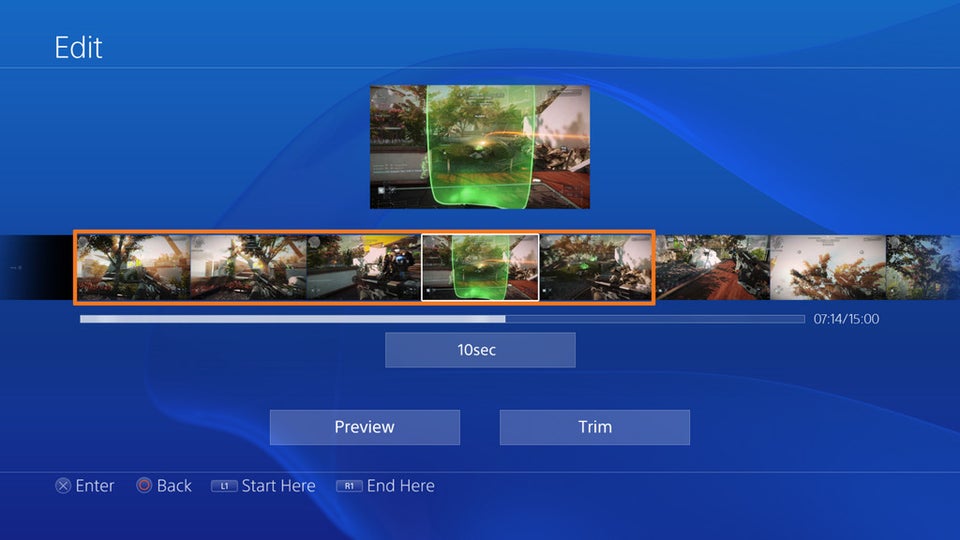
You can record video on PS4 using its native functionality. Here’s how:
- Play your game as usual.
- When you want to record a clip, press the Share button on your controller.
- Select “Clip Video” and choose where you want to save it.
Method 2: Using External Devices (Alternative Solutions)
If you’re looking for better quality or longer recording times, consider using external devices like capture cards from Elgato, AverMedia, or Roxio. These devices can connect your PS4 to a PC, allowing you to record video and stream it live.
Sharing Your Video on Youtube
To share your recorded video on YouTube:
- Connect your PSN account to your YouTube account (if you haven’t already).
- Go to the Share menu in-game.
- Select “Clip Video” and choose YouTube as your sharing platform.
- Complete the title, description, and tags for your video.
Sharing Your Video on Facebook
To share your recorded video on Facebook:
- Go to the Share menu in-game.
- Select “Clip Video” and choose Facebook as your sharing platform.
- Complete the title, comment, and public settings for your video.
Troubleshooting And Alternative Solutions
If you encounter any issues or problems during recording or sharing, don’t worry! You can try using alternative solutions like external devices (capture cards) or consulting online resources for troubleshooting tips.
Conclusion
Recording and sharing your PS4 gameplay videos is easier than ever. By following these simple steps and ensuring that your PS4 meets the basic requirements, you’ll be able to share your gaming achievements with friends and a wider audience on YouTube and Facebook.
Frequently Asked Questions (FAQs)
- Q: What Are The System Requirements For Recording Video on Ps4?
A: You need a stable internet connection and a configured PSN account. - Q: Can I Record Longer Videos Than 15 Minutes Using Native Functionality?
A: No, but you can use external devices like capture cards to record longer videos. - Q: How do I Connect my Ps4 to Youtube?
A: Go to Settings > Network and configure your internet connection, then go to the Share menu in-game and select YouTube as your sharing platform. - Q: Can I Share my Video on Both Youtube And Facebook at The Same Time?
A: Yes, you can share your video on multiple platforms simultaneously. - Q: What if I Encounter Problems or Issues During Recording or Sharing?
A: Try using alternative solutions like external devices or consulting online resources for troubleshooting tips. - Q: Do I Need a Psn Account to Record Video on my Ps4?
A: Yes, you need a configured PSN account to record video on your PS4. - Q: Can I Use External Devices (capture Cards) to Improve The Quality of my Recorded Videos?
A: Yes, using external devices can improve the quality and length of your recorded videos. - Q: How do I Troubleshoot Issues With my Psn Account or Internet Connection?
A: Go to the official Sony support website for troubleshooting tips and contact their customer service for assistance.


