
How to Create a Video With Photos And Music Free: A Step-by-step Guide
Are you looking for a way to create a video with photos and music free? Look no further! In this article, we will guide you through the process of creating a beautiful video using photos and music, without spending a single cent.
Why Create a Video With Photos And Music Free?
Creating a video with photos and music free is a great way to preserve memories, tell stories, and express yourself creatively. You can use this technique to create a video for any occasion, whether it’s a wedding, a birthday party, or just a fun day out with friends.
Software And Tools For Creating Video With Photos And Music Free
There are several software and tools available that allow you to create a video with photos and music free. Here are some of the best ones:
Clipchamp (Windows)
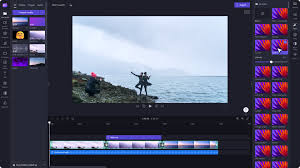
Clipchamp is a free video editing software developed by Microsoft. It allows you to create a video with photos, music, and text, without any watermarks or limitations. You can also export your video in high resolution and add effects, transitions, and color corrections.
How to Use Clipchamp
To use Clipchamp, simply download and install the software on your Windows computer. Then, open the program and select the “Create a new video” option. Choose the photos you want to include in your video, add music or sound effects, and adjust the settings as needed.
Photo (macOS)
If you’re using a Mac, you can use Photo to create a video with photos and music free. This application allows you to create presentations, slideshows, and videos with images, transitions, and background music.
How to Use Photo
To use Photo, open the program and select the “Create” option. Choose the photos you want to include in your video, add text or music as needed, and adjust the settings to create a beautiful presentation.
Canva (Online)
If you don’t have any software installed on your computer, you can use Canva to create a video with photos and music free online. This platform allows you to create graphic designs, presentations, and videos without any design experience.
How to Use Canva
To use Canva, simply sign up for an account and select the “Video” option. Choose the photos you want to include in your video, add text or music as needed, and adjust the settings to create a beautiful video.
Other Online Solutions
There are several other online solutions available that allow you to create a video with photos and music free. Some of these include:
- Adobe Express: A web-based platform that allows you to create graphics, presentations, and videos without any software installed on your computer.
- Animoto: A service that allows you to create videos with images, music, and text, without any watermarks or limitations.
- WeVideo: A cloud-based video editing software that allows you to create videos with photos, music, and text, without any watermarks or limitations.
Mobile Apps For Creating Video With Photos And Music Free
If you’re using a mobile device, there are several apps available that allow you to create a video with photos and music free. Some of these include:
- Splice: A video editing app that allows you to create videos with images, music, and text, without any watermarks or limitations.
- Quik: A video editing app developed by GoPro, which allows you to create videos with photos, music, and text, without any watermarks or limitations.
- Adobe Premiere Rush: A mobile app that allows you to create videos with photos, music, and text, without any watermarks or limitations.
- IMovie (iOS/iPadOS): A video editing app developed by Apple, which allows you to create videos with images, music, and text, without any watermarks or limitations.
Conclusion
Creating a video with photos and music free is easier than ever. With the software and tools available today, you can preserve memories, tell stories, and express yourself creatively without spending a single cent. Whether you’re using Clipchamp, Photo, Canva, or one of the many mobile apps available, creating a beautiful video has never been so easy.
Faqs
- Q: What is The Best Software For Creating a Video With Photos And Music Free?
A: The best software for creating a video with photos and music free depends on your operating system. For Windows users, Clipchamp is an excellent choice. For Mac users, Photo is a great option. - Q: Can I Create a Video With Photos And Music Free Online?
A: Yes, you can create a video with photos and music free online using platforms like Canva or services like Animoto. - Q: Are There Any Mobile Apps That Allow me to Create a Video With Photos And Music Free?
A: Yes, there are several mobile apps available that allow you to create a video with photos and music free. Some of these include Splice, Quik, Adobe Premiere Rush, and iMovie. - Q: Can I Export my Video in High Resolution Without Any Watermarks or Limitations?
A: Yes, some software and services allow you to export your video in high resolution without any watermarks or limitations. However, be aware that some may have limits on the length of videos or the quality of exports. - Q: Can I Add Text or Music to my Video Using These Software And Services?
A: Yes, most of these software and services allow you to add text or music to your video.


