
Unlocking The Power of Virtual Dj: A Comprehensive Guide
Are you ready to take your music mixing skills to the next level? Look no further than Virtual DJ, a powerful and user-friendly software that allows you to mix audio and video tracks with ease. In this article, we’ll explore the world of Virtual DJ, covering everything from installation and setup to advanced techniques for mixing and mastering.
Getting Started With Virtual DJ
Before we dive into the nitty-gritty details, let’s take a look at what Virtual DJ has to offer. This software is designed specifically for music enthusiasts and professionals alike, providing an intuitive interface that makes it easy to navigate and use. With Virtual DJ, you can:
- Mix audio and video tracks with precision
- Access a vast library of effects and transitions
- Control the tempo and pitch of your tracks with ease
- Create custom playlists and mixes
Installing And Setting Up Virtual DJ
Getting started with Virtual DJ is a breeze. Simply download the software from the official website, follow the installation instructions, and you’re good to go! Here are some tips to keep in mind:
- Make sure you have a compatible operating system (Windows or macOS)
- Choose the correct version of Virtual DJ for your needs (Home, PRO, or Business)
- Install any necessary updates or patches
Understanding The Interface
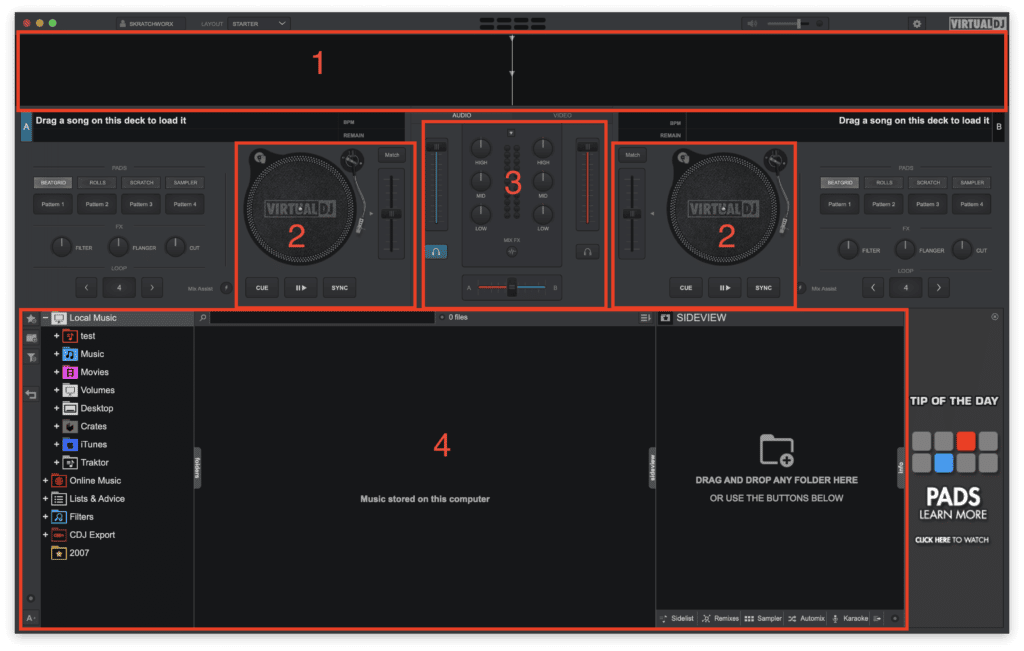
Once you’ve installed and set up Virtual DJ, it’s time to get familiar with the interface. The software is divided into several sections, each serving a specific purpose:
- Deck 1 And Deck 2: These are the two main decks where you’ll load your audio and video tracks.
- Browser: Use this section to browse through your music library or access online content.
- Effects: This is where you’ll find all sorts of effects and transitions to enhance your mixes.
Mixing Audio With Virtual DJ
Now that we’ve covered the basics, it’s time to dive into the world of audio mixing. Here are some essential techniques to get you started:
- Load your tracks: Simply drag and drop your audio files into Deck 1 or Deck 2.
- Adjust the tempo and pitch: Use the built-in controls to adjust the speed and tempo of your tracks.
- Add effects: Choose from a vast library of effects to enhance your mixes.
Mixing Video With Virtual DJ
Virtual DJ isn’t just for mixing audio – you can also mix video! Here are some tips to get you started:
- Load your video files: Just like with audio, drag and drop your video files into Deck 1 or Deck 2.
- Adjust the tempo and pitch: Use the built-in controls to adjust the speed and tempo of your videos.
- Add transitions: Choose from a variety of transitions to enhance your video mixes.
Mixing on Smartphone And Tablet
Want to take your Virtual DJ experience on-the-go? You can download the Virtual DJ app for Android and iOS devices, which allows you to control the software remotely using your smartphone or tablet.
Advanced Techniques With Virtual DJ
Once you’ve mastered the basics, it’s time to explore more advanced techniques. Here are some tips to get you started:
- Use the cross-fader: This is a powerful tool that allows you to transition between tracks seamlessly.
- Add effects and transitions: Experiment with different effects and transitions to enhance your mixes.
- Mastering: Use Virtual DJ’s built-in mastering tools to fine-tune your final mixes.
Conclusion
Virtual DJ is an incredibly powerful software that offers endless possibilities for music enthusiasts and professionals alike. With this comprehensive guide, you’ll be well on your way to unlocking the full potential of Virtual DJ. Whether you’re a seasoned DJ or just starting out, this software is sure to take your mixing skills to the next level.
Frequently Asked Questions
- What is Virtual Dj?
Virtual DJ is a powerful music mixing software that allows you to mix audio and video tracks with ease. - Is Virtual DJ Free?
Yes, Virtual DJ offers a free version (Home) that’s perfect for beginners and hobbyists. - How do I Install Virtual Dj?
Simply download the software from the official website and follow the installation instructions. - What Are The System Requirements For Virtual Dj?
Make sure you have a compatible operating system (Windows or macOS) and sufficient RAM to run the software smoothly. - Can I Use Virtual DJ on my Smartphone or Tablet?
Yes, you can download the Virtual DJ app for Android and iOS devices, which allows you to control the software remotely using your mobile device. - What Are Some Advanced Techniques With Virtual Dj?
Experiment with cross-fading, effects, and transitions to enhance your mixes. Use Virtual DJ’s built-in mastering tools to fine-tune your final mixes. - Can I Mix Video With Virtual Dj?
Yes, you can mix video with Virtual DJ using the software’s built-in video mixing capabilities. - Is Virtual DJ Suitable For Beginners?
Absolutely! Virtual DJ offers an intuitive interface that makes it easy to navigate and use, even for those new to music mixing.


