
Mounting a Sony Bravia Tv: A Step-by-step Guide
Are you thinking of mounting your new Sony BRAVIA TV on the wall? Look no further! This guide will walk you through the process, providing you with all the necessary information to ensure a safe and successful installation.
Preliminary Requirements
Before you start, it’s essential to check if you meet the preliminary requirements for mounting a Sony BRAVIA TV. These include:
- Ensuring your TV is compatible with the wall mount (check the standard VESA supported by your TV)
- Measuring the weight of your TV
- Checking the distance between the 4 forums on the back of your TV
Checking Your Tv’s Compatibility
To ensure you have the correct wall mount, check the standard VESA supported by your TV. You can find this information in the user manual or by measuring the distance between the 4 forums on the back of your TV.
Choosing The Right Wall Mount
Sony offers various wall mounts that are compatible with their TVs. Make sure to choose a mount that meets your requirements, including the weight and size of your TV. Some popular options include:
- Staffe to Wall: These mounts come with a mobile arm that can be removed from the wall.
- Pedestals: These mounts provide a stable base for your TV and are ideal for larger screens.
Preparing Your Wall
Before installing your wall mount, make sure your wall is ready. This includes:
- Checking for any cables or pipes that may interfere with the installation
- Ensuring the wall can support the weight of your TV (for staffe to wall) or pedestal
Installing The Staffe to Wall
To install a staffe to wall, follow these steps:
- Choose the correct location on the wall for the staffe.
- Mark the spot with a pencil and drill pilot holes for the screws.
- Insert the screws into the forums on the back of your TV.
- Mount the staffe to the wall using the provided screws.
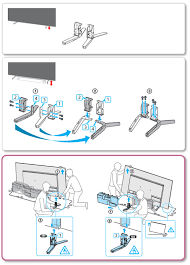
Installing a Pedestal
To install a pedestal, follow these steps:
- Choose the correct location on the floor for the pedestal.
- Place the pedestal in position and ensure it is level.
- Insert the screws into the forums on the back of your TV.
- Mount the pedestal to the floor using the provided screws.
Finalizing Your Installation
After installing your wall mount, follow these steps:
- Attach the TV to the staffe or pedestal.
- Connect any cables and ensure they are securely attached.
- Test your installation to ensure everything is working correctly.
Troubleshooting Tips
- If you encounter any issues during the installation process, consult the user manual for troubleshooting tips.
- Consider seeking help from a professional if you’re unsure about any aspect of the installation.
Conclusion
Mounting a Sony BRAVIA TV can be a straightforward process if you follow these steps. Remember to check your preliminary requirements and choose the correct wall mount for your TV. With patience and attention to detail, you’ll have your TV securely mounted on the wall in no time.
Frequently Asked Questions (FAQs)
- What Are The Benefits of Mounting my Sony Bravia Tv?
Mounting your TV provides a sleek and modern look while freeing up space for other decorative items. - Which Type of Wall Mount is Best Suited For my Tv?
Choose a staffe to wall if you have a smaller screen or prefer a more mobile design. Pedestals are ideal for larger screens or those who want a stable base. - How do I Ensure The Stability of my TV During Installation?
Use a level and consult the user manual for guidance on ensuring your TV is securely attached to the wall mount. - What Should I do if I Encounter Any Issues During Installation?
Consult the user manual or seek help from a professional if you’re unsure about any aspect of the installation process.
This article provides a step-by-step guide for mounting a Sony BRAVIA TV on the wall, including:
- Checking preliminary requirements
- Choosing the right wall mount
- Preparing the wall
- Installing the staffe to wall or pedestal
- Finalizing the installation and troubleshooting tips.


