
How to Open Csv Files: A Step-by-step Guide
Are you struggling to open a CSV file on your computer or mobile device? Look no further! In this article, we will guide you through the process of opening and working with CSV files using various software and apps.
What is a Csv File?
A CSV (Comma Separated Values) file is a plain text file that contains data in a table format. Each line of the file represents a record, and each column in the table represents a field. The data is separated by commas, which makes it easy to import into spreadsheet software or databases.
Why Open a Csv File?
CSV files are widely used for exchanging data between different applications and systems. You might need to open a CSV file if you want to:
- Import contacts from an old phone or computer
- Analyze data from a survey or research study
- Transfer data from one software program to another
Software Programs For Opening Csv Files
There are several software programs that can help you open and work with CSV files. Here are some of the most popular ones:
Microsoft Excel (Windows, Macos, Online, Android, Ios, Ipados)
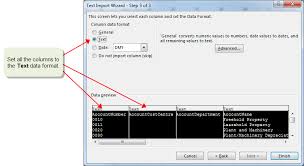
If you have Microsoft Office installed on your computer or mobile device, you can use Excel to open and edit CSV files. To do this:
- Open Excel and click on “File” > “Open”
- Navigate to the location of the CSV file
- Select the file and click on “Open”
Libreoffice (Windows, Macos, Linux)
If you don’t have Microsoft Office, you can use LibreOffice, a free and open-source office suite that includes a spreadsheet program called Calc.
- Open LibreOffice Calc and click on “File” > “Open”
- Navigate to the location of the CSV file
- Select the file and click on “Open”
Google Drive (Online, Android, Ios, Ipados)
You can also use Google Drive to open and edit CSV files. To do this:
- Sign in to your Google account and navigate to the Google Drive website
- Click on the “+” icon to upload a file or drag and drop the CSV file into the browser window
- Right-click on the file and select “Open with” > “Google Sheets”
Wps Office (Android, Ios, Ipados)
If you have WPS Office installed on your mobile device, you can use it to open and edit CSV files.
- Open WPS Office and click on the “+” icon to create a new file
- Select “CSV” as the file type
- Navigate to the location of the CSV file and select it
How to Import Contacts From a Csv File
If you have a CSV file containing contacts, you can import them into your email client or contact manager using the following steps:
Microsoft Outlook (Windows, Macos)
- Open Microsoft Outlook
- Click on “File” > “Import and Export”
- Select “Comma Separated Values (CSV)” as the file type
- Navigate to the location of the CSV file
- Select the file and click on “Open”
Thunderbird (Windows, Macos, Linux)
- Open Thunderbird
- Click on the “Contacts” icon in the toolbar
- Select “Import” from the menu
- Choose “CSV” as the file type
- Navigate to the location of the CSV file
- Select the file and click on “Open”
Apple Mail (Mac)
- Open Apple Mail
- Click on the “Contacts” icon in the toolbar
- Select “Import” from the menu
- Choose “CSV” as the file type
- Navigate to the location of the CSV file
- Select the file and click on “Open”
Conclusion
In conclusion, opening a CSV file is a straightforward process that can be accomplished using various software programs and apps. Whether you’re working with contacts, data analysis, or transferring information between applications, knowing how to open and work with CSV files will save you time and effort.
Frequently Asked Questions (FAQs)
- What is a Csv File?
A CSV file is a plain text file that contains data in a table format, separated by commas.
- Why Can’t I Open my Csv File?
Make sure you have the correct software program installed on your computer or mobile device to open and edit CSV files.
- Can I Import Contacts From a Csv File Into my Email Client?
Yes, most email clients allow you to import contacts from a CSV file. Check the instructions above for specific steps.
- What if my Csv File is Too Big to Open in Excel or Libreoffice?
If your CSV file exceeds the maximum number of rows allowed by Excel or LibreOffice, consider using Power Query or Google Sheets to handle large files.
- Can I Use Python or Java to Read a Csv File?
Yes, you can use programming languages like Python and Java to read and manipulate CSV files. However, this may require some knowledge of coding.
- How do I Import Contacts From a Csv File Into my Phone’s Contact List?
Check the instructions above for specific steps on how to import contacts from a CSV file using various software programs and apps.
- What if I Don’t Have Microsoft Office or Libreoffice Installed on my Computer?
You can use free alternatives like Google Drive, WPS Office, or online spreadsheet programs to open and edit CSV files.
- Can I Use a Mobile App to Import Contacts From a Csv File Into my Phone’s Contact List?
Yes, many mobile apps allow you to import contacts from a CSV file directly into your phone’s contact list. Check the App Store or Google Play for available options.


