
How to Open Docx Files: A Step-by-step Guide
Are you having trouble opening a file with the extension .DOCX on your computer? Don’t worry, we’ve got you covered! In this article, we’ll walk you through the steps to open and edit DOCX files using various software and online services.
What is a Docx File?
A DOCX file is an open document format used by Microsoft Word. It’s similar to a Word document but in a more modern and flexible format. The .DOCX extension was introduced with Microsoft Office 2007, and it has become the standard for saving documents in Word.
Programs to Open Docx Files
There are several programs that can open and edit DOCX files, including:
Microsoft Word (Windows/Mac)
The first program you should try is Microsoft Word. It’s the original software designed to create and edit .DOCX files. If you have a recent version of Office installed on your computer, you’ll be able to open and edit DOCX files with ease.
How to Open a Docx File in Microsoft Word:
- Double-click on the DOCX file.
- If it doesn’t open automatically, right-click on the file and select “Open with” > “Microsoft Word.”
Libreoffice (Windows/Mac/Linux)
If you don’t have Microsoft Office installed or prefer a free alternative, consider using LibreOffice. This software suite includes a word processor called Writer that can open and edit DOCX files.
How to Open a Docx File in Libreoffice:
- Download and install LibreOffice on your computer.
- Double-click on the DOCX file.
- If it doesn’t open automatically, right-click on the file and select “Open with” > “LibreOffice Writer.”
Wordpad (Windows)
If you’re using Windows, WordPad is another program that can open and edit DOCX files. While it’s not as powerful as Microsoft Word or LibreOffice, it can still read and modify basic .DOCX documents.
How to Open a Docx File in Wordpad:
- Double-click on the DOCX file.
- If it doesn’t open automatically, right-click on the file and select “Open with” > “WordPad.”
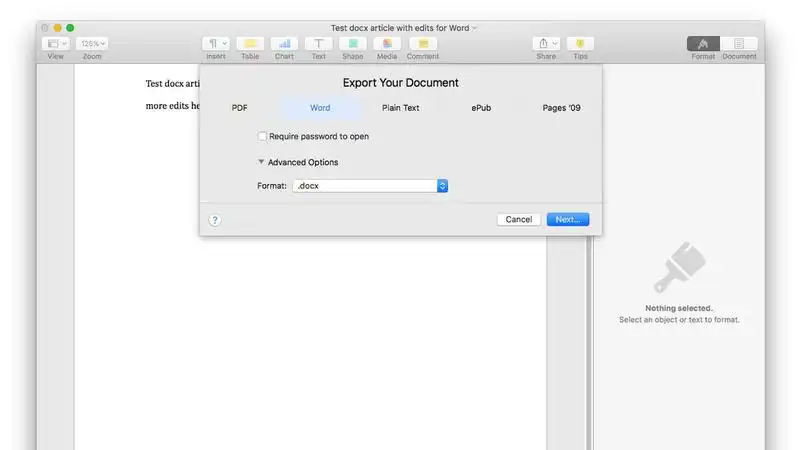
Pages (Mac)
If you’re using a Mac, Pages is a great alternative to Microsoft Word or LibreOffice. It’s free and comes pre-installed on macOS.
How to Open a Docx File in Pages:
- Double-click on the DOCX file.
- If it doesn’t open automatically, right-click on the file and select “Open with” > “Pages.”
Online Services (Google Drive/onedrive)
If you don’t have any software installed or prefer to work online, consider using Google Drive or OneDrive. These cloud-based services allow you to upload and edit .DOCX files directly in your browser.
How to Open a Docx File Online:
- Upload the .DOCX file to Google Drive or OneDrive.
- Double-click on the uploaded file to open it online.
- You can now edit the document using the web-based editor.
Mobile Apps (Word/Rows)
If you need to access and edit .DOCX files on your smartphone, consider downloading a mobile app specifically designed for this purpose.
How to Open a Docx File on Mobile:
- Download the Word or Rows app.
- Tap on the file to open it in the app.
- You can now edit the document using the mobile app.
In conclusion, opening and editing .DOCX files is easier than you might think! With various software options and online services available, you should be able to find a solution that suits your needs.
Frequently Asked Questions (FAQs)
- What is The Difference Between Doc And Docx Files?
A DOC file is an older format used by Microsoft Word 97-2003, while a .DOCX file is the newer format introduced with Microsoft Office 2007.
- Why Can’t I Open my Docx File in Microsoft Word?
Check if you have a recent version of Office installed on your computer. Also, ensure that the file association is set to Microsoft Word.
- What Other Software Can I Use to Edit Docx Files?
You can use LibreOffice, WordPad, Pages, Google Drive, OneDrive, or mobile apps like Word or Rows to edit .DOCX files.
- How do I Convert a Doc File to a Docx File?
Use the built-in converter in Microsoft Office or download an external conversion tool.
- What is The Best Software For Editing Docx Files on a Mac?
Pages and LibreOffice are excellent alternatives to Microsoft Word for editing .DOCX files on a Mac.
- How do I Open a Docx File Online?
Upload the file to Google Drive or OneDrive, double-click on it to open, and edit using the web-based editor.
- What Mobile App Can I Use to Edit Docx Files on my Smartphone?
Download the Word or Rows app from the App Store or Google Play Store.
- Why is my Computer Unable to Find The Software to Open a Docx File?
Check if you have the latest version of Office installed, and ensure that the file association is set correctly.


