
How to Open .DOCX Files: A Comprehensive Guide
Are you struggling to open a file with the extension .DOCX? You’re not alone! Many people face this issue, especially when they’ve recently switched to a new computer or operating system. In this article, we’ll provide a step-by-step guide on how to open .DOCX files on various platforms, including Windows, Mac, Android, and iPhone.
What is a .DOCX File?
Before we dive into the solutions, let’s briefly explain what a .DOCX file is. A .DOCX file is a document file format created by Microsoft Word. It’s a more modern and improved version of the classic .DOC format. .DOCX files can contain various types of documents, such as text, images, tables, and more.
Opening .DOCX Files on Windows
If you’re using a Windows computer, opening a .DOCX file is relatively straightforward. Here are your options:
Using Microsoft Word
- Download and install Microsoft Word from the official website.
- Open Microsoft Word and click on “File” > “Open”.
- Navigate to the location of your .DOCX file and select it.
- Click “Open” to view the document.
Using Microsoft Word Online
- Go to the Microsoft Word online portal.
- Sign in with your Microsoft account.
- Click on the “Create” button and select “Blank Document”.
- Upload your .DOCX file by clicking on the “Upload” button.
- Wait for the file to upload and then click on it to view the document.
Using Wordpad
- Open WordPad, which is a free text editor that comes pre-installed with Windows.
- Click on “File” > “Open”.
- Navigate to the location of your .DOCX file and select it.
- Click “Open” to view the document.
Opening .DOCX Files on Mac
If you’re using a Mac, here are your options:
Using Microsoft Word For Mac
- Download and install Microsoft Word from the official website.
- Open Microsoft Word and click on “File” > “Open”.
- Navigate to the location of your .DOCX file and select it.
- Click “Open” to view the document.
Using Pages
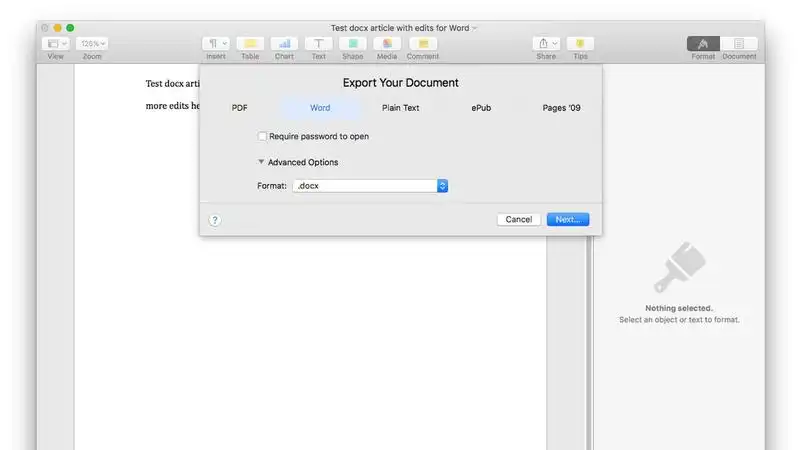
- Open Pages, which is a free word processor that comes pre-installed with Macs.
- Click on “File” > “Open”.
- Navigate to the location of your .DOCX file and select it.
- Click “Open” to view the document.
Opening .DOCX Files Online
If you don’t have access to a computer or prefer to open files online, here are your options:
Using Microsoft Word Online
- Go to the Microsoft Word online portal.
- Sign in with your Microsoft account.
- Click on the “Create” button and select “Blank Document”.
- Upload your .DOCX file by clicking on the “Upload” button.
- Wait for the file to upload and then click on it to view the document.
Using Google Documents
- Go to the Google Documents portal.
- Sign in with your Google account.
- Click on the “New” button and select “Blank Document”.
- Upload your .DOCX file by clicking on the “Upload” button.
- Wait for the file to upload and then click on it to view the document.
Opening .DOCX Files on Android
If you’re using an Android device, here’s how to open a .DOCX file:
- Download and install Microsoft Word from the Google Play Store.
- Open Microsoft Word and sign in with your Microsoft account.
- Click on the “Open” button and navigate to the location of your .DOCX file.
- Select the file and click “Open” to view it.
Opening .DOCX Files on Iphone
If you’re using an iPhone, here’s how to open a .DOCX file:
- Download and install Microsoft Word from the App Store.
- Open Microsoft Word and sign in with your Microsoft account.
- Click on the “Open” button and navigate to the location of your .DOCX file.
- Select the file and click “Open” to view it.
Troubleshooting Damaged .DOCX Files
If you’re experiencing issues opening a damaged .DOCX file, here are some troubleshooting steps:
- Try using a different software application to open the file.
- Check if the file is corrupted by trying to open it in a text editor like Notepad or TextEdit.
- If the file is still inaccessible, try using a specialized software tool to recover corrupt files.
Conclusion
Opening .DOCX files is relatively straightforward on various platforms. Whether you’re using Windows, Mac, Android, or iPhone, there are multiple options available to view and edit these documents. By following the steps outlined in this article, you should be able to access your .DOCX files with ease.
Frequently Asked Questions
- What is a .DOCX File?
A .DOCX file is a document file format created by Microsoft Word. - How do I Open a .DOCX File on Windows?
You can use Microsoft Word, Microsoft Word Online, or WordPad to open a .DOCX file on Windows. - How do I Open a .DOCX File on Mac?
You can use Microsoft Word for Mac or Pages to open a .DOCX file on Mac. - Can I Open a .DOCX File Online?
Yes, you can use Microsoft Word Online or Google Documents to open a .DOCX file online. - How do I Open a .DOCX File on Android?
You can download and install Microsoft Word from the Google Play Store to open a .DOCX file on Android. - How do I Open a .DOCX File on Iphone?
You can download and install Microsoft Word from the App Store to open a .DOCX file on iPhone. - What if my .DOCX File is Damaged?
Try using a different software application or specialized tool to recover corrupt files.
I hope this article has provided you with a comprehensive guide on how to open .DOCX files on various platforms!


