
How to Open Epub Files on Your Pc: A Comprehensive Guide
Are you struggling to open ePUB files on your computer? Do you want to read your favorite eBooks in a format that’s easy to navigate and compatible with various devices? Look no further! In this article, we’ll guide you through the process of opening ePUB files on your Windows PC, macOS, or Linux device.
What is an Epub File?
An ePUB file is a digital book format that’s widely used for eBooks. It’s a standard format recognized internationally and compatible with various software and devices, including eBook readers, tablets, smartphones, and computers.
Why Can’t I Open My Epub File?
If you’re having trouble opening your ePUB file, it might be due to the type of device or software you’re using. Don’t worry; we’ve got solutions for you!
Free Software to Open Epub Files on PC
Here are some free software options that can help you open and read ePUB files on your Windows PC:
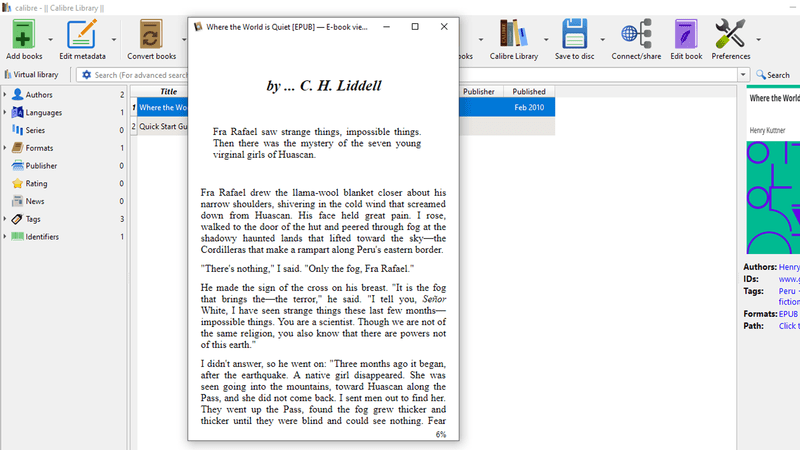
- Calibre: This is one of the best free software programs available for managing eBooks. It’s compatible with Windows, macOS, and Linux devices. Calibre allows you to add books, convert formats, and synchronize your eBook library across various devices.
- Neatreader: This user-friendly application lets you read, note, and manage your ePUB files in a comfortable manner. NeatReader supports various file formats, including PDF, MOBI, FB2, HTML, and TXT.
- Freda: Freda is another versatile eBook reader that can open ePUB files on Windows devices. It also supports other formats like MOBI, FB2, HTML, and TXT.
- Epub Reader: This application allows you to read ePUB files in addition to other formats like PDF, MOBI, CBZ, and CBR.
How to Open Epub Files Online
If you prefer to open ePUB files online without downloading any software or apps, here are some options:
- Groupdocs: This platform allows you to visualize, inspect, convert, and manage various file formats, including ePUB. You can access GroupDocs directly from your browser.
- Google Books: Google Books is another online platform where you can search, preview, and purchase eBooks in various formats, including ePUB.
How to Open Epub Files on Android
If you’re using an Android device, here are some options for opening ePUB files:
- Readera: This free eBook reader app supports ePUB file format and allows you to read your eBooks comfortably. ReadEra also supports other formats like PDF, DOC, DOCX, RTF, MOBI, AZW3, DJVU, FB2, TXT, ODT, and CHM.
- Eboox Reader: Eboox Reader is another popular app for opening ePUB files on Android devices. It supports various file formats like FB2, ePub, DOC, MOBI, PRC, TXT, RTF, ODT, HTML, and ZIP.
How to Open Epub Files on Iphone/ipad
If you’re using an iPhone or iPad, here are some options for opening ePUB files:
- Yomu: Yomu is a free eBook reader app that supports the ePUB file format. It also allows you to access various eBook stores directly from the app.
- Apple Books: Apple Books is another popular app for reading eBooks on iPhone and iPad devices. You can use it to open ePUB files, as well as other formats like PDF.
Converting Epub Files to Pdf
If your ePUB file doesn’t display correctly or you prefer a different format, you can convert it to PDF using various tools available online.
In conclusion, opening and reading ePUB files on PC, Android, or iPhone devices is easy with the right software or app. Whether you choose Calibre, NeatReader, Freda, EPUB Reader, ReadEra, Eboox Reader, Yomu, Apple Books, GroupDocs, or Google Books, there’s a solution for everyone.
Frequently Asked Questions (FAQs)
- Q: What is an Epub File?
A: An ePUB file is a digital book format that’s widely used for eBooks. - Q: Why Can’t I Open my Epub File?
A: It might be due to the type of device or software you’re using. Try installing the Calibre software or other compatible readers mentioned above. - Q: How do I Convert an Epub File to Pdf?
A: You can use online tools like GroupDocs or follow the guides on converting ePUB to PDF and vice versa.
Conclusion
Opening ePUB files is a straightforward process, whether you’re using Windows PC, macOS, Linux, Android, iPhone, or iPad. With Calibre, NeatReader, Freda, EPUB Reader, ReadEra, Eboox Reader, Yomu, Apple Books, GroupDocs, or Google Books at your disposal, there’s no excuse for not being able to read your favorite eBooks in comfort.
By now, you should have a comprehensive understanding of how to open ePUB files on various devices. If you’re still struggling, feel free to ask!


