
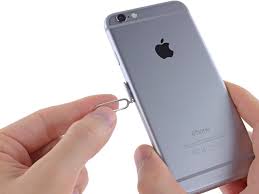
How to Open Sim Slot on Iphone Without Prying Tool
Are you tired of using a prying tool to open the SIM slot on your iPhone? Do you want to explore alternative methods that are easy, safe, and effective? Look no further! In this article, we will guide you through various ways to open the SIM slot on your iPhone without a prying tool.
Why Open Sim Slot Without Prying Tool?
Opening the SIM slot on your iPhone without a prying tool can be a bit tricky, but it’s definitely possible. Here are some reasons why you might want to try this:
- Convenience: You don’t need to purchase or carry around a prying tool every time you need to open the SIM slot.
- Safety: Using alternative methods can minimize the risk of damaging your iPhone’s delicate components.
- Ease of Use: Some methods are easier and more straightforward than others, making it simpler for you to open the SIM slot.
Method 1: Use a Paper Clip
Yes, you read that right! A paper clip can be used to open the SIM slot on your iPhone. Here’s how:
- Straighten out a paper clip.
- Insert one end of the paper clip into the SIM slot on your iPhone.
- Gently push the paper clip until it clicks.
- Remove the paper clip, and you should see the SIM card tray.
Method 2: Use a Bobby Pin
A bobby pin can be another handy tool to open the SIM slot on your iPhone. Here’s how:
- Take out a bobby pin and straighten it out.
- Insert one end of the bobby pin into the SIM slot on your iPhone.
- Gently push the bobby pin until it clicks.
- Remove the bobby pin, and you should see the SIM card tray.
Method 3: Use a Needle
A needle can also be used to open the SIM slot on your iPhone. Here’s how:
- Take out a needle and insert one end into the SIM slot on your iPhone.
- Gently push the needle until it clicks.
- Remove the needle, and you should see the SIM card tray.
Method 4: Use a Spill
A spill or a slotted screwdriver can also be used to open the SIM slot on your iPhone. Here’s how:
- Take out a spill or slotted screwdriver and insert one end into the SIM slot on your iPhone.
- Gently push the spill until it clicks.
- Remove the spill, and you should see the SIM card tray.
Method 5: Use a Pencil
A pencil can also be used to open the SIM slot on your iPhone. Here’s how:
- Take out a pencil and insert one end into the SIM slot on your iPhone.
- Gently push the pencil until it clicks.
- Remove the pencil, and you should see the SIM card tray.
Tips And Precautions
When attempting to open the SIM slot without a prying tool, keep in mind:
- Be Gentle: Avoid applying too much force, as this can damage your iPhone’s delicate components.
- Use Caution: Be mindful of the edges and corners of the SIM slot, as these can be sharp.
- Avoid Using Objects That Are Too Thin: Objects like needles or paper clips can break easily if used improperly.
- Don’t Push Too Hard: If you encounter resistance while trying to open the SIM slot, do not push harder. Instead, try a different method.
Conclusion
Opening the SIM slot on your iPhone without a prying tool can be a bit tricky, but it’s definitely possible with the right methods and precautions. Remember to always be gentle when handling your iPhone’s delicate components, and avoid using objects that are too thin or fragile. Happy tinkering!
Additional Methods And Tools
If you’re still having trouble opening the SIM slot on your iPhone, here are some additional methods and tools you can try:
- Sim Ejector Tool: This is a specialized tool designed specifically for opening the SIM slot on iPhones.
- Prying Tool Alternatives: You can also use other prying tool alternatives like a coin or a credit card to open the SIM slot.
Frequently Asked Questions
Q: Can I damage my iPhone’s SIM slot by using alternative methods?
A: Yes, if you’re not careful, you can potentially damage your iPhone’s delicate components. Be gentle and cautious when handling your iPhone.
Q: Are these alternative methods safe?
A: Generally yes, but it depends on how carefully you use them. Always be mindful of the edges and corners of the SIM slot.
Recommendations
If you’re still having trouble opening the SIM slot on your iPhone, we recommend using a prying tool specifically designed for this purpose. These tools are usually inexpensive and can be found online or at local electronics stores.
Sources
- “How to Open the SIM Slot on Your iPhone” by Apple Support
- “5 Alternative Methods to Open the SIM Slot on Your iPhone” by Android Authority


