
How to Open Odf Files: A Step-by-step Guide
Are you struggling to open ODF files on your computer or mobile device? Look no further! In this article, we’ll guide you through the process of opening ODF files using various software and online tools.
What is Odf?
Before we dive into the instructions, let’s briefly explain what ODF stands for. ODF is an acronym for Open Document Format, a format used to create and share documents, spreadsheets, and presentations. ODF files have a .Odt, .Ods, or .Odp extension, depending on their type.
Opening Odf Files on PC
If you’re using a computer, there are several software options available to open ODF files. Here’s how:
- Libreoffice: This is the go-to software for opening and editing ODF files. Download LibreOffice from its official website and install it on your computer.
- Microsoft 365: If you have a Microsoft 365 subscription, you can use the Office Online version to open ODF files.
Opening Odf Files in Libreoffice
To open an ODF file using LibreOffice:
- Launch LibreOffice on your PC.
- Click on the “File” menu and select “Open.”
- Navigate to the location of the ODF file you want to open.
- Select the file by clicking on it, then click “Open.”
Opening Odf Files in Microsoft 365
To open an ODF file using Microsoft 365:
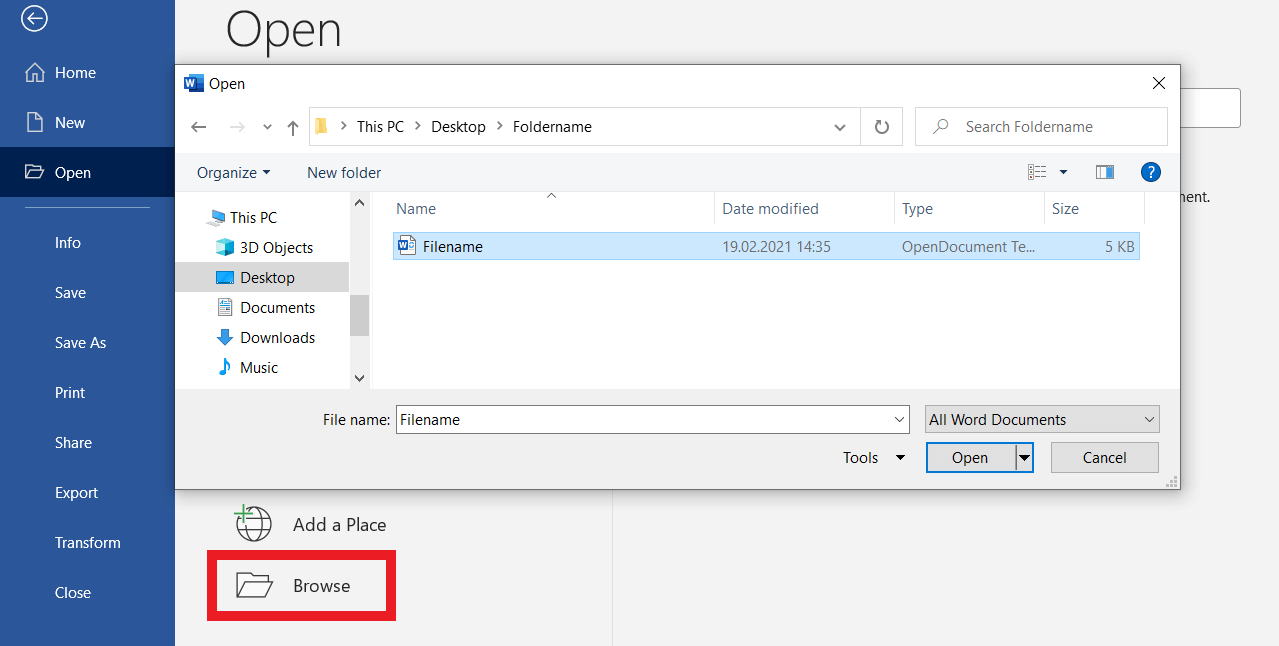
- Sign in to your Microsoft 365 account online.
- Click on the Office Online version (Word, Excel, or PowerPoint).
- Click on the “File” menu and select “Open.”
- Navigate to the location of the ODF file you want to open.
- Select the file by clicking on it, then click “Open.”
Opening Odf Files Online
If you don’t have access to a computer or prefer not to download software, you can use online tools to open and edit ODF files.
- Google Docs: Google Docs allows you to upload and edit ODF files directly in your browser.
- Microsoft 365 Online: Similar to Google Docs, Microsoft 365 offers an online version where you can upload and edit ODF files using their Office Online suite.
Opening Odf Files on Smartphone or Tablet
If you’re accessing your files on a smartphone or tablet, here’s how to open them:
- Collaborate Office (Android/iOS/iPadOS): This app allows you to open and edit ODF files on-the-go.
- Microsoft 365 (Android/iOS/iPadOS): You can use the Microsoft 365 mobile app to access your files, including ODF files.
Opening Odf Files in Collaborate Office
To open an ODF file using Collaborate Office:
- Download and install the Collaborate Office app from the App Store or Google Play.
- Launch the app and sign in with your account credentials.
- Tap on the folder icon to access your local files.
- Select the ODF file you want to open by tapping on it.
Opening Odf Files in Microsoft 365 Mobile
To open an ODF file using Microsoft 365:
- Download and install the Microsoft 365 mobile app from the App Store or Google Play.
- Launch the app and sign in with your account credentials.
- Tap on the OneDrive icon to access your local files.
- Select the ODF file you want to open by tapping on it.
Troubleshooting Tips
If you’re experiencing issues opening ODF files, try the following:
- Ensure that the software or online tool is updated to the latest version.
- Check that the file is not corrupted or damaged.
- Try converting the ODF file to a different format (e.G., .Docx).
Conclusion
Opening ODF files is relatively straightforward once you know where to look. Whether you’re using software on your PC, online tools, or mobile apps, there are various options available to access and edit these documents. By following the steps outlined in this article, you should be able to open ODF files with ease.
Frequently Asked Questions
- Q: What is an Odf File?
A: An ODF file is a document format used to create and share text documents, spreadsheets, and presentations. - Q: Which Software Can I Use to Open Odf Files?
A: You can use LibreOffice, Microsoft 365, Google Docs, or online tools like Collaborate Office or Microsoft 365 Mobile. - Q: How do I Open an Odf File Using Libreoffice?
A: Launch LibreOffice on your PC, click on the “File” menu and select “Open,” then navigate to the location of the ODF file. - Q: Can I Use Microsoft 365 Online to Open Odf Files?
A: Yes, sign in to your Microsoft 365 account online, click on the Office Online version (Word, Excel, or PowerPoint), and follow the steps outlined above. - Q: How do I Open an Odf File Using Collaborate Office?
A: Download and install the Collaborate Office app, launch it, sign in with your account credentials, tap on the folder icon to access your local files, and select the ODF file you want to open. - Q: Can I Use Microsoft 365 Mobile to Open Odf Files?
A: Yes, download and install the Microsoft 365 mobile app, launch it, sign in with your account credentials, tap on the OneDrive icon to access your local files, and select the ODF file you want to open. - Q: What Should I do if I’m Experiencing Issues Opening Odf Files?
A: Ensure that the software or online tool is updated to the latest version, check that the file is not corrupted or damaged, and try converting the ODF file to a different format (e.G., .Docx). - Q: Are There Any Limitations When Using Microsoft 365 Mobile to Open Odf Files?
A: Yes, Microsoft 365 Mobile only allows you to read ODF files; editing requires saving a copy in a Microsoft-compatible format.


