
How to Open Xls Files: A Comprehensive Guide
Are you struggling to open XLS files on your computer? Do you want to know the best ways to view and edit these types of files without worrying about compatibility issues? Look no further! In this article, we’ll explore the various methods for opening XLS files on different operating systems, including Windows, Mac, Android, and iOS.
Understanding Xls Files
Before we dive into the how-to’s, it’s essential to understand what XLS files are. XLS stands for Excel, which is a spreadsheet program developed by Microsoft. XLS files contain data in a table format, making them useful for calculations, charts, and other statistical analysis. These files can be created using various software programs, including Microsoft Excel, Google Sheets, and LibreOffice Calc.
Opening Xls Files on Windows
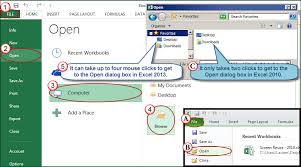
If you’re running Windows, the easiest way to open an XLS file is by using Microsoft Excel. Here’s a step-by-step guide:
- Install Microsoft Office: Make sure you have Microsoft Office installed on your computer.
- Double-click The Xls File: Double-click the XLS file to open it directly with Excel.
- Choose Open With: If Excel doesn’t open automatically, choose “Open with” and select Microsoft Excel from the list of available programs.
Opening Xls Files on Mac
On a Mac, you can use Microsoft Excel or other spreadsheet software like Numbers to open an XLS file. Here’s how:
- Install Microsoft Office: Download and install Microsoft Office for Mac.
- Double-click The Xls File: Double-click the XLS file to open it directly with Excel.
- Choose Open With: If Excel doesn’t open automatically, choose “Open with” and select Microsoft Excel from the list of available programs.
Opening Xls Files on Android
If you’re using an Android device, there are several apps that can help you view and edit XLS files. Here’s a rundown:
- Microsoft Excel: Download the Microsoft Excel app from the Google Play Store.
- Google Sheets: Open Google Sheets, which is a free spreadsheet app that allows you to create and edit XLS files.
- Other Apps: Explore other apps like WPS Office, AndroOpen Office, and Office Online, which also support XLS file viewing and editing.
Opening Xls Files on Ios
On an iOS device, follow these steps:
- Microsoft Excel: Download the Microsoft Excel app from the App Store.
- Google Sheets: Open Google Sheets, a free spreadsheet app that allows you to create and edit XLS files.
- Other Apps: Explore other apps like Numbers, which can view and edit XLS files.
Opening Xls Files Online
If you don’t want to install software on your computer or device, there are online options available:
- Microsoft Excel Online: Access Microsoft Excel online by signing in with your Microsoft account.
- Google Sheets: Use Google Sheets, which allows you to create and edit XLS files directly from the web browser.
Conclusion
Opening XLS files is a breeze when you know where to start! Whether you’re using Windows, Mac, Android, or iOS, there are various methods for viewing and editing these types of files. Remember to install Microsoft Office or other spreadsheet software on your computer or device for seamless integration. If you prefer online solutions, explore Microsoft Excel Online or Google Sheets.


