
Unlocking The Secrets of Overclocking: A Comprehensive Guide
Are you ready to push your computer’s hardware to the limit? Overclocking is a fascinating process that can significantly enhance your gaming experience, but it requires careful planning and attention to detail. In this article, we will delve into the world of overclocking, exploring its benefits, risks, and best practices.
What is Overclocking?
Overclocking refers to the practice of increasing the frequency or voltage of a computer’s hardware components, such as the CPU, RAM, or GPU, beyond their factory-set limits. This can result in improved performance, increased speed, and enhanced gaming capabilities.
Why Overclock?
There are several reasons why you might want to overclock your computer:
- Improved Gaming Performance: By increasing the CPU’s frequency or voltage, you can enjoy smoother gameplay, faster loading times, and more detailed graphics.
- Enhanced Productivity: Overclocking can also improve productivity by allowing you to multitask more efficiently, open multiple applications simultaneously, and enjoy faster data processing.
- Curiosity And Challenge: Many users overclock their computers simply because they want to push the limits of their hardware and see how far they can go.
Risks And Precautions
While overclocking can be a rewarding experience, it also carries some risks:
- System Instability: Overclocking can cause system instability, crashes, or even permanent damage to your computer’s components.
- Overheating: Increasing the CPU’s frequency or voltage can lead to overheating, which can result in component failure or reduced lifespan.
- Voiding Warranty: Most manufacturers void their warranties if you overclock your computer, so be aware of this before proceeding.
How to Overclock
To overclock successfully, follow these steps:
- Check Compatibility: Ensure that your CPU, motherboard, and other components are compatible with overclocking.
- Monitor Temperatures: Use software or hardware tools to monitor temperatures and adjust settings accordingly.
- Incremental Changes: Make incremental changes to the CPU’s frequency or voltage, testing stability between each adjustment.
- Stress Testing: Perform stress tests using software or games to simulate real-world scenarios.
- Cooling Solutions: Implement adequate cooling solutions, such as liquid cooling or high-performance air coolers.
Software And Tools
Several software tools can aid in the overclocking process:
- Cpu-z: A utility for monitoring CPU temperatures, voltages, and frequencies.
- Hwinfo: A comprehensive monitoring tool that displays system temperatures, voltages, and frequencies.
- Occt: A stress-testing program that simulates real-world scenarios to test system stability.
Bios Vs. Software Overclocking
You can overclock your computer using either the BIOS or software methods:
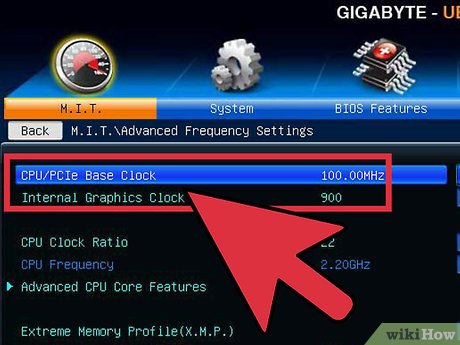
- Bios Overclocking: Involve accessing the BIOS settings menu and adjusting the CPU’s frequency, voltage, or multiplier.
- Software Overclocking: Utilize specialized software tools that provide an interface for adjusting CPU frequencies, voltages, and multipliers.
Conclusion
Overclocking is a fascinating process that can unlock your computer’s true potential. By understanding the risks and benefits, following best practices, and utilizing the right software tools, you can successfully overclock your system and enjoy improved gaming performance, enhanced productivity, or simply the satisfaction of pushing your hardware to the limit.
Faqs
Q: What is Overclocking?
A: Overclocking refers to the practice of increasing the frequency or voltage of a computer’s hardware components beyond their factory-set limits.
Q: Why Should I Overclock my Computer?
A: You might want to overclock your computer for improved gaming performance, enhanced productivity, or simply as a challenge and curiosity-driven experience.
Q: What Are The Risks of Overclocking?
A: Overclocking can result in system instability, overheating, component failure, reduced lifespan, or voiding warranties.
Q: How do I Overclock my Computer Safely?
A: Ensure compatibility, monitor temperatures, make incremental changes, stress test, and implement adequate cooling solutions to minimize risks.
Q: What Software Tools Are Available For Overclocking?
A: Utilize CPU-Z, HWiNFO, OCCT, and other specialized software tools that aid in monitoring system temperatures, voltages, frequencies, and stability during the overclocking process.


