
How to Pay With Paypal: A Step-by-step Guide
Are you looking for a way to make online payments safely and securely? Look no further than PayPal! With millions of users worldwide, PayPal is one of the most popular payment services available. In this article, we’ll guide you through the process of paying with PayPal on various online platforms.
Why Use Paypal?
PayPal offers a range of benefits that make it an attractive option for online payments. These include:
- Security: PayPal provides a secure way to pay online, protecting your financial information from unauthorized access.
- Convenience: With PayPal, you can pay without sharing your credit or debit card details with merchants.
- Flexibility: PayPal allows you to link multiple payment methods, including cards and bank accounts.
Paying With Paypal on Ebay
If you’re looking to pay with PayPal on eBay, here’s what you need to do:
- Log in to your eBay account and go to the item you want to purchase.
- Click on the “Pay” button and select PayPal as your payment method.
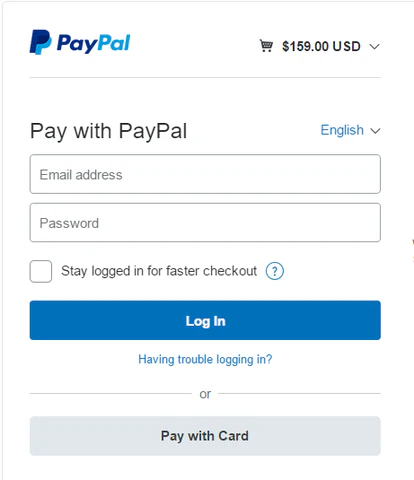
- Enter your PayPal login credentials and complete the payment process.
Paying With Paypal on Subito
To pay with PayPal on Subito, follow these steps:
- Log in to your Subito account and go to the item you want to purchase.
- Click on the “Buy” button and select PayPal as your payment method.
- Enter your PayPal login credentials and complete the payment process.
Paying With Paypal on Amazon
Unfortunately, it’s not possible to pay directly with PayPal on Amazon. However, you can transfer your available balance from PayPal to a card or bank account and use that to make payments on Amazon.
- Log in to your PayPal account and go to the “Balance” section.
- Click on the “Transfer money” button and select the account you want to transfer funds to.
- Enter the amount you want to transfer and complete the process.
Paying With Paypal on Vinted
Unfortunately, it’s not possible to pay directly with PayPal on Vinted. However, you can transfer your available balance from PayPal to a card and use that to make payments on Vinted.
- Log in to your PayPal account and go to the “Balance” section.
- Click on the “Transfer money” button and select the card you want to transfer funds to.
- Enter the amount you want to transfer and complete the process.
Paying With Paypal on Apple Store
Unfortunately, it’s not possible to pay directly with PayPal on the Apple Store. However, you can use a credit or debit card to make payments.
- Log in to your Apple ID account and go to the App Store.
- Click on the “Buy” button and select your payment method.
- Enter your payment details and complete the process.
Paying With Paypal in a Physical Store
If you want to pay with PayPal in a physical store, here’s what you need to do:
- Inform the cashier that you want to pay with PayPal.
- The cashier will provide you with a code to scan using your PayPal app.
- Open the PayPal app and select the “Scan” option.
- Scan the code provided by the cashier and enter the amount you want to pay.
Paying With Paypal Without an Account
If you don’t have a PayPal account, but still want to use PayPal to make payments, here’s what you can do:
- Log in to your online account or go to the checkout page of the website or app you’re using.
- Select PayPal as your payment method and click on “Pay with a card”.
- Enter your card details and complete the payment process.
Paying With Paypal at a Store
To pay with PayPal at a store, here’s what you need to do:
- Inform the cashier that you want to pay with PayPal.
- The cashier will provide you with a code to scan using your PayPal app.
- Open the PayPal app and select the “Scan” option.
- Scan the code provided by the cashier and enter the amount you want to pay.
Paying With Paypal on Pagopa
To pay with PayPal on pagoPA, here’s what you need to do:
- Log in to your online account or go to the checkout page of the website or app you’re using.
- Select PayPal as your payment method and click on “Pay with a card”.
- Enter your card details and complete the payment process.
Conclusion
Paying with PayPal is a convenient and secure way to make online payments. Whether you’re shopping on eBay, Subito, or Amazon, or using your PayPal app in a physical store, the process is relatively straightforward. By following these steps, you can enjoy the benefits of PayPal and make payments with confidence.
Faqs
- Q: Can I Pay Directly With Paypal on Amazon?
A: Unfortunately, it’s not possible to pay directly with PayPal on Amazon. - Q: Can I Transfer my Available Balance From Paypal to a Card or Bank Account?
A: Yes, you can transfer your available balance from PayPal to a card or bank account and use that to make payments on Amazon or Vinted. - Q: Is it Possible to Pay With Paypal in a Physical Store?
A: Yes, it is possible to pay with PayPal in a physical store by scanning a code provided by the cashier using your PayPal app. - Q: Can I Use Paypal Without an Account?
A: Yes, you can use PayPal without an account by selecting “Pay with a card” as your payment method and entering your card details. - Q: Are There Any Fees Associated With Paying With Paypal?
A: Yes, there may be fees associated with paying with PayPal, depending on the country or region you’re in.
We hope this article has been helpful in explaining how to pay with PayPal on various online platforms and physical stores. If you have any further questions, please don’t hesitate to ask!


