
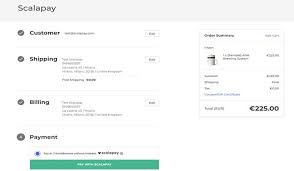
Paying With Scalapay on Amazon: A Convenient Way to Divide Your Expenses
Are you tired of paying for your shopping in one go? Do you wish there was a way to divide your expenses into manageable installments? Look no further than Scalapay, an innovative payment service that allows you to pay for your purchases in three or four installments. In this article, we’ll explore how to use Scalapay on Amazon and other e-commerce platforms.
What is Scalapay?
Scalapay is a trusted payment service that enables users to divide their expenses into three or four interest-free installments. This means you can pay for your shopping in smaller chunks, without worrying about interest rates or fees.
How Does it Work on Amazon?
To use Scalapay on Amazon, you’ll need to create an account and download the Scalapay app on your mobile device. Once installed, follow these simple steps:
- Open the app and select the “Acquire” section.
- Search for Amazon and tap on it.
- The app will open a browser with Amazon’s homepage; log in using your credentials.
- Access your shopping cart by tapping on the trolley icon.
- Click on the “Pay with Scalapay” button, which is represented by a pink rose symbol.
- Select the payment method you prefer (3 or 4 installments) and confirm the matter of paying.
Creating a Virtual Card With Scalapay
One of the features that makes Scalapay stand out is the creation of virtual cards. These cards can be used for online payments, even on e-commerce platforms that don’t integrate Scalapay as a payment option. To create a virtual card:
- Open the Scalapay app and select “Create a card.”
- Fill in the required information (e.G., Card number, expiration date, and security code).
- Save the card details for future use.
Using a Virtual Card on Amazon
To pay with a virtual card on Amazon using Scalapay:
- Add a new form of payment to your Amazon account.
- Select “Add a card” and enter the virtual card details generated by Scalapay.
- Confirm the payment, just like you would for any other online purchase.
Benefits of Using Scalapay
The benefits of using Scalapay on Amazon are numerous:
- Interest-free payments
- No fees or charges
- Easy to use and understand
- Can be used in conjunction with other forms of payment
Frequently Asked Questions (FAQs)
Q: How do I know if a website accepts Scalapay as a payment option?
A: Look for the pink rose symbol on the website’s checkout page; this indicates that Scalapay is an accepted payment method.
Q: Can I use Scalapay to pay for services, not just products?
A: Yes, Scalapay can be used to pay for both products and services.
Q: What if I encounter any issues or problems while using Scalapay?
A: Contact Scalapay’s customer support team for assistance; they’re always ready to help.
Q: Is my personal data secure when using Scalapay?
A: Yes, Scalapay uses state-of-the-art security measures to protect your data.
Conclusion
Scalapay offers a convenient and interest-free way to divide your expenses into manageable installments. By following the simple steps outlined in this article, you can use Scalapay on Amazon and other e-commerce platforms with confidence. Remember to always follow the instructions carefully, and don’t hesitate to reach out if you encounter any issues.
Frequently Asked Questions (FAQs)
-
Q: What is Scalapay?
A: Scalapay is a trusted payment service that enables users to divide their expenses into three or four interest-free installments. -
Q: How does Scalapay work on Amazon?
A: To use Scalapay on Amazon, create an account and download the app; follow the steps outlined in this article for a smooth transaction. -
Q: Can I use Scalapay to pay for services?
A: Yes, Scalapay can be used to pay for both products and services. -
Q: Is my personal data secure when using Scalapay?
A: Yes, Scalapay uses state-of-the-art security measures to protect your data. -
Q: What if I encounter any issues or problems while using Scalapay?
A: Contact Scalapay’s customer support team for assistance; they’re always ready to help. -
Q: Can I use a virtual card with Scalapay on Amazon?
A: Yes, you can create and use a virtual card with Scalapay for online payments on Amazon and other e-commerce platforms. -
Q: Are there any fees or charges associated with using Scalapay?
A: No, Scalapay offers interest-free payments with no fees or charges. -
Q: How do I know if a website accepts Scalapay as a payment option?
A: Look for the pink rose symbol on the website’s checkout page; this indicates that Scalapay is an accepted payment method.


