
How to Play Among Us on Pc: A Step-by-step Guide
Are you ready to embark on a thrilling adventure in the world of Among Us? This popular online multiplayer game has taken the gaming community by storm, and for good reason! With its unique blend of social deduction, strategy, and excitement, Among Us is a must-play experience. In this article, we’ll show you how to play Among Us on PC, including the steps to join a private room with your friends.
System Requirements
Before we dive into the gameplay, make sure your computer meets the minimum system requirements:
- Operating System: Windows 10
- Processor: Intel Core i3 or AMD equivalent
- Memory: 4 GB RAM
- Graphics: NVIDIA GeForce GTX 460 or AMD Radeon HD 4850
Getting Started
To play Among Us on PC, follow these simple steps:
- Download The Game: Head over to the official Among Us website and download the game for your platform (Windows).
- Create a Steam Account: If you don’t have a Steam account, create one to access the game.
- Launch The Game: Once downloaded, launch the game from your Steam library.
How to Play Among Us With Friends
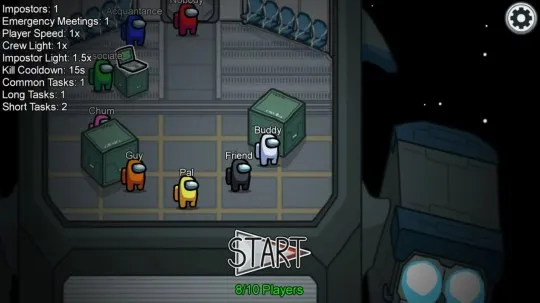
Playing Among Us with friends is where the magic happens! To join a private room with your friends, follow these steps:
- Create a Private Room: Open the game and click on “Play” at the top of the screen.
- Select The Room Type: Choose “Private Game” from the drop-down menu.
- Set The Game Options: Select the number of players, map, and other settings for your game.
- Create a Code: Generate a 6-digit code to share with your friends.
- Share The Code: Share the code with your friends via text or social media.
How to Join a Private Room
To join a private room created by your friend, follow these steps:
- Open The Game: Launch the game and click on “Play” at the top of the screen.
- Select The Room Type: Choose “Private Game” from the drop-down menu.
- Enter The Code: Enter the 6-digit code shared by your friend.
- Join The Game: Click on “Join” to join the private room.
Gameplay Basics
Now that you’ve joined a private room, here’s a brief overview of how to play:
- Complete Tasks: Complete tasks and missions assigned to you as a crew member.
- Sabotage: Use sabotage mechanics to impede other players’ progress.
- Vote: Vote on suspected impostors to eliminate them from the game.
Tips For New Players
- Communicate with your team members using the in-game chat feature.
- Use your observations and intuition to identify impostors.
- Don’t hesitate to accuse someone if you suspect they’re an imposter!
Frequently Asked Questions (FAQs)
- Q: How Many Players Can Play Among Us?
A: The game supports up to 15 players per match. - Q: Can I Play Among Us on Console or Mobile Devices?
A: Yes, Among Us is available on PC, Xbox, PlayStation, Nintendo Switch, and mobile devices. - Q: How do I Report a Bug or Issue With The Game?
A: Contact the game developers at [email protected]. - Q: Can I Play Among Us For Free?
A: Yes, you can play the game in demo mode without purchasing it. - Q: How do I Reset my Account or Password?
A: Contact Steam support at help.Steampowered.Com. - Q: Can I Use Mods or Custom Maps With Among Us?
A: Check the game’s official forums and wiki for information on modding and custom map creation. - Q: How do I Report a Toxic Player or Cheating Behavior?
A: Contact the game developers at [email protected].
Conclusion
Now that you know how to play Among Us on PC, gather your friends and join a private room for an unforgettable gaming experience. Remember to communicate with your team members, use your observation skills to identify impostors, and don’t hesitate to accuse someone if you suspect they’re not who they claim to be!


