
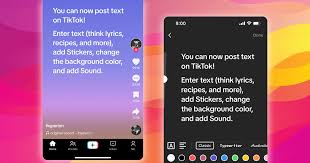
Are you looking for ways to communicate with your community on TikTok? Look no further! In this article, we’ll show you how to post text on TikTok, a feature that allows you to share written content with your followers.
What is Tiktok’s Text Feature?
TikTok’s text feature allows users to create and share posts in the form of text. This feature is available on both Android and iPhone devices. With this feature, you can create and customize your own text-based posts using various fonts, colors, and backgrounds.
How to Post Text on Tiktok From Android
To post text on TikTok from Android, follow these steps:
- Access The App: Open the TikTok app on your Android device.
- Create a New Content: Tap on the “+” button at the bottom of the screen to create a new content.
- Select Text Mode: Choose the “Text” mode option.
- Edit Your Text: Use the editor to type and customize your text, including choosing a font, color, and size.
How to Post Text on Tiktok From Iphone
To post text on TikTok from iPhone, follow these steps:
- Access The App: Open the TikTok app on your iPhone.
- Create a New Content: Tap on the “+” button at the bottom of the screen to create a new content.
- Select Text Mode: Choose the “Text” mode option.
- Edit Your Text: Use the editor to type and customize your text, including choosing a font, color, and size.
How to Post Text on Tiktok From PC
Unfortunately, it is not currently possible to post text directly on TikTok from a PC using the web version of the app. However, you can still upload videos from your computer by following these steps:
- Access The Website: Open the TikTok website on your PC.
- Upload a Video: Click on the “Upload” button and select a video from your computer.
How to Add Text to Videos on Tiktok
If you’re looking for ways to add text to videos on TikTok, we have a separate article that covers this topic in detail. Check it out!
Tips And Tricks
- Use the editor to customize your text with different fonts, colors, and backgrounds.
- Experiment with various sticker options to add visual interest to your posts.
- Change the music background or add new effects to enhance your content.
Conclusion
Posting text on TikTok is a simple yet powerful way to communicate with your community. By following these steps, you can create and share written content that showcases your creativity and style. Remember to experiment with different fonts, colors, and backgrounds to make your posts stand out!
Frequently Asked Questions (FAQs)
- What is Tiktok’s Text Feature?
TikTok’s text feature allows users to create and share posts in the form of text. - How do I Post Text on Tiktok From Android?
Follow the steps outlined above to create a new content, select the “Text” mode option, and edit your text. - Can I Post Text Directly on Tiktok From Pc?
No, it is not currently possible to post text directly on TikTok from a PC using the web version of the app. - How do I Add Text to Videos on Tiktok?
We have a separate article that covers this topic in detail. Check it out! - What Are Some Tips And Tricks For Posting Text on Tiktok?
Experiment with different fonts, colors, and backgrounds to make your posts stand out! Use the editor to customize your text, and don’t forget to add sticker options or change the music background. - Can I Use Tiktok’s Text Feature to Communicate With my Community?
Absolutely! Posting text on TikTok is a great way to share written content with your followers and engage with them in a new way. - Is Posting Text on Tiktok Free?
Yes, posting text on TikTok is completely free! - How do I Access Tiktok’s Text Feature?
Follow the steps outlined above to create a new content, select the “Text” mode option, and edit your text.
Get Ready to Shine With Your Text Posts!
Now that you know how to post text on TikTok, get creative and show off your style! Use our tips and tricks to make your posts stand out, and don’t hesitate to reach out if you have any questions. Happy posting!


