
How to Print a Libretto: A Step-by-step Guide
Are you looking to print a libretto, but not sure where to start? Printing a libretto can seem like a daunting task, but with the right tools and knowledge, it’s definitely achievable. In this article, we’ll guide you through the process of printing a libretto using Microsoft Word and other software.
Understanding The Basics
Before we dive into the specifics, let’s understand what a libretto is. A libretto is a printed book or document that contains music notation, lyrics, and other relevant information. It’s usually printed on high-quality paper and bound with a cover.
Printing a Libretto With Microsoft Word
If you’re using Microsoft Word to print your libretto, here are the steps to follow:
- Open Microsoft Word: Open Microsoft Word on your computer and create a new document.
- Check For Errors: Before printing your libretto, make sure to check for any errors in spelling and grammar. You can do this by clicking on the “Spelling & Grammar” button in the toolbar or by pressing F7.
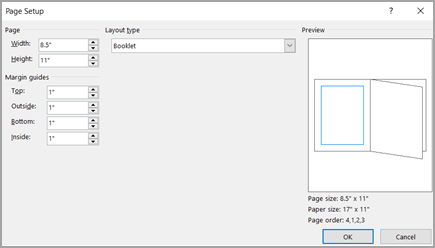
- Set Margins: Set the margins of your document to ensure that it’s printed correctly. You can do this by going to the “Layout” tab and adjusting the margin settings.
- Choose Page Layout: Choose a page layout that suits your libretto. You can select from various layouts, such as portrait or landscape, by clicking on the “Page Layout” button in the toolbar.
- Print Your Libretto: Once you’ve made all the necessary adjustments, click on the “Print” button to print your libretto.
Printing a Libretto With Other Software
If you’re not using Microsoft Word or want to explore other options, here are some alternative software programs that can help you print a libretto:
- Libreoffice: LibreOffice is a free and open-source office suite that includes a word processor called Writer. You can use Writer to create your libretto and then print it.
- Adobe Indesign: Adobe InDesign is a professional page design and layout software that’s ideal for creating complex documents like librettos. You can use InDesign to design and print your libretto.
Printing a Libretto Online
If you don’t want to deal with printing a libretto yourself, there are several online services that can help you print it:
- Amazon Kindle Direct Publishing: Amazon’s Kindle Direct Publishing (KDP) service allows you to create, publish, and sell eBooks and paperbacks.
- Lulu: Lulu is an online self-publishing platform that allows you to create, print, and distribute books.
Tips For Printing a Libretto
Here are some additional tips to keep in mind when printing a libretto:
- Use High-quality Paper: Use high-quality paper to ensure that your libretto looks professional.
- Choose The Right Font: Choose a font that’s easy to read and suitable for music notation.
- Check Your Margins: Make sure to check your margins to ensure that they’re correct.
- Proofread Carefully: Proofread your libretto carefully to catch any errors in spelling or grammar.
Conclusion
Printing a libretto can seem like a daunting task, but with the right tools and knowledge, it’s definitely achievable. Whether you’re using Microsoft Word or other software, make sure to follow the steps outlined above to ensure that your libretto looks professional and is printed correctly.


