
How to Program Forward Mail on Gmail
Are you tired of manually sending emails or wanting to schedule them in advance? Look no further! In this article, we will explore how to program forward mail on Gmail using your computer, smartphone, and tablet.
Why is Programming Forward Mail Important?
In today’s digitalized world, effective email management is essential. Maybe you need to send an important message at a specific time or want to schedule multiple emails in advance. With programming forward mail, you can achieve this with ease.
Programming Forward Mail on Computer
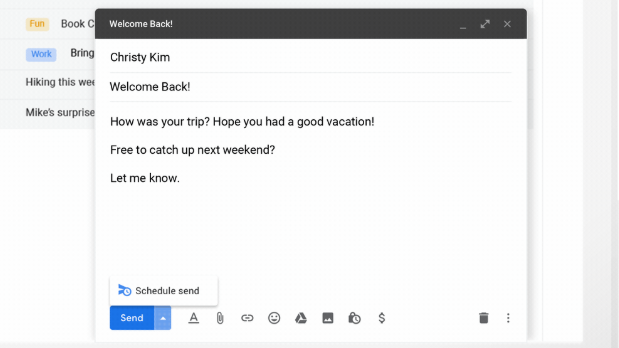
To program forward mail directly from your computer, follow these steps:
- Log in to your Gmail account using Google Chrome, Mozilla Firefox, Microsoft Edge, or Safari.
- Click on the “Compose” button and fill out the recipient’s email address, subject, and message body.
- Select “Program forward” from the drop-down menu located below the send button.
- Choose a date and time for the email to be sent from the four pre-set options: Tomorrow morning, This afternoon, Monday morning, or Choose date and hour.
- If you select “Choose date and hour,” you can manually enter the desired time using the countrysides provided.
Programming Forward Mail on Smartphone And Tablet
To program forward mail on your smartphone or tablet:
- Open the Gmail app (available for Android, iOS, iPadOS).
- Tap on the pencil icon in the top-right corner to create a new email.
- Fill out the recipient’s email address, subject, and message body.
- Select “Program the forward” from the menu that appears after tapping on the three dots.
- Choose a date and time for the email to be sent from the four pre-set options: Tomorrow morning, This afternoon, Monday morning, or Choose date and hour.
Programming Forward Mail on Client Third Parties
If you use a client other than Gmail’s official client (e.G., Outlook, Spark), follow these steps:
- Log in to your account using the alternative email client.
- Create a new message as you normally would.
- Select “Program forward” from the menu or use the app’s built-in scheduling feature.
Programming Forward Mail on Outlook
If you’re using Microsoft Outlook, follow these steps:
- Open Outlook and click on the “Compose” button to create a new email.
- Fill out the recipient’s email address, subject, and message body.
- Click on the “Options” icon in the top-right corner and select “Delay Delivery.”
- Choose the date and time for the email to be sent from the dropdown menu.
Programming Forward Mail on Mail (macOS)
If you’re using Apple’s Mail app:
- Open Mail and click on the “Compose” button to create a new email.
- Fill out the recipient’s email address, subject, and message body.
- Click on the arrow icon in the bottom-right corner next to the send button.
- Select “Forward tonight at 21:00” Or “Forward tomorrow.”
Programming Forward Mail on Ios/ipados
If you’re using an iPhone or iPad:
- Open the Mail app and tap on the pencil icon in the top-right corner to create a new email.
- Fill out the recipient’s email address, subject, and message body.
- Tap on the three dots in the top-right corner and select “Save in Drafts.”
- Tap on the mail you want to forward and tap on the “Forward” button.
Frequently Asked Questions
- How Many Emails Can I Program at Once?
You can program up to 100 emails at a time. - Can I Change or Cancel a Programmed Email?
Yes, you can modify, posticipare, or delete a programmed email by accessing the “In progress” folder in your Gmail account. - How do I Delete a Programmed Email?
To delete a programmed email, go to the “In progress” folder and click on the trash icon next to the message. - Can I Program Emails Using my Smartphone or Tablet?
Yes, you can program emails using the Gmail app on your Android, iOS, iPadOS device. - How do I Cancel Forward of an Email?
To cancel the forward of an email, go to the “In progress” folder and click on the “Cancel forward” button.
Conclusion
Programming forward mail on Gmail is a simple yet effective way to manage your emails. With this guide, you can learn how to program forward mail using your computer, smartphone, tablet, or client third parties. Whether you’re looking to send important messages at specific times or schedule multiple emails in advance, programming forward mail has got you covered!


