
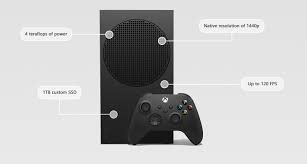
Unlocking 120 Fps on Xbox Series S: A Comprehensive Guide
As you’ve probably heard, the new Xbox Series S is capable of delivering incredible performance with its Xbox Velocity Architecture, allowing for smooth gameplay at high frame rates. But what does it take to unlock those elusive 120 frames per second (FPS) on your Xbox Series S? In this article, we’ll dive into the world of gaming and explore the requirements, settings, and tips you need to know to experience the best possible performance.
What You Need to Know Before We Begin
Before we start, it’s essential to understand that achieving 120 FPS on Xbox Series S requires more than just a console upgrade. Your TV or monitor must also meet certain specifications, as we’ll discuss in detail later. So, if you’re eager to know how to unlock the full potential of your Xbox Series S, keep reading!
Gaming at 120 Fps: What’s The Big Deal?
You might be wondering why anyone would care about gaming at such high frame rates. Well, let us tell you – it makes a significant difference! With 120 FPS, games become more immersive, responsive, and enjoyable overall. You’ll experience:
- Smoother animations and transitions
- Reduced input lag
- Enhanced visual fidelity
System Requirements For 120 Fps on Xbox Series S
To unlock the full potential of your Xbox Series S, you need to ensure that your TV or monitor can handle 120 FPS. Here are the minimum requirements:
- A panel with a frequency of at least 120Hz (or superior)
- At least an HDMI 2.0 (Or superior) connection
- Support for Variable Frequencies (Variable Refresh Rate)
Setting Up Your Xbox Series S For 120 Fps
Now that you know the system requirements, it’s time to configure your console for optimal performance.
- Ensure your TV or monitor is set to the correct HDMI port.
- Check that your TV or monitor supports 120 Hz and Variable Refresh Rate.
- Connect your Xbox Series S to your TV or monitor using an HDMI cable (preferably version 2.0 Or superior).
- Go to Settings > Display & Video, then select HDMI (2.0) For your connection type.
Enabling Fps Boost on Your Favorite Games
FPS Boost is a feature that allows you to play certain games at higher frame rates without any additional setup. Here’s how to enable it:
- Launch the game you want to play.
- Go to Settings > Graphics, then select the desired resolution (1080p or 1440p).
- Confirm that FPS Boost is enabled for your chosen resolution.
Tips And Tricks For Achieving 120 Fps
To get the most out of your Xbox Series S, keep these tips in mind:
- Ensure your console is updated with the latest firmware.
- Close unnecessary apps to free up system resources.
- Use a high-quality HDMI cable (preferably version 2.0 Or superior).
- Adjust the graphics settings according to the game’s requirements.
Which Games Support 120 Fps on Xbox Series S?
Not all games are created equal when it comes to frame rates. Here are some popular titles that support 120 FPS on Xbox Series S:
- Fortnite: Enjoy smooth gameplay and responsive controls.
- Warzone: Experience the thrill of battle royale without any lag or stuttering.
- Halo Infinite: Get ready for an immersive gaming experience with stunning graphics.
Conclusion
Unlocking 120 FPS on your Xbox Series S requires some setup, but it’s worth the effort. With these tips and tricks, you’ll be able to enjoy smoother gameplay, reduced input lag, and enhanced visual fidelity. So, go ahead and give your console a try – we’re sure you won’t be disappointed!
Frequently Asked Questions
-
What is Xbox Velocity Architecture?
- The Xbox Velocity Architecture is a proprietary system developed by Microsoft that optimizes the performance of Xbox consoles.
-
Do I Need a Specific TV or Monitor For 120 Fps?
-
Yes, your TV or monitor must meet certain specifications to handle 120 FPS, including a frequency of at least 120Hz and support for Variable Refresh Rate.
-
How do I Enable Fps Boost on my Xbox Series S?
-
To enable FPS Boost, go to Settings > Display & Video, then select the desired resolution (1080p or 1440p) in the Graphics settings.
-
Which Games Support 120 Fps on Xbox Series S?
- Some popular titles that support 120 FPS on Xbox Series S include Fortnite, Warzone, and Halo Infinite.
-
What Are The Minimum System Requirements For 120 Fps on Xbox Series S?
- The minimum system requirements for 120 FPS on Xbox Series S include a panel with a frequency of at least 120Hz, an HDMI 2.0 (Or superior) connection, and support for Variable Frequencies (Variable Refresh Rate).


