
Contacting Hdmi on Tv: A Step-by-step Guide
Are you having trouble connecting your external device to your TV via HDMI? Don’t worry, it’s a common issue! In this article, we’ll guide you through the process of contacting HDMI on TV for various brands, including LG, Samsung, United, Philips, Sharp, and TCL.
Understanding Hdmi
Before we dive into the step-by-step guides, let’s briefly explain what HDMI is. HDMI (High-Definition Multimedia Interface) is a standard for digital video and audio transmission between devices. It supports high-definition video and audio, as well as other features like 3D, Ethernet connectivity, and ARC (Audio Return Channel).
Hdmi Versions
There are three versions of HDMI: HDMI 1.4, HDMI 2.0, And HDMI 2.1. Each version has its own set of features and capabilities.
- Hdmi 1.4: Supports 3D, Ethernet connectivity, ARC, resolutions up to 4K (4096 x 2160 pixels at 24 Hz), and audio management up to 8 channels.
- Hdmi 2.0: Introduces compatibility with 4K at 60Hz, HDR (High Dynamic Range), HLG (Hybrid Log-Gamma), and audio management up to 32 channels.
- Hdmi 2.1: Supports resolutions up to 10K with frequencies of update up to 120Hz, a bandwidth of 48 Gbps, HDR dynamic, and eARC (enhanced Audio Return Channel).
Connecting Hdmi on Tv: Brand-specific Guides
LG Tvs
To connect HDMI on LG TV:
- Physically link the devices using an HDMI cable.
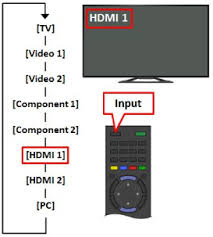
- Select the corresponding HDMI source from the menu using the remote control.
- Follow the instructions for activating the HDMI CEC (Consumer Electronics Control) function.
Connecting Hdmi on Samsung Tv:
- Physically link the devices using an HDMI cable.
- Select the corresponding HDMI source from the menu using the remote control.
- Activate the ARC (Audio Return Channel) or eARC feature as needed.
Connecting Hdmi on United Tv:
- Physically link the devices using an HDMI cable.
- Select the corresponding HDMI source from the menu using the remote control.
- Activate the CEC (Consumer Electronics Control) function.
Connecting Hdmi on Philips Tv:
- Physically link the devices using an HDMI cable.
- Select the corresponding HDMI source from the menu using the remote control.
- Activate the Easylink system for HDMI CEC functionality.
Connecting Hdmi on Sharp Tv:
- Select the corresponding HDMI source from the menu using the remote control.
- Follow the instructions for activating the HDMI Control feature.
Connecting Hdmi on Tcl Tv:
- Physically link the devices using an HDMI cable.
- Select the corresponding HDMI source from the menu using the remote control or the Input function.
- Activate the CEC (Consumer Electronics Control) function as needed.
Connecting Hdmi on TV Without Remote Control:
If you don’t have a remote control, follow these general steps:
- Check if your TV has a panel with buttons. If it does, use the Source button to access the menu and select the desired HDMI source.
- Use the directional arrows to highlight the HDMI source and press the OK button to confirm.
Additional Tips:
- Always check the specific features of your devices to ensure compatibility.
- Consider investing in a universal remote control for convenience.
- For more detailed guides, refer to our comprehensive guide on configuring frequencies and settings.
Conclusion:
Connecting HDMI on TV is a straightforward process, but it may vary depending on the brand and model of your device. By following these step-by-step guides, you should be able to successfully connect your external device to your TV via HDMI. Remember to check the specific features of your devices for compatibility and to consider investing in a universal remote control for added convenience.
Frequently Asked Questions:
- What is Hdmi?
HDMI (High-Definition Multimedia Interface) is a standard for digital video and audio transmission between devices. - What Are The Different Versions of Hdmi?
There are three versions of HDMI: HDMI 1.4, HDMI 2.0, And HDMI 2.1, Each with its own set of features and capabilities. - How do I Connect Hdmi on my Tv?
Follow the brand-specific guides provided above to connect HDMI on your TV. - What is Cec (Consumer Electronics Control)?
CEC is a system that enables communication between devices connected to the same TV, allowing for synchronized functions like lighting and standby. - How do I Activate Arc (Audio Return Channel) or Earc on my Tv?
Refer to the specific guide for your brand of TV to learn how to activate ARC or eARC. - What is The Difference Between Hdmi 1.4, Hdmi 2.0, And Hdmi 2.1?
HDMI 1.4 Supports up to 8 channels of audio, while HDMI 2.0 Introduces compatibility with 4K at 60Hz and HDR. HDMI 2.1 Supports resolutions up to 10K with frequencies of update up to 120Hz. - How do I Connect Hdmi on my TV Without a Remote Control?
Follow the general steps provided above to access the menu and select the desired HDMI source.
Hope this helps!


