
How to Use Nightbot on Youtube: A Step-by-step Guide
Are you tired of moderating comments and engaging with your viewers manually? Look no further than Nightbot, a free tool that can automate the chat during live streams on YouTube.
What is Nightbot?
Nightbot is an AI-powered tool that allows you to moderate comments and engage with your audience automatically. It’s a game-changer for content creators who want to focus on producing high-quality content without getting bogged down in moderating comments.
How to Add Nightbot to Your Youtube Channel
Adding Nightbot to your YouTube channel is a straightforward process. Here’s how:
- Sign up For a Nightbot Account: Go to the official Nightbot website and sign up for an account.
- Login With Youtube: Once you’re logged in, click on the “Login with YouTube” button and select your Google account associated with your YouTube channel.
- Join Your Channel: Follow the prompts to join your channel and authorize Nightbot to access your channel’s data.
How to Create Commands For Nightbot
Creating commands is a breeze! Here’s how:
- Log in to Your Nightbot Account: Go to the Nightbot dashboard and log in with your credentials.
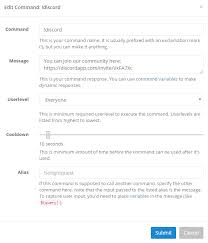
- Create a New Command: Click on the “Commands” tab and select “Add Command”.
- Configure The Command: Choose the type of command you want to create (e.G., Filter, game, poll, etc.) And configure its settings.
How to Use Nightbot on Youtube
Using Nightbot on YouTube is easy! Here’s how:
- Create a Live Stream: Go to your YouTube Studio and create a new live stream.
- Add Nightbot to The Chat: In the live stream settings, add Nightbot as a moderator.
- Configure Nightbot Commands: Configure the Nightbot commands you created earlier to automate certain tasks (e.G., Responding to comments, playing music, etc.).
Advanced Features of Nightbot
Nightbot offers a range of advanced features that can enhance your live streaming experience. Here are some of its key features:
- Filters: Use filters to moderate comments and block spam.
- Games: Create games and challenges for your audience to participate in.
- Polls: Conduct polls to engage with your audience and gather feedback.
- Timers: Schedule messages to be sent automatically at specified intervals.
Benefits of Using Nightbot
Using Nightbot can have a significant impact on your live streaming experience. Here are some benefits you can expect:
- Increased Efficiency: Automate tasks such as moderating comments, responding to questions, and playing music.
- Improved Audience Engagement: Engage with your audience through games, polls, and other interactive features.
- Enhanced Content Quality: Focus on producing high-quality content without getting bogged down in moderation.
Conclusion
Nightbot is a powerful tool that can revolutionize the way you live stream on YouTube. With its advanced features and user-friendly interface, it’s easy to see why so many creators have adopted this platform. Whether you’re just starting out or looking to take your streaming game to the next level, Nightbot is an essential addition to your toolkit.
Frequently Asked Questions (FAQs)
Here are some frequently asked questions about Nightbot:
Q: What is Nightbot?
A: Nightbot is a free tool that can automate chat moderation and engagement during live streams on YouTube.
Q: How do I add Nightbot to my YouTube channel?
A: Go to the official Nightbot website, sign up for an account, login with your YouTube credentials, and authorize access to your channel data.
Q: Can I create custom commands for Nightbot?
A: Yes! You can create custom commands by logging in to your Nightbot dashboard and selecting “Add Command”.
Q: How do I use Nightbot on my live stream?
A: Add Nightbot as a moderator to your live stream settings, configure the commands you created earlier, and let Nightbot take care of the rest.
Q: What are some advanced features of Nightbot?
A: Some advanced features include filters, games, polls, timers, and more!
Q: How can using Nightbot benefit my streaming experience?
A: Using Nightbot can increase efficiency, improve audience engagement, and enhance content quality.
Q: Is Nightbot free to use?
A: Yes! Nightbot is a completely free tool that you can use to enhance your live streaming experience.


