
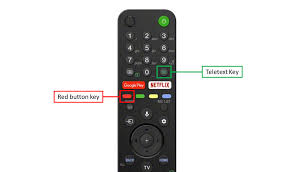
How to Access Teletext on Your Smart Tv: A Step-by-step Guide
Are you a fan of the classic teletext service? Do you want to continue using it on your new smart TV? Look no further! In this article, we’ll guide you through the process of accessing teletext on your smart TV, regardless of the brand and model.
What is Teletext?
Before we dive into the instructions, let’s briefly explain what teletext is. Teletext is a service that allows users to access updated information directly from their television, without the need for an internet connection. It was born as an electronic daily newspaper and has been used in Italy since the 1980s.
Why Access Teletext on Your Smart Tv?
Although teletext may seem like an outdated technology compared to modern streaming services and apps, it still offers a reliable way to access updated information on news, sports, weather, and more. With the evolution of televisions, accessing teletext has become easier than ever.
Step 1: Ensure Your Smart TV is Connected to The Internet
To access teletext on your smart TV, you need to ensure that it’s connected to the internet. If your TV doesn’t have an internet connection, you won’t be able to access teletext.
How to Access Teletext on LG Smart Tvs
If you have an LG smart TV, follow these steps:
- Ensure your TV is connected to the internet.
- Press the “Home” button on your remote control.
- Navigate to the “Apps” section.
- Search for “Teletext” and select it.
- Follow the on-screen instructions to access teletext.
How to Access Teletext on Samsung Smart Tvs
If you have a Samsung smart TV, follow these steps:
- Ensure your TV is connected to the internet.
- Press the “Home” button on your remote control.
- Navigate to the “Apps” section.
- Search for “Teletext” and select it.
- Follow the on-screen instructions to access teletext.
How to Access Teletext on Other Smart TV Brands
If you have a smart TV from another brand, follow these general steps:
- Ensure your TV is connected to the internet.
- Press the “Home” button on your remote control.
- Navigate to the “Settings” or “Apps” section.
- Search for “Teletext” and select it.
- Follow the on-screen instructions to access teletext.
Tips And Tricks
- Make sure you’re sintonizzato (tuned in) to a Rai channel to access teletext.
- Use the numerical keypad on your remote control to navigate through the teletext menu.
- Consult the manual or online documentation for specific instructions tailored to your TV brand and model.
Conclusion
Accessing teletext on your smart TV is easier than ever. With these step-by-step guides, you can enjoy this classic service on your new device. Remember to ensure your TV is connected to the internet and follow the specific instructions for your brand and model.
Frequently Asked Questions (FAQs)
- Q: What is Teletext?
A: Teletext is a service that allows users to access updated information directly from their television, without the need for an internet connection. - Q: Why Should I Access Teletext on my Smart Tv?
A: Although teletext may seem like an outdated technology compared to modern streaming services and apps, it still offers a reliable way to access updated information on news, sports, weather, and more. - Q: Do I Need an Internet Connection to Access Teletext?
A: Yes, you need an internet connection to access teletext on your smart TV. - Q: How do I Access Teletext on my LG Smart Tv?
A: Follow the steps outlined in this guide for accessing teletext on LG smart TVs. - Q: Can I Access Teletext on Other Smart TV Brands?
A: Yes, you can access teletext on most smart TV brands by following the general steps outlined in this guide. - Q: Do I Need to Consult a Manual or Online Documentation For Specific Instructions?
A: Yes, it’s recommended that you consult a manual or online documentation for specific instructions tailored to your TV brand and model. - Q: What Information Can I Access Through Teletext?
A: You can access updated information on news, sports, weather, and more through teletext. - Q: Can I Access Regional Teletext on my Smart Tv?
A: Yes, you can access regional teletext by sintonizzato (tuning in) to Rai 3 and following the on-screen instructions.
We hope this guide has been helpful in accessing teletext on your smart TV. If you have any further questions or concerns, please don’t hesitate to reach out!


