
Unlocking Secure Communication: A Guide to Reading End-to-end (E2E) Encrypted Messages on Whatsapp, Messenger, And Telegram
In today’s digital age, maintaining the security and confidentiality of personal conversations is a top priority for individuals and organizations alike. With the rise of messaging apps, end-to-end encryption has become an essential feature for safeguarding sensitive information. In this article, we will delve into the world of E2E encrypted messages on popular platforms like WhatsApp, Messenger, and Telegram.
What Are End-to-end Encrypted Messages?
Before diving into the specifics of each platform, it’s essential to understand what end-to-end encryption means. E2E encryption is a type of cryptography where only the sender and intended recipient can access the encrypted messages. This ensures that even the messaging app itself cannot intercept or read the conversations.
Reading End-to-end Encrypted Messages on Whatsapp
WhatsApp has been at the forefront of E2E encryption, offering this feature by default on all chats since 2016. To check if a chat is E2E encrypted:
- Open WhatsApp and select a chat.
- Tap on the contact’s name in the top bar.
- Check for the “Encryption” option; it should be enabled.
Reading End-to-end Encrypted Messages on Messenger
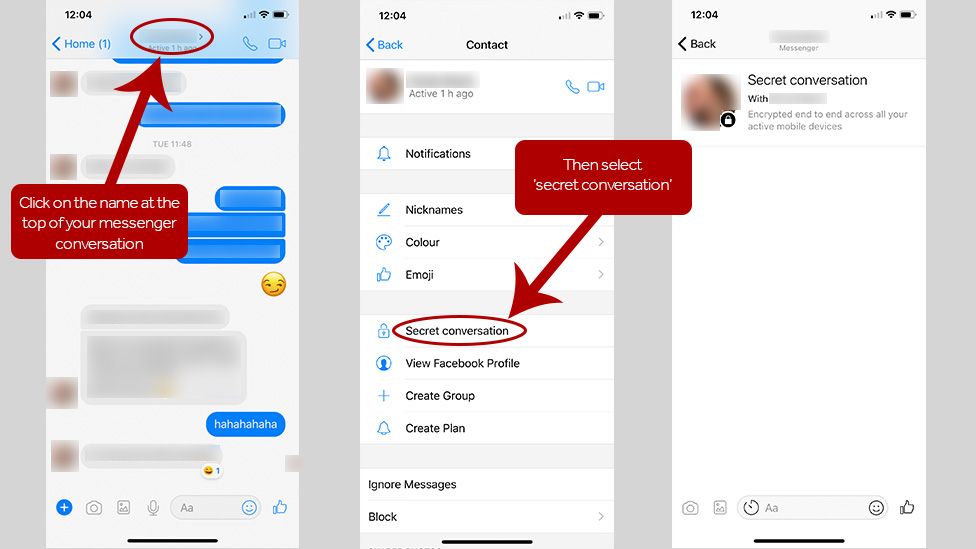
Facebook-owned Messenger introduced E2E encryption in December 2023, making it available to all users. To enable this feature:
- Open Messenger and initiate a chat with a contact.
- Tap on the contact’s name at the top of the screen.
- Select “Initiate Secret Conversation” to activate E2E encryption.
Reading End-to-end Encrypted Messages on Telegram
Telegram offers E2E encryption for secret chats, while standard chats are encrypted but not protected by E2E encryption. To initiate a secret chat:
- Open Telegram and select an existing chat or create a new one.
- Tap on the contact’s name at the top of the screen.
- Select “Start Secret Chat” to activate E2E encryption.
Additional Security Features on Whatsapp, Messenger, And Telegram
Beyond E2E encryption, these platforms offer additional security features:
- Chat With Padlock: WhatsApp allows users to create encrypted chats that require an extra verification step before accessing the conversation.
- Ephemeral Messages: Both WhatsApp and Telegram offer ephemeral messages, which self-destruct after a predetermined time period.
- Media Viewing: Telegram enables users to view media content within a secret chat without making it visible on their device.
Understanding The Limitations of E2e Encryption
While E2E encryption provides robust protection for individual conversations, there are limitations to consider:
- Backup Storage: Even if you enable E2E encryption, backing up your chats may not be entirely secure. In some cases, third-party access to backup storage could compromise message security.
- Device-specific Access: Devices with compromised or unauthorized access can potentially bypass E2E encryption.
Conclusion
Reading end-to-end encrypted messages on WhatsApp, Messenger, and Telegram requires understanding the specific features and limitations of each platform. By activating these features, you can enjoy secure communication with your contacts while maintaining control over sensitive information.
Frequently Asked Questions (FAQs)
- Q: What is End-to-end Encryption?
A: E2E encryption ensures that only the sender and intended recipient can access encrypted messages. - Q: Is Whatsapp’s E2e Encryption Activated by Default?
A: Yes, WhatsApp enables E2E encryption on all chats since 2016. - Q: How do I Enable E2e Encryption on Messenger?
A: Initiate a secret conversation with a contact to activate E2E encryption. - Q: What is The Difference Between Encrypted And End-to-end Encrypted Messages on Telegram?
A: Standard chats are encrypted, but not protected by E2E encryption, while secret chats are fully E2E encrypted. - Q: Can I View Media Content Within a Secret Chat on Telegram?
A: Yes, you can view media content without making it visible on your device within a secret chat. - Q: What Happens if I Backup my Chats And Enable E2e Encryption?
A: Backup storage may not be entirely secure; third-party access could compromise message security. - Q: Can Devices With Compromised or Unauthorized Access Bypass E2e Encryption?
A: Yes, in some cases, device-specific access can potentially bypass E2E encryption.
By understanding these features and limitations, you can make informed decisions about your digital communication security and maintain the confidentiality of your conversations.


