
How to Read Epubs on Your Devices
Are you tired of being unable to read your favorite ePubs due to compatibility issues with your device? Look no further! In this article, we will guide you through the process of reading ePubs on various devices, including computers, Android smartphones, iPhones, iPads, and Kindles.
What Are Epubs?
Before we dive into the how-to section, let’s quickly explain what an ePub is. An ePub (electronic publication) is a digital book that uses an open standard based on XML to provide dynamic texts optimized for visualisation on readers like eBook readers, tablets, smartphones, and computers.
Why Can’t I Read My Epubs?
If you’re having trouble reading your ePubs, it might be due to compatibility issues with the device or software you’re using. This could also be caused by digital rights management (DRM) restrictions applied by the publisher.
How to Read Epubs on Your Computer
There are several software options available for reading ePubs on your computer, including Calibre and FBReader. Let’s take a look at how to use each of these programs:
Calibre (Windows/macOS/Linux)
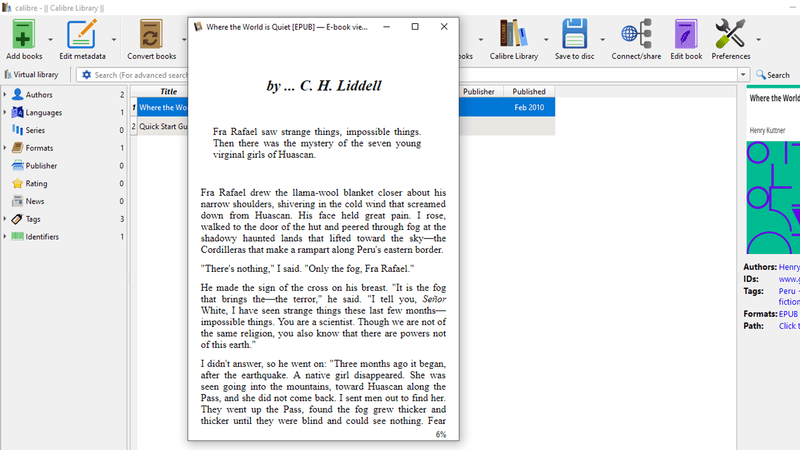
Calibre is a free software that allows you to visualise and manage digital books in various formats, making it incredibly easy and swift.
- Download Calibre from the official website.
- Follow the installation instructions provided by the software.
- Launch Calibre and select your preferred eBook reader or tablet.
- Click on the “Add” button to add your ePubs to Calibre.
- Double-click on an ePbub title to open it in a new window.
Fbreader (Windows/macOS/Linux)
Another excellent option for reading ePubs is FBReader, which is available as a free download for Windows, macOS, and Linux.
- Download the FBReader app from the official website.
- Follow the installation instructions provided by the software.
- Launch FBReader and select your preferred eBook reader or tablet.
- Click on the “Open” button to add your ePubs to FBReader.
- Double-click on an ePbub title to open it in a new window.
How to Read Epubs on Your Android Device
If you have an Android smartphone, you can use the FBReader app to read ePubs.
- Download the FBReader app from the Google Play Store.
- Launch FBReader and select your preferred eBook reader or tablet.
- Tap on the “Pick” button to add your ePubs to FBReader.
- Double-tap on an ePbub title to open it in a new window.
How to Read Epubs on Your Iphone/ipad
You can also read ePubs on your iPhone or iPad using the Books app, which is pre-installed on Apple devices.
- Open the Books app and select the eBook reader or tablet you prefer.
- Tap on the “Open” button to add your ePubs to Books.
- Double-tap on an ePbub title to open it in a new window.
How to Read Epubs on Your Kindle
If you have a Kindle device, you can read ePubs by emailing them directly to your Kindle account.
- Send the email with the ePubs attached from your computer.
- Open your Kindle device and select the “Receive” option.
- The ePubs will be automatically synced to your Kindle device.
Conclusion
In conclusion, reading ePubs on various devices is easier than ever! With Calibre, FBReader, and the Books app, you can access your favorite ePubs from anywhere. Whether you’re using a computer, Android smartphone, iPhone, iPad, or Kindle, we hope this article has provided you with the information you need to enjoy reading your digital books.
Faqs
Q: What are ePubs?
A: An ePub (electronic publication) is a digital book that uses an open standard based on XML to provide dynamic texts optimized for visualisation on readers like eBook readers, tablets, smartphones, and computers.
Q: Why can’t I read my ePubs?
A: There could be several reasons why you’re unable to read your ePubs. These include compatibility issues with the device or software you’re using, or digital rights management (DRM) restrictions applied by the publisher.
Q: How do I read ePubs on my computer?
A: You can use Calibre or FBReader to read ePubs on your computer. Simply download and install either of these programs, then follow the steps outlined above to add and open your ePubs.
Q: Can I read ePubs on my Android device?
A: Yes! You can use the FBReader app to read ePubs on your Android smartphone or tablet.
Q: How do I read ePubs on my iPhone/iPad?
A: You can use the Books app, which is pre-installed on Apple devices. Simply open the Books app and follow the steps outlined above to add and open your ePubs.
Q: Can I read ePubs on my Kindle device?
A: Yes! You can email ePubs directly to your Kindle account, and they will be automatically synced to your device.
Q: Are Calibre and FBReader free software options?
A: Yes! Both Calibre and FBReader are available as free downloads for Windows, macOS, and Linux.
Q: Can I use the Books app on my Android device?
A: Unfortunately not! The Books app is exclusive to Apple devices.


