
How to Read Epub Files on Pc: A Step-by-step Guide
Are you looking for a way to read your favorite ebooks in ePub format on your PC? Look no further! In this article, we will guide you through the process of reading ePub files on PC using various software programs and online services.
What is an Epub File?
Before we dive into the step-by-step guide, let’s briefly explain what an ePub file is. An ePub file is a digital book format that uses open standards to provide dynamic text for visualization on readers such as smartphones, tablets, and PCs. It’s like a physical book but in digital form.
Programs to Read Epub Files on PC
Here are some free programs available for download and use on your PC:
Calibre (Windows/macOS/Linux)
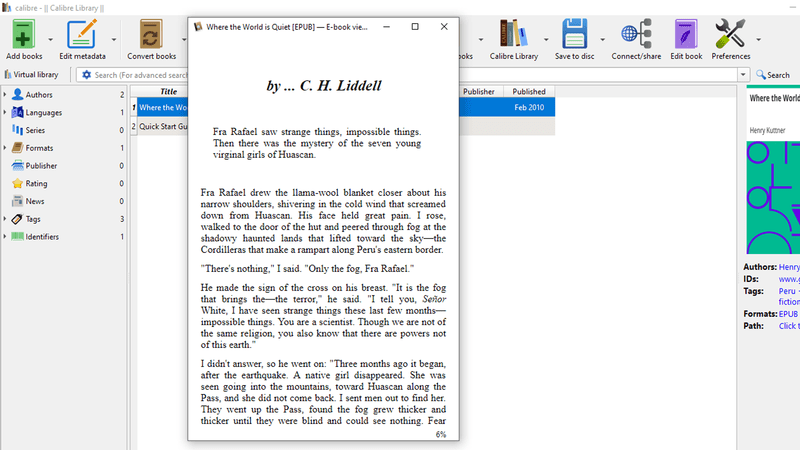
Calibre is a versatile program that allows you to read, manage, and convert ebooks in various formats. It’s available for Windows, macOS, and Linux operating systems.
To install Calibre, follow these steps:
- Download the latest version of Calibre from its official website.
- Run the installation file and follow the prompts to complete the installation process.
- Once installed, launch Calibre and select your language and desired settings.
- To add an ebook, click on “Add books” and select the ePub file you want to read.
Neat Reader (Windows/macOS)
Neat Reader is a free and intuitive application that allows you to read ebooks in ePub format.
To install Neat Reader, follow these steps:
- Download the latest version of Neat Reader from its official website.
- Run the installation file and follow the prompts to complete the installation process.
- Once installed, launch Neat Reader and select your language.
- To add an ebook, click on “Add book” and select the ePub file you want to read.
Freda Ebook Reader (Windows)
Freda is another free program that allows you to read ebooks in various formats, including ePub.
To install Freda, follow these steps:
- Download the latest version of Freda from its official website.
- Run the installation file and follow the prompts to complete the installation process.
- Once installed, launch Freda and select your language.
- To add an ebook, click on “Add book” and select the ePub file you want to read.
Reading Epub Files Online
If you don’t want to download any software, you can also read your ePub files online using various services such as:
Epub Reader
EPUB Reader is a free online service that allows you to read ebooks in ePub format directly from your browser.
To use EPUB Reader, follow these steps:
- Visit the official website of EPUB Reader.
- Click on “Open EPUB book” and select the ePub file you want to read.
- The file will be displayed in the browser window, and you can start reading it immediately.
Fviewer
Fviewer is another online service that allows you to open and read ebooks in various formats, including ePub.
To use fviewer, follow these steps:
- Visit the official website of fviewer.
- Click on “Choose file” and select the ePub file you want to read.
- The file will be displayed in the browser window, and you can start reading it immediately.
Epub Online Reader
EPub Online Reader is yet another online service that allows you to open and read ebooks in ePub format directly from your browser.
To use EPub Online Reader, follow these steps:
- Visit the official website of EPub Online Reader.
- Click on “Choose file” and select the ePub file you want to read.
- The file will be displayed in the browser window, and you can start reading it immediately.
Conclusion
Reading ePub files on PC is a straightforward process that involves downloading and installing software programs or using online services. With these guides, you should now be able to access your favorite ebooks in ePub format on your PC.
Frequently Asked Questions (FAQs)
- Q: What is an Epub File?
A: An ePub file is a digital book format that uses open standards to provide dynamic text for visualization on readers such as smartphones, tablets, and PCs. - Q: Which Software Programs Can I Use to Read Epub Files on Pc?
A: You can use Calibre, Neat Reader, Freda Ebook Reader, EPUB Reader, fviewer, or EPub Online Reader to read ePub files on your PC. - Q: Do I Need to Download Any Software to Read Epub Files on my Pc?
A: No, you don’t necessarily need to download software if you prefer using online services such as EPUB Reader, fviewer, or EPub Online Reader. - Q: How do I Add an Ebook to Calibre?
A: To add an ebook to Calibre, click on “Add books” and select the ePub file you want to read. - Q: Can I Use Neat Reader to Read Epub Files Online?
A: Yes, Neat Reader also has a browser-based version that allows you to open and read ebooks in ePub format directly from your browser.
I hope this article has provided helpful information for you! If you have any further questions or need additional assistance, please don’t hesitate to ask.


