
How to Read QR Codes With Your Pc: A Step-by-step Guide
Are you tired of using your smartphone to read QR codes? Do you want to access the information contained in these codes directly from your computer? Look no further! In this article, we will show you how to read QR codes with your PC, using various software and online services.
Understanding QR Codes
Before we dive into the technical aspects of reading QR codes with your PC, let’s briefly explain what QR codes are. QR stands for Quick Response, a type of barcode that can store more data than traditional barcodes. These codes are widely used in various industries, such as marketing, logistics, and healthcare.
Software to Read QR Codes With Your PC
There are several software options available that allow you to read QR codes with your PC. Here are some popular ones:
QR Tails (Windows 10/11)
If you’re using Windows 10 or 11, you can download the free application “QR Tails” from the Microsoft Store. This app allows you to scan QR codes on your screen, webcam, or clipboard.
To use this app, follow these steps:
- Download and install “QR Tails” from the Microsoft Store.
- Launch the app and select the desired mode of acquisition (screen, webcam, or clipboard).
- Scan the QR code using the selected method.
- The app will display the content of the QR code.
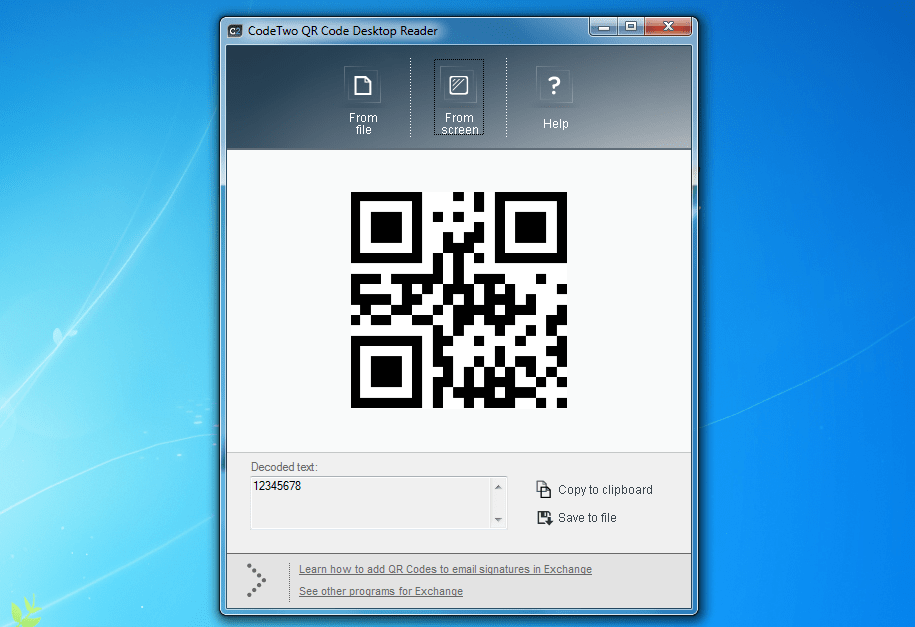
Codetwo QR Tails Desktop Reader (Windows)
Another free software option is CodeTwo QR Tails Desktop Reader. This app supports various image formats and allows you to capture screenshots or select files from your local storage.
To use this app, follow these steps:
- Download and install CodeTwo QR Tails Desktop Reader.
- Launch the app and select a file containing the QR code (image, clipboard, or webcam).
- The app will scan the QR code and display its content.
Scan QR (macOS)
If you’re using a Mac, you can use the “Scan QR” app to read QR codes on your device. This app is available for free from the App Store.
To use this app, follow these steps:
- Download and install “Scan QR” from the App Store.
- Launch the app and select the desired mode of acquisition (webcam or file).
- Scan the QR code using the selected method.
- The app will display the content of the QR code.
Online Services to Read QR Codes With Your PC
In addition to software, there are several online services that allow you to read QR codes with your PC. Here are some popular ones:
QR Tails Scanner
One such service is “QR Tails Scanner,” a simple and easy-to-use tool that allows you to scan QR codes using your webcam or upload an image file.
To use this service, follow these steps:
- Visit the official website of QR Tails Scanner.
- Authorize the use of your webcam (if necessary).
- Scan the QR code using your webcam or upload an image file.
- The service will display the content of the QR code.
Webqr
Another online service is “WebQR,” which allows you to scan QR codes using your webcam or upload an image file. This service is compatible with most modern web browsers.
To use this service, follow these steps:
- Visit the official website of WebQR.
- Authorize the use of your webcam (if necessary).
- Scan the QR code using your webcam or drag and drop an image file onto the page.
- The service will display the content of the QR code.
Inlite
If you need to scan other types of codes, such as PDF417 or Data Matrix, Inlite is a versatile online service that can help. This service allows you to upload an image file containing the code and retrieve its content.
To use this service, follow these steps:
- Visit the official website of Inlite.
- Select the type of code you want to scan (QR, PDF417, or Data Matrix).
- Upload an image file containing the code.
- The service will display the content of the code.
Conclusion
Reading QR codes with your PC is a simple and convenient process that can be achieved using various software options and online services. Whether you’re using Windows 10/11, macOS, or any other operating system, there’s a solution available to suit your needs. By following the steps outlined in this article, you’ll be able to access the information contained in QR codes directly from your computer.
Frequently Asked Questions
Q: What is a QR code?
A: A QR code (Quick Response) is a type of barcode that can store more data than traditional barcodes.
Q: How do I read QR codes with my PC?
A: You can use various software options, such as “QR Tails” (Windows 10/11), CodeTwo QR Tails Desktop Reader (Windows), or Scan QR (macOS), or online services like QR Tails Scanner, WebQR, or Inlite.
Q: What are the benefits of reading QR codes with my PC?
A: Reading QR codes with your PC can save time and increase productivity by allowing you to access information directly from your computer, without needing to use a smartphone or mobile device.


