
The Ultimate Guide to Blocking Spam Calls on Your Iphone
Are you tired of receiving unwanted calls on your iPhone? Do you wish there was a way to stop those annoying telemarketers and spammers from disturbing you? Well, you’re in luck! In this comprehensive guide, we’ll show you how to block spam calls on your iPhone using various methods.
What Are Spam Calls?
Spam calls, also known as robocalls or unwanted calls, are automated phone calls that aim to sell you something or collect information about you. These calls can be annoying and even deceptive, making it difficult for you to determine whether they’re legitimate or not.
Why Should You Block Spam Calls on Your Iphone?
Blocking spam calls is essential to protect your peace of mind and prevent unwanted interruptions. By blocking these calls, you’ll avoid receiving unwanted solicitations, scams, and other malicious activities that can compromise your security and privacy.
Method 1: Using The Iphone’s Built-in Features
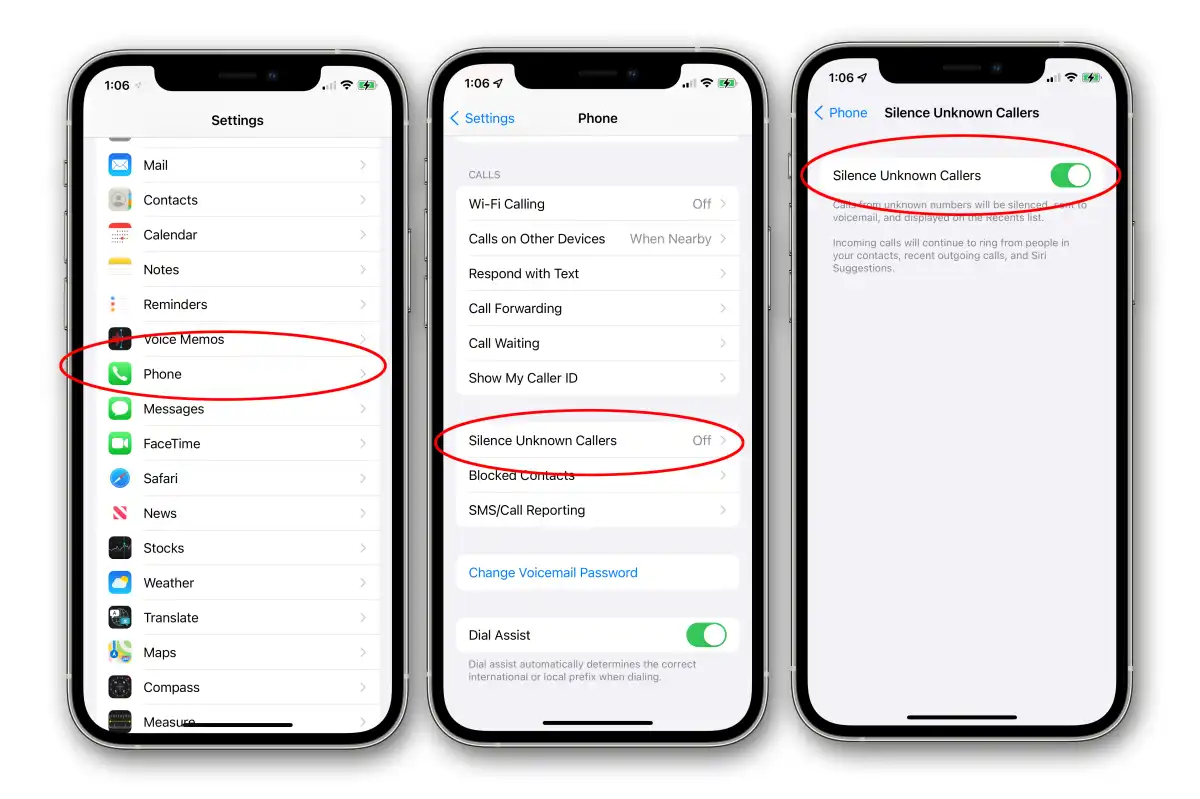
Your iPhone comes with built-in features that allow you to block spam calls. Here’s how:
- Identify Spam Calls: Go to Settings > Phone > Block Contact. Tap on “Block Contact” and enter the phone number of the spam caller.
- Block Contacts: If you’ve already blocked a contact in the past, you can simply tap on it from your recent calls list.
Method 2: Using Third-party Apps
There are various third-party apps available that can help you block spam calls. Some popular options include:
- Tellows: This app uses a community-driven database to identify and block spam calls.
- Truecaller: This app allows you to identify and block spam calls by sharing your phone number with their database.
- Should I Answer: This app helps you determine whether you should answer an incoming call based on the caller’s identity and reputation.
How to Use Tellows to Block Spam Calls
Tellows is a popular app that uses a community-driven database to identify and block spam calls. Here’s how to use it:
- Download And Install: Download and install the Tellows app from the App Store.
- Configure: Configure the app by selecting your language, country, and other settings.
- Block Spam Calls: Tap on the “Block” button to block a spam call.
How to Use Truecaller to Block Spam Calls
Truecaller is another popular app that allows you to identify and block spam calls. Here’s how to use it:
- Download And Install: Download and install the Truecaller app from the App Store.
- Configure: Configure the app by selecting your language, country, and other settings.
- Block Spam Calls: Tap on the “Block” button to block a spam call.
How to Use Should I Answer to Block Spam Calls
Should I Answer is an app that helps you determine whether you should answer an incoming call based on the caller’s identity and reputation. Here’s how to use it:
- Download And Install: Download and install the Should I Answer app from the App Store.
- Configure: Configure the app by selecting your language, country, and other settings.
- Block Spam Calls: Tap on the “Block” button to block a spam call.
Conclusion
Blocking spam calls on your iPhone is easy and effective using various methods. By following these steps, you can protect yourself from unwanted solicitations, scams, and other malicious activities that can compromise your security and privacy.
Faqs
- What Are Spam Calls?
Spam calls, also known as robocalls or unwanted calls, are automated phone calls that aim to sell you something or collect information about you. - Why Should You Block Spam Calls on Your Iphone?
Blocking spam calls is essential to protect your peace of mind and prevent unwanted interruptions. - How Can I Use The Iphone’s Built-in Features to Block Spam Calls?
Go to Settings > Phone > Block Contact and enter the phone number of the spam caller. - What Are Some Third-party Apps That Can Help Me Block Spam Calls?
Some popular options include Tellows, Truecaller, and Should I Answer. - How Do I Use Tellows to Block Spam Calls?
Download and install the Tellows app from the App Store, configure it by selecting your language, country, and other settings, and tap on the “Block” button to block a spam call. - How Do I Use Truecaller to Block Spam Calls?
Download and install the Truecaller app from the App Store, configure it by selecting your language, country, and other settings, and tap on the “Block” button to block a spam call. - How Do I Use Should I Answer to Block Spam Calls?
Download and install the Should I Answer app from the App Store, configure it by selecting your language, country, and other settings, and tap on the “Block” button to block a spam call.
Final Thoughts
Blocking spam calls on your iPhone is easy and effective using various methods. By following these steps, you can protect yourself from unwanted solicitations, scams, and other malicious activities that can compromise your security and privacy.


