
Recording Your Electronic Drum Kit: A Step-by-step Guide
Are you a drummer looking to record your electronic drum kit and capture the perfect sound? With so many options available, it can be overwhelming to choose the right software and hardware. In this article, we’ll take you through the process of recording your electronic drum kit with Audacity, Cubase, GarageBand, Ableton, and more.
Understanding Your Electronic Drum Kit
Before we dive into the technical aspects, let’s briefly discuss the components of an electronic drum kit. Typically, these kits consist of a set of electronic pads that simulate the feel and sound of acoustic drums. They often come with built-in sounds, effects, and a MIDI interface for connectivity.
Software Options: Audacity
We’ll start with Audacity, a free and open-source software perfect for beginners. To record your electronic drum kit with Audacity:
- Open Audacity and select the “Recording” tab.
- Choose the correct input device (usually USB or audio interface).
- Set the recording format to 16-bit or 24-bit WAV.
- Arm the track by clicking on the “Record” button.
- Start playing your electronic drum kit, and Audacity will capture the sound.
Software Options: Cubase
Next up is Cubase, a professional-grade DAW that’s popular among musicians. To record your electronic drum kit with Cubase:
- Open Cubase and create a new project.
- Select the correct input device (usually USB or audio interface).
- Set the recording format to 16-bit or 24-bit WAV.
- Arm the track by clicking on the “Record” button.
- Start playing your electronic drum kit, and Cubase will capture the sound.
Software Options: Garageband
GarageBand is a user-friendly DAW developed by Apple for Mac users. To record your electronic drum kit with GarageBand:
- Open GarageBand and select the “New Project” option.
- Choose the correct input device (usually USB or audio interface).
- Set the recording format to 16-bit or 24-bit WAV.
- Arm the track by clicking on the “Record” button.
- Start playing your electronic drum kit, and GarageBand will capture the sound.
Software Options: Ableton
Ableton is a popular DAW among electronic music producers. To record your electronic drum kit with Ableton:
- Open Ableton and create a new project.
- Select the correct input device (usually USB or audio interface).
- Set the recording format to 16-bit or 24-bit WAV.
- Arm the track by clicking on the “Record” button.
- Start playing your electronic drum kit, and Ableton will capture the sound.
Hardware: Microphones And Mixers
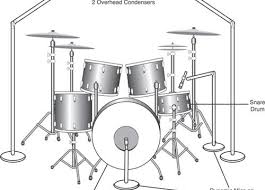
For acoustic drums, you’ll need a mixer and microphones to capture the sound. Here are some tips:
- Use a omnidirectional microphone for live-like sound.
- Place microphones in an intermediate position among the kick drum, snare, and tom-toms.
- Consider using two microphones for added depth.
- Invest in a high-quality mixer with multiple channels.
Recording Your Acoustic Drum Kit
To record your acoustic drum kit:
- Set up your drums and microphones correctly.
- Choose the right recording software (e.G., Audacity, Cubase, GarageBand).
- Set the recording format to 16-bit or 24-bit WAV.
- Arm the track by clicking on the “Record” button.
- Start playing your acoustic drum kit, and the software will capture the sound.
Recording With a Scheda Audio
To record your electronic drum kit using a scheda audio:
- Connect your electronic drum kit to the scheda audio.
- Choose the correct input device (usually USB or audio interface).
- Set the recording format to 16-bit or 24-bit WAV.
- Arm the track by clicking on the “Record” button.
- Start playing your electronic drum kit, and the scheda audio will capture the sound.
Conclusion
Recording your electronic drum kit can be a fun and rewarding experience. Whether you choose Audacity, Cubase, GarageBand, Ableton, or other software options, make sure to understand your hardware and software components before starting. Don’t hesitate to experiment with different settings and effects to achieve the perfect sound.
Faqs
- What is the best software for recording my electronic drum kit?
A: The best software depends on your specific needs and preferences. - How do I connect my electronic drum kit to my computer?
A: Use a USB or audio interface cable to connect your electronic drum kit to your computer. - Can I use a mixer with my electronic drum kit?
A: Yes, you can use a mixer with your electronic drum kit for added depth and control. - What is the difference between 16-bit and 24-bit WAV recording formats?
A: The 16-bit format offers lower quality but larger file sizes, while the 24-bit format offers higher quality but smaller file sizes. - Can I record my acoustic drum kit using a scheda audio?
A: Yes, you can record your acoustic drum kit using a scheda audio for added depth and control.
I hope this article has been helpful in guiding you through the process of recording your electronic drum kit. Happy recording!


