
How to Record Your PC Monitor Without Downloading Programs
Are you tired of searching for software to record your PC monitor, but can’t seem to find a reliable one? Look no further! In this article, we’ll show you how to record your PC monitor without downloading any programs.
The Problem With Traditional Recording Software
Traditional recording software can be clunky, resource-intensive, and sometimes even require you to download additional software or plugins. This can be frustrating, especially when you’re trying to record a quick video or tutorial.
Alternative Solutions For Windows Users
If you’re using a Windows PC, there are several alternative solutions that don’t require downloading any programs:
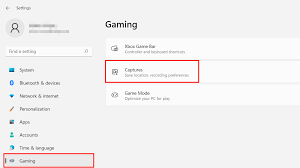
- Xbox Game Bar: You can use the Xbox Game Bar to record your screen. This utility is pre-installed on most Windows PCs and allows you to record gameplay, but it also works for other purposes.
- Windows 11’s Built-in Recording Tool: If you’re using Windows 11, you can use its built-in recording tool to capture your screen.
Recording Your PC Monitor With Windows 7
If you’re still using Windows 7, there’s a workaround that allows you to record your monitor without downloading any programs:
- Screencast-o-matic: You can use this free online service to record your desktop. While it has some limitations, such as a maximum video length of 15 minutes and watermarks on the recordings, it’s still a viable option.
Recording Your Mac Monitor
If you’re using a Mac, there are also alternative solutions that don’t require downloading any programs:
- Screenshot: You can use the built-in Screenshot app to record your screen. This app allows you to capture screenshots and record videos of your desktop.
- Other Solutions For Recording Your PC Monitor
If none of these solutions work for you, there are other options available in the market:
- Browser Extensions: There are several browser extensions that allow you to record your screen, such as Vidyard Go Video, Nimbus, and Loom. While they have their own limitations, they can still be useful tools.
Frequently Asked Questions
Here are some frequently asked questions about recording your PC monitor:
- Q: What is The Best Way to Record my PC Monitor?
A: The best way to record your PC monitor depends on your specific needs and preferences. However, using the Xbox Game Bar or Windows 11’s built-in recording tool can be a good starting point.
- Q: Can I Use a Browser Extension to Record my Screen?
A: Yes, you can use browser extensions like Vidyard Go Video, Nimbus, or Loom to record your screen. However, keep in mind that they may have their own limitations and requirements.
Conclusion
Recording your PC monitor doesn’t have to be a complicated process. With the right tools and solutions, you can easily capture your screen without downloading any programs. Whether you’re using Windows or Mac, there are alternative options available that can help you achieve your recording needs.


