
Recovering Deleted Photos on Instagram: A Step-by-step Guide
Are you tired of losing precious memories due to accidentally deleting a photo on Instagram? Don’t worry, we’ve got you covered! In this article, we’ll walk you through the process of recovering deleted photos on Instagram, whether it’s from your profile, chat, or Reels.
Understanding Instagram’s Photo Recovery Feature
Before we dive into the steps, it’s essential to understand how Instagram’s photo recovery feature works. Instagram allows users to recover deleted photos and videos within a certain time frame. For posts, stories, and reels, you can recover them for up to 30 days after deletion. However, if you’ve enabled the “Save” feature in your camera settings, you can recover deleted photos for up to 24 hours.
Recovering Deleted Photos on Instagram (Android & Ios)
To recover a deleted photo on Instagram, follow these steps:
Step 1: Open The Instagram App
First, open the Instagram app on your Android or iOS device. Make sure you’re logged in to your account.
Tap on your profile picture in the bottom right corner to access your profile page.
Step 3: Tap on The Menu Icon
In the top right corner, tap on the three horizontal lines (menu icon) to open the navigation menu.
Step 4: Go to Settings
From the menu, navigate to Settings > Account > Deleted.
Step 5: Find And Select The Deleted Photo
Look for the deleted photo you want to recover and select it. You’ll see a three-dot icon in the top right corner of the selected photo.
Step 6: Tap on The Three-dot Icon
Tap on the three-dot icon, which will display a menu with options.
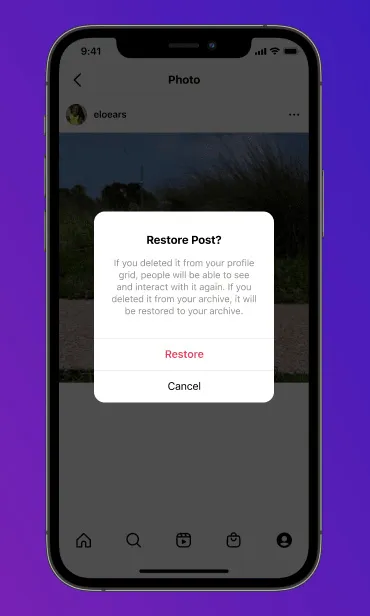
Step 7: Select “Recover”
From the menu, select “Recover.” You’ll be asked to confirm your recovery request via email or SMS. Choose how you’d like to receive the verification code and tap “Send.”
Step 8: Enter The Verification Code
Enter the verification code sent to you via email or SMS in the app.
Step 9: Confirm Recovery
Once you’ve entered the verification code, confirm your recovery request by tapping on “Confirm.” This will restore the deleted photo to its original position.
Recovering Deleted Photos From Chats (iOS & Android)
Unfortunately, recovering deleted photos from chats is not currently possible. If you delete a photo shared in a chat, it’s gone for good!
Tips And Precautions
To avoid losing important photos, keep the following tips in mind:
- Make sure to save your photos regularly.
- Use Instagram’s “Save” feature to recover deleted photos within 24 hours.
- Be cautious when deleting photos, especially from chats.
Conclusion
Recovering deleted photos on Instagram can be a lifesaver. By following these simple steps, you’ll be able to restore lost memories and cherish them forever. Remember to save your photos regularly and use the “Save” feature to ensure they’re not lost in cyberspace!


