
How to Recover Your Forgotten Facebook Email: A Step-by-step Guide
Are you worried that you’ve forgotten your Facebook email address? Don’t panic! You can easily recover it by following these simple steps.
Table 1: Recovering Your Facebook Email From Smartphone And Tablet
| Method | Steps |
|---|---|
| Using the Facebook App | Initiate the app, tap on the login screen, and select “Password forgotten?” |
| Searching for Phone Number | Tap on “Search for phone number,” enter your phone number, and tap on “Find account” |
Table 2: Recovering Your Facebook Email From Computer
| Method | Steps |
|---|---|
| Using the Official Website | Go to the official website, click on “Password forgotten?”, and enter your phone number |
| Searching for Phone Number | Click on “Search for phone number,” enter your phone number, and click on “Find account” |
Why You Might Have Forgotten Your Facebook Email
You might have forgotten your Facebook email address due to various reasons such as:
- Not using it frequently
- Changing your primary email address
- Not updating your contact information
How to Recover Your Forgotten Facebook Email From Smartphone And Tablet
To recover your Facebook email address from your smartphone or tablet, follow these steps:
- Initiate the Facebook app on your device.
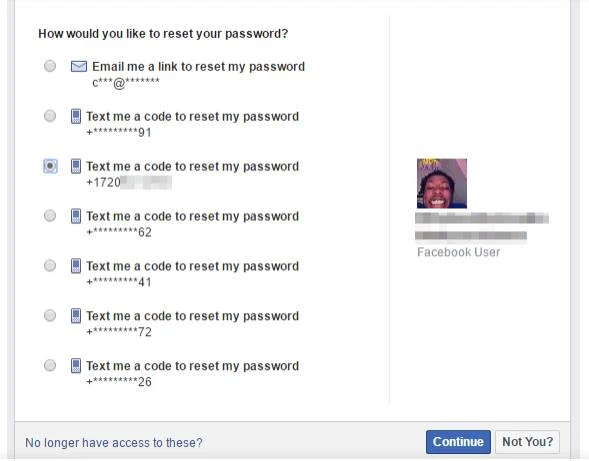
- Tap on the login screen and select “Password forgotten?”
- If you’re not already logged in, tap on “Search for phone number” and enter your phone number.
- Tap on “Find account” to see your associated account information.
- You’ll be able to view your Facebook email address along with your other contact details.
How to Recover Your Forgotten Facebook Email From Computer
To recover your Facebook email address from a computer, follow these steps:
- Go to the official Facebook website using your preferred browser.
- Click on “Password forgotten?” and enter your phone number.
- Click on “Search for phone number” and enter your phone number again.
- You’ll see your associated account information, including your Facebook email address.
What to Do if You Can’t Remember Your Password
If you’re having trouble recovering your password, don’t worry! You can follow the guide on how to reset your password using either your email or phone number.
Visualizing Other Users’ Email Addresses on Facebook
You can also view other users’ email addresses by searching for them and accessing their profile information. Just remember that this might not be helpful if you’ve forgotten your own email address!
How to Recover Your Facebook Password And Email Address
If you’re having trouble recovering both your password and email address, don’t worry! You can follow the guide on how to recover both using either your phone number or email address.
Other Tips For Recovering Your Facebook Account
In addition to these steps, here are some other tips to help you recover your Facebook account:
- Make sure you’re accessing the official Facebook website or app.
- Check your spam and junk mail folders for any password reset emails.
- If you’ve forgotten both your password and email address, try using a friend’s profile information to access yours.
Conclusion
Recovering your forgotten Facebook email address is easier than you think! By following these simple steps, you’ll be able to access your account and enjoy the full range of features that Facebook has to offer.
Frequently Asked Questions (FAQs)
- Q: Why Can’t I Remember my Facebook Password?
A: You might have forgotten your password due to various reasons such as not using it frequently or changing your primary email address. - Q: How do I Recover my Facebook Email Address From Smartphone And Tablet?
A: Initiate the Facebook app, tap on the login screen, select “Password forgotten?”, and follow the steps to retrieve your email address. - Q: Can I See Other Users’ Email Addresses on Facebook?
A: Yes, you can view other users’ email addresses by searching for them and accessing their profile information. - Q: How do I Recover my Facebook Password And Email Address?
A: You can follow the guide on how to reset your password using either your email or phone number, and then retrieve your email address. - Q: What if I’ve Forgotten Both my Password And Email Address?
A: Try using a friend’s profile information to access yours, or contact Facebook support for further assistance. - Q: Can I Recover my Facebook Account From Computer?
A: Yes, you can go to the official Facebook website, click on “Password forgotten?”, enter your phone number, and follow the steps to retrieve your email address. - Q: How do I Prevent Forgetting my Facebook Password in The Future?
A: Make sure to save your password securely, update your contact information regularly, and consider using a password manager. - Q: What if I’m Having Trouble Recovering my Facebook Account?
A: Contact Facebook support for further assistance or try using a friend’s profile information to access yours.


