
How to Recover Icloud Password: A Step-by-step Guide
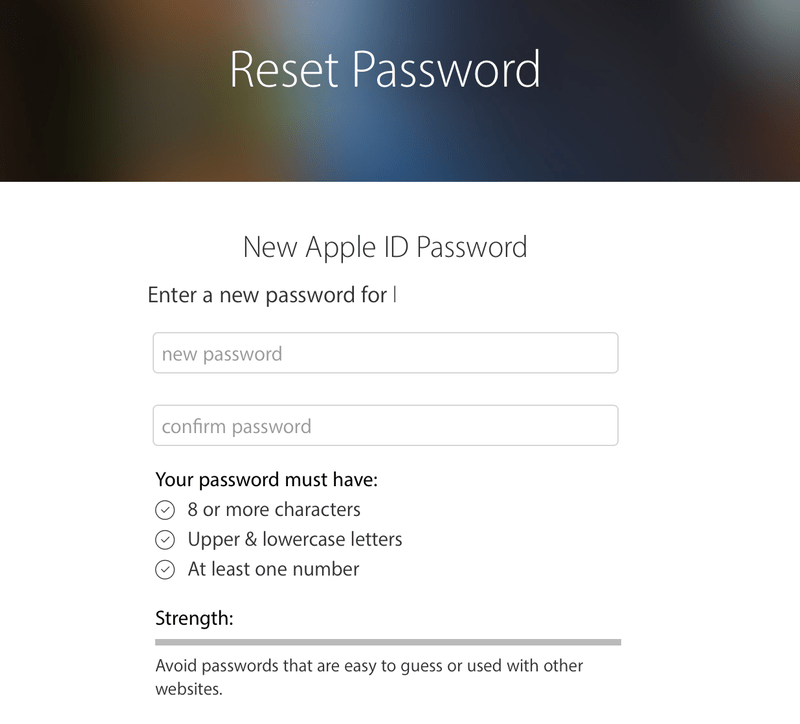
Are you struggling to remember your iCloud password? Don’t worry, we’ve got you covered! In this article, we’ll guide you through the process of recovering your iCloud password on various devices, including iPhone, iPad, Mac, PC, and Android.
What is Icloud?
ICloud is a cloud storage service provided by Apple that allows users to store their data, such as photos, contacts, and calendars, online. It also provides features like Find My iPhone and iCloud Mail.
Why Recover Icloud Password?
Recovering your iCloud password is essential if you’ve forgotten it or can’t access your account due to a change in device or email address. Having trouble accessing your iCloud data can be frustrating, but with our guide, you’ll be back on track in no time!
How to Recover Icloud Password on Iphone/ipad
If you’re using an iPhone or iPad, follow these steps:
- Go to Settings: Open the Settings app and tap on your name at the top.
- Select Password & Security: Tap on “Password & Security.”
- Tap Modify Password: Select “Modify Password” from the options.
- Enter Your Current Password: Enter your current password to access the next step.
- Create a New Password: Create a new password and confirm it by entering it again.
- Save Changes: Tap on “Done” to save your changes.
How to Recover Icloud Password on Mac
If you’re using a Mac, follow these steps:
- Go to System Preferences: Click on the Apple menu and select “System Preferences.”
- Select Icloud: Click on “iCloud” from the list of options.
- Click Account Details: Click on “Account Details.”
- Enter Your Current Password: Enter your current password to access the next step.
- Create a New Password: Create a new password and confirm it by entering it again.
- Save Changes: Click on “Done” to save your changes.
How to Recover Icloud Password on PC
If you’re using a Windows PC, follow these steps:
- Go to Icloud.Com: Open a web browser and go to icloud.Com.
- Click Forgot Password: Click on the “Forgot Password” link below the password field.
- Enter Your Apple ID Email Address: Enter your Apple ID email address.
- Follow On-screen Instructions: Follow the on-screen instructions to recover your password.
How to Recover Icloud Password on Android
If you’re using an Android device, follow these steps:
- Go to Icloud.Com: Open a web browser and go to icloud.Com.
- Click Forgot Password: Click on the “Forgot Password” link below the password field.
- Enter Your Apple ID Email Address: Enter your Apple ID email address.
- Follow On-screen Instructions: Follow the on-screen instructions to recover your password.
How to Recover Icloud Mail Password
If you’re having trouble accessing your iCloud mail account, follow these steps:
- Go to Icloud.Com/mail: Open a web browser and go to icloud.Com/mail.
- Click Forgot Password: Click on the “Forgot Password” link below the password field.
- Enter Your Apple ID Email Address: Enter your Apple ID email address.
- Follow On-screen Instructions: Follow the on-screen instructions to recover your password.
How to Recover Icloud Keychain Password
If you’re having trouble accessing your iCloud keychain, follow these steps:
- Go to Settings: Open the Settings app and tap on “Passwords & Accounts.”
- Select Keychain: Select “Keychain” from the list of options.
- Tap Modify Keychain: Tap on “Modify Keychain.”
- Enter Your Current Password: Enter your current password to access the next step.
- Create a New Password: Create a new password and confirm it by entering it again.
- Save Changes: Tap on “Done” to save your changes.
What if I Still Can’t Recover My Icloud Password?
If you’re still having trouble recovering your iCloud password, try contacting Apple Support for further assistance.
Frequently Asked Questions (FAQs)
- Q: How do I Reset my Icloud Password?
A: To reset your iCloud password, follow the steps outlined in this article. - Q: What if I Forgot my Apple ID Email Address?
A: If you forgot your Apple ID email address, try contacting Apple Support for further assistance. - Q: How do I Recover my Icloud Keychain Password?
A: To recover your iCloud keychain password, follow the steps outlined in this article. - Q: What if I’m Still Having Trouble Recovering my Icloud Password?
A: If you’re still having trouble recovering your iCloud password, try contacting Apple Support for further assistance.
Conclusion
Recovering your iCloud password can be a bit of a challenge, but with our step-by-step guide, you should be able to access your account in no time! Remember to always keep your password secure and up-to-date to avoid any future issues. If you have any further questions or concerns, feel free to ask!


