
How to Recover Your Microsoft Account: A Step-by-step Guide
Are you a Microsoft user who has forgotten your account credentials or wants to recover an existing account? Look no further! In this article, we will guide you through the process of recovering your Microsoft account in various scenarios.
Understanding Microsoft Accounts
A Microsoft account is a unique identifier that allows you to access multiple services offered by Microsoft, including Outlook, Office, and Xbox. It’s essential to have a working Microsoft account to enjoy these services seamlessly.
Recovering a Forgotten Microsoft Account
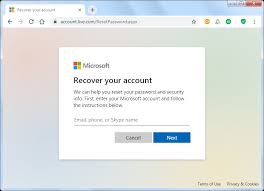
If you’ve forgotten your Microsoft account credentials, don’t worry! The recovery process is straightforward:
- Go to the Microsoft account recovery page.
- Click on “Access” and enter your email address associated with the account.
- Choose a method to retrieve your password (e.G., Code sent to your email or phone).
- Follow the instructions to reset your password.
Recovering a Deleted Microsoft Account
If you’ve accidentally deleted your Microsoft account, you might be able to recover it within 30-60 days from deletion:
- Visit the Microsoft account recovery page.
- Sign in with your email address and password.
- Check your identity using the two-factor authentication system.
- Follow the instructions to reactivate your account.
Recovering a Blocked Microsoft Account
If your Microsoft account has been blocked due to suspicious activity, don’t worry:
- Go to the Microsoft account login page.
- Sign in with your email address and password.
- Request a code sent to your phone or email to verify your identity.
- Follow the instructions to unblock your account.
Recovering a Hacked Microsoft Account
If you suspect that your Microsoft account has been hacked:
- Check recent activities on your account profile.
- Remove any unfamiliar devices or apps connected to your account.
- Change your password and security questions.
- Consider using two-factor authentication for added security.
Recovering Microsoft Services: Outlook, Office, Xbox, And Minecraft
If you’re struggling to access specific services like Outlook, Office, Xbox, or Minecraft:
- Sign in with your email address and password on the respective service pages.
- Follow the instructions provided by each service to recover your account.
Microsoft Authenticator App
To enhance security and avoid future account issues:
- Download the Microsoft Authenticator app for Android or iOS/iPadOS.
- Use it to authenticate logins, eliminating the need for passwords.
Conclusion
Recovering a Microsoft account can be a straightforward process if you follow these steps. Remember to act quickly when recovering a deleted account and take necessary security measures to prevent future issues. With this guide, you’ll be back up and running in no time!
Frequently Asked Questions (FAQs)
- What Happens if I Forget my Microsoft Account Password?
You can recover your password by following the instructions provided on the Microsoft account recovery page.
- How do I Recover a Deleted Microsoft Account?
If you’ve deleted your account within 30-60 days, you might be able to recover it. Visit the Microsoft account recovery page and follow the instructions.
- Can I Unblock my Blocked Microsoft Account?
Yes! Sign in with your email address and password on the Microsoft account login page, request a code sent to your phone or email, and follow the instructions to unblock your account.
- How do I Prevent Future Account Issues?
Use the Microsoft Authenticator app for enhanced security and change your password regularly to avoid hacking attempts.
- What Services Can be Recovered Using These Methods?
You can recover accounts for Outlook, Office, Xbox, and Minecraft by following the specific instructions provided on their respective service pages.
- Can I Use a Different Email Address to Recover my Microsoft Account?
Yes! You can add an alternative email address to your account and receive recovery instructions through that email address.
- How Long Does it Take to Recover a Deleted or Blocked Microsoft Account?
Recovery times vary depending on the situation, but generally, you’ll have access within 24 hours of submitting your request.
- Can I Contact Microsoft Support For Further Assistance?
Yes! Reach out to Microsoft support for personalized help with recovering your account.


