
How to Recover a Video Sent on Whatsapp: A Step-by-step Guide
Are you struggling to find a video sent on WhatsApp? Have you accidentally deleted it, and now you’re desperate to recover it? Don’t worry; we’ve got you covered! In this article, we’ll show you how to recover a video sent on WhatsApp using your smartphone or computer.
Recovering Video on Whatsapp: A Beginner’s Guide
If you’re wondering how to recover a video sent on WhatsApp, you’re not alone. With the increasing popularity of mobile messaging apps, it’s no surprise that people are looking for ways to retrieve deleted videos. In this article, we’ll walk you through the process of recovering a video sent on WhatsApp using your smartphone or computer.
Recovering Video on Android: A Step-by-step Guide
If you’re using an Android device, follow these steps to recover a video sent on WhatsApp:
- Access Whatsapp: Open WhatsApp on your Android device and tap on the chat where the video was sent.
- Tap on Media: Tap on the media icon (represented by a camera) at the top-right corner of the screen.
- Select The Video: Scroll through the list of media files and select the video you want to recover.
- Tap on Share: Tap on the share button (represented by a rectangle with an arrow) to share the video or save it to your device.
Recovering Erased Video on Android: A Step-by-step Guide
If you’ve accidentally deleted a video sent on WhatsApp, follow these steps to recover it:
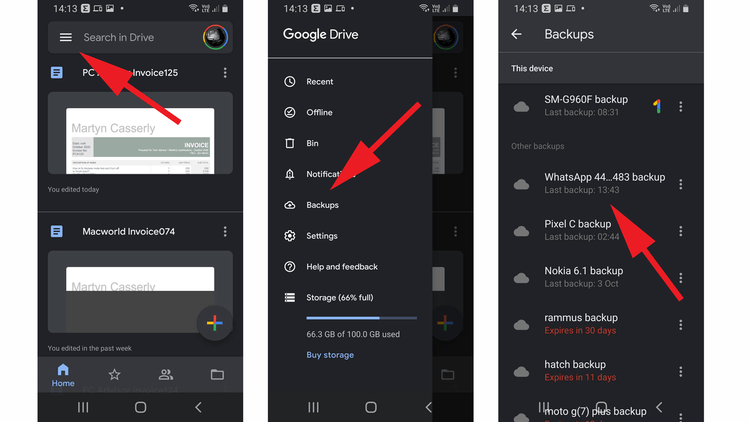
- Check For Backup: Check if you have a backup of your WhatsApp conversations on Google Drive or locally on your device.
- Restore From Backup: If the last backup was before the video was deleted, restore your conversations from that backup.
- Reinstall Whatsapp: Reinstall WhatsApp and follow the setup process to recover your conversations.
Recovering Video on Iphone: A Step-by-step Guide
If you’re using an iPhone, follow these steps to recover a video sent on WhatsApp:
- Access Whatsapp: Open WhatsApp on your iPhone and tap on the chat where the video was sent.
- Tap on Media: Tap on the media icon (represented by a camera) at the top-right corner of the screen.
- Select The Video: Scroll through the list of media files and select the video you want to recover.
- Tap on Share: Tap on the share button (represented by a rectangle with an arrow) to share the video or save it to your device.
Recovering Erased Video on Iphone: A Step-by-step Guide
If you’ve accidentally deleted a video sent on WhatsApp, follow these steps to recover it:
- Check For Backup: Check if you have a backup of your WhatsApp conversations on iCloud.
- Restore From Backup: If the last backup was before the video was deleted, restore your conversations from that backup.
- Reinstall Whatsapp: Reinstall WhatsApp and follow the setup process to recover your conversations.
Recovering Video on Computer: A Step-by-step Guide
If you want to recover a video sent on WhatsApp using your computer, follow these steps:
- Access Whatsapp Web: Open WhatsApp Web on your computer and log in with your account.
- Tap on Media: Tap on the media icon (represented by a camera) at the top-right corner of the screen.
- Select The Video: Scroll through the list of media files and select the video you want to recover.
- Save or Share: Save the video to your computer or share it with someone.
Recovering Video Without Backup: A Step-by-step Guide
If you don’t have a backup of your WhatsApp conversations, follow these steps to recover a video sent on WhatsApp:
- Use a Data Recovery Software: Use a data recovery software like EaseUS MobiSaver to scan your device for deleted files.
- Scan And Recover: Scan the device for deleted files and recover the video.
Frequently Asked Questions (FAQs)
- Can I Recover a Video Sent on Whatsapp if it Was Deleted?
Yes, you can recover a video sent on WhatsApp if it was deleted, but only if you have a backup of your conversations. - How do I Recover a Video Sent on Whatsapp Using my Computer?
You can recover a video sent on WhatsApp using your computer by accessing WhatsApp Web and following the steps outlined above. - Can I Use a Data Recovery Software to Recover a Deleted Video?
Yes, you can use a data recovery software like EaseUS MobiSaver to scan your device for deleted files and recover the video.
Conclusion
Recovering a video sent on WhatsApp is easier than you think! By following these step-by-step guides, you’ll be able to retrieve deleted videos using your smartphone or computer. Remember to always backup your conversations regularly to avoid losing important data. If you’re still struggling to recover a video, don’t hesitate to reach out for help.


