
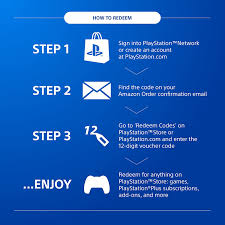
How to Redeem a Playstation Plus Code
Are you itching to experience the thrill of gaming with your friends online? Do you want to access exclusive discounts, free titles, and other perks without breaking the bank? Look no further! In this article, we’ll guide you through the process of redeeming a PlayStation Plus code on various platforms.
What is Playstation Plus?
PlayStation Plus (PS+) is a subscription-based service that offers a wide range of benefits to its members. These include:
- Multiplayer online gaming with friends
- Exclusive discounts and free titles every month
- Access to a vast library of games, including big productions and indie titles
- The possibility to play classic games from the PlayStation archives
How Does it Work?
PlayStation Plus offers three levels of subscription: Essential, Extra, and Premium. Each level comes with its own set of benefits and prices.
- Essential: 8.99 Euros per month, 24.99 Euros for 3 months, or 71.99 Euros for a year
- Extra: 13.99 Euros per month, 39.99 Euros for 3 months, or 125.99 Euros for a year
- Premium: 16.99 Euros per month, 49.99 Euros for 3 months, or 151.99 Euros for a year
How to Redeem a Playstation Plus Code
To redeem a code on your PlayStation console, follow these steps:
On Ps5:
- Open the PlayStation Store app on your console.
- Select the “Riscatta code” option from the menu.
- Enter the 12-digit code provided and click “Riscatta”.
- Follow the prompts to add the balance to your account.
On Ps4:
- Open the PlayStation Store on your console.
- Select the “Riscatta codes” option from the menu.
- Enter the 12-digit code provided and click “Continua”.
- Confirm that you want to proceed with redeeming the code.
Redeeming a Code on PC
To redeem a code on your PC, follow these steps:
- Open the official PlayStation Store website on your browser.
- Click on the “Access” button in the top right corner of the screen.
- Enter your email and password to log in to your account.
- Select the option to redeem a code from the menu.
- Enter the 12-digit code provided and click “Continua”.
Redeeming a Code on Mobile Devices
To redeem a code on your mobile device, follow these steps:
- Download and install the PlayStation app from the App Store (for iOS devices) or Google Play Store (for Android devices).
- Log in to your account using your email and password.
- Select the option to redeem a code from the menu.
- Enter the 12-digit code provided and click “Continua”.
Tips And Variations
- Make sure you have a valid PlayStation Network account before attempting to redeem a code.
- If you encounter any issues during the redemption process, refer to our tutorial on how to redeem a code on PS5 or PS4 for step-by-step instructions.
- Keep in mind that some promotions may require you to have a specific subscription plan or be part of a partnership with an operator.
Conclusion
Redeeming a PlayStation Plus code is a straightforward process that can be completed on various platforms, including PS5, PS4, PC, and mobile devices. By following the steps outlined above, you’ll be able to access exclusive benefits, discounts, and games without breaking the bank.
Faqs
- What is The Difference Between Essential, Extra, And Premium Playstation Plus Subscriptions?
- The Essential plan offers basic multiplayer online gaming with friends.
- The Extra plan adds access to a vast library of games, including big productions and indie titles.
- The Premium plan includes additional benefits like exclusive discounts, free titles every month, and the possibility to play classic games from the PlayStation archives.
- Can I Redeem a Playstation Plus Code on Multiple Devices?
- Yes, you can redeem a code on one device and use it on another device as long as both devices are linked to your same account.
- What Happens if my Code is Invalid or Expired?
- If your code is invalid or has expired, try contacting PlayStation support for assistance.
- Can I Cancel my Subscription at Any Time?
- Yes, you can cancel your subscription at any time through the PlayStation website or mobile app.
- How do I Check if a Game is Available on Playstation Plus?
- Check the PlayStation Store website or mobile app for games that are included in the PS+ library.
- What Happens to my Subscription if I go Over my Data Cap While Downloading Games?
- If you go over your data cap, contact your internet service provider (ISP) to discuss possible solutions.
- Can I Share my Playstation Plus Subscription With Friends or Family Members?
- No, PS+ subscriptions are non-transferable and can only be used by the account holder.
Note: The above FAQs are meant to provide general information and may not cover all possible scenarios. For specific questions or concerns, consult the official PlayStation website or mobile app for more detailed guidance.


